UOVA: Website Builder, Features, and Pricing
uova.com · checked 21 Oct 2026
Build and publish a website in UOVA, with image, video, and audio tools in its shared Studio workspace.
How it plugs in
Signal on Salon Website Builders6.3#4 of 27
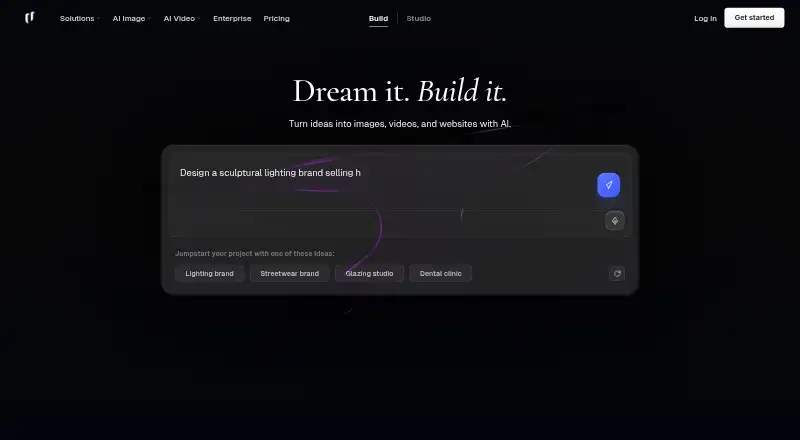
Turn a business description or template into an editable, multi-page site, then revise its content and layout in a browser. Studio includes tools for image, video, and audio generation, while Spaces links creative operations in a node-based workspace. Publish to a uova.io address or use a custom domain on a paid plan. A free plan is available; monthly credits reset and unused credits expire.
Review
In a line
UOVA is an AI website builder that runs in a browser, alongside a Studio for creating images, video, and audio.
What it does
Describe a business and UOVA creates a multi-page website draft using one of 12 generator templates. You can also start from a template, then edit the site's text, images, styles, sections, and structure in a browser. Publishing updates is a manual step.
Studio provides image generation, video creation from text or still images, audio generation, image upscaling, and background removal. In Spaces, you can arrange image, video, text, and other creative operations as connected nodes. The listed image and video models come from providers such as OpenAI, Google, Kling, and Stability AI.
How it connects
A published site can use a uova.io address, or a paid-plan domain that you buy through UOVA, transfer, or connect. Hosting, SSL, and delivery through a global CDN are included. The built-in store uses Stripe checkout; alternatively, you can link out to Shopify or Gumroad checkout.
For bookings, a site can display a calendar or button connected to Cal.com, Calendly, or Square Appointments. Google, Apple, and Microsoft sign-in are listed. UOVA provides neither a public API or SDK nor a self-hosting package.
Custom code is supported with restrictions: scripts and iframes are removed from user HTML. A site uses one detected language, chosen from English, Portuguese, Spanish, French, German, and Italian.
Good fit
Creators, businesses, and agencies making personal, creative, or professional sites may find UOVA useful, particularly if they want to build and edit a site in the browser. Its AI content tools may appeal to people seeking website creation and visual generation in a single service.
Stripe checkout and booking links can cover straightforward store and booking needs. Sites can support print sales and booking forms, but client galleries and proofing tools are not available.
Watch for
Bulk catalog import and Shopify product embedding are unavailable, so each product needs to be entered separately. Sites use a single detected language rather than offering a language switcher.
Website generation and Studio draw from the same credit balance. A complete site uses at least 250 credits; video generation costs between 147 and 15,442 credits. Allowances renew at the start of each UTC calendar month, with no rollover.
There are no collaborator accounts, team members, invitations, or roles. UOVA has no paid-plan trial; its free plan is the option for evaluating the service.
Pricing
Free is $0 and includes 250 monthly credits, unlimited sites, all templates and models, and a uova.io address. It displays the UOVA badge and does not require a card.
Basic is $144 per year, equivalent to $12 monthly. Pro is $300 yearly ($25 monthly), and Studio is $588 yearly ($49 monthly). Each adds custom domains, SSL, WHOIS privacy, badge removal, and a larger credit allowance. Pro and Studio also include unlimited published sites.
Creator costs $1,788 per year ($149 monthly). UOVA lists it as available from the Studio pricing page.
Verdict
UOVA is an option for people who want a browser-based site builder and AI tools for visual content, provided its language, store, and collaboration limits fit their needs. The free plan lets you try the service before paying, but custom domains require a paid plan.
Look elsewhere if you need bulk product imports, team access, a public API, or self-hosting. Before selecting a paid plan, weigh its monthly credits against your expected generation use.
Our take
UOVA may suit individuals and businesses that want website creation and image or video tools in one web service. The free tier provides a no-card way to start; paid tiers add custom domains and larger credit balances. It is less suitable for large product catalogs, collaborative teams, or self-hosted sites. Review credit costs against your expected workload before choosing a plan.
- Creates editable multi-page drafts from a business description.
- Studio provides image, video, and audio creation tools.
- Free tier includes unlimited sites and all templates and models.
- Paid tiers include custom domains, SSL, and WHOIS privacy.
- Booking links support Cal.com, Calendly, and Square Appointments.
- No public API or SDK, and no self-hosting package.
- No collaborators, team members, invitations, or roles.
- Products are entered individually; bulk imports are unavailable.
- Monthly credits expire rather than carrying forward.
- Scripts and iframes are removed from custom HTML.
- Pick it ifCreators and businesses making personal, creative, or professional sites; People seeking website and visual content tools in one service; Sites that need simple booking links or Stripe checkout
- Skip it ifYou need team access, an API, or self-hosted publishing.; You need bulk product imports or Shopify product embedding.; Your site needs to support multiple selectable languages.
Pricing
Free includes 250 monthly credits and requires no card. Credit allowances reset monthly without rollover, and there is no paid-plan trial.
- Free$0, no card · 250 credits/month · unlimited sites · all templates and models · uova.io address · UOVA badgeFree
- Basic$19 a month · 18,000 credits/month · custom domains · WHOIS privacy · SSL · badge removal · up to 1,800 AI chat messages$19/mo
- Pro$39 a month · 38,000 credits/month · custom domains · WHOIS privacy · SSL · badge removal · unlimited published sites · up to 3,800 AI chat messages$39/mo
- Studio$79 a month · 75,000 credits/month · custom domains · WHOIS privacy · SSL · badge removal · unlimited published sites · up to 7,500 AI chat messages$79/mo
- Basic$144 a year (shown as $12 a month) · 18,000 credits/month · custom domains · WHOIS privacy · SSL · badge removal · up to 1,800 AI chat messages$144/yr
- Creator$179 a month · 228,000 credits/month · available from Studio pricing page$179/mo
- Pro$300 a year (shown as $25 a month) · 38,000 credits/month · custom domains · WHOIS privacy · SSL · badge removal · unlimited published sites · up to 3,800 AI chat messages$300/yr
- Studio$588 a year (shown as $49 a month) · 75,000 credits/month · custom domains · WHOIS privacy · SSL · badge removal · unlimited published sites · up to 7,500 AI chat messages · one first-year domain up to $20$588/yr
As uova.com lists them, checked 21 Oct 2026.
Questions
Does UOVA have a free plan?
Yes. Free costs nothing, requires no card, and comes with 250 monthly credits, unlimited sites, all templates and models, and a uova.io address.
How much does UOVA cost?
Annual billing starts with Basic at $144 ($12 monthly). Pro is $300 yearly, Studio is $588, and Creator is $1,788.
Can I use my own domain?
Yes. Paid plans allow you to buy a domain through UOVA, transfer one, or connect one you own. SSL and WHOIS privacy are included.
Can UOVA connect to a booking service?
Yes. The Book section can display a calendar or button linked to Cal.com, Calendly, or Square Appointments.
Can I import a product catalog or embed Shopify products?
No. Products must be entered individually, and Shopify product embedding is unavailable. You can link to Shopify checkout.
Does UOVA have an API or support self-hosting?
UOVA does not provide a public API or SDK, and its documentation describes UOVA-hosted publishing rather than a self-hosting option.
Do unused credits roll over?
No. Monthly credits reset at the beginning of each UTC calendar month.
Does UOVA use my content to train AI models?
UOVA says prompts, generated content, and other user content are not used to train or fine-tune its AI models. Prompts are sent to OpenAI and Replicate for processing.