
Worklytics Workplace Analytics
worklytics.co · checked 15 Oct 2026
Workplace analytics for productivity, collaboration, employee experience, and AI adoption.
How it plugs in
Signal on People Analytics6.3#1 of 19
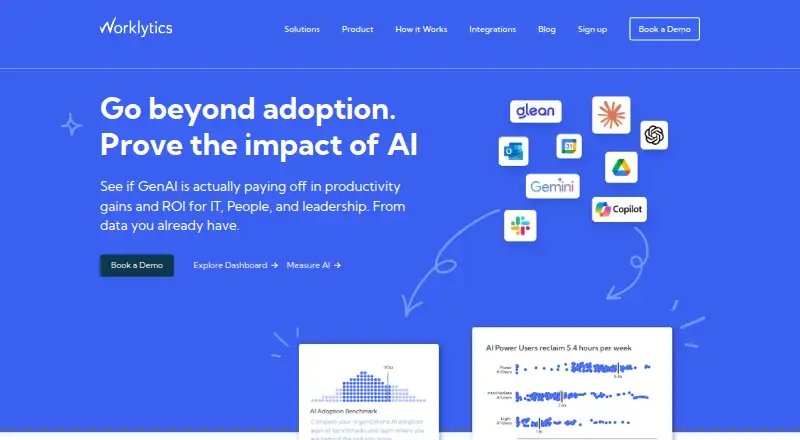
Worklytics turns activity details from workplace tools into team-level metrics, dashboards, network views, and forecasts. It connects with common work and AI apps, offers a free plan, and can run through an API, web app, or self-hosted privacy proxy. Enterprise adds data pipelines, row-level data, predictive analytics, and advanced controls.
Review
In a line
Worklytics is a workplace analytics platform. It helps organizations study productivity, collaboration, employee experience, and AI adoption from work-tool metadata.
What it does
Connectors collect work activity details, remove personal identifiers, clean and group the information, then create more than 400 metrics. Dashboards provide ready-made reports and visualizations without technical setup.
Managers can view activity streams, collaboration network graphs, meeting time, workday length, one-to-ones, live KPIs, and team patterns. Predictive models cover relationships linked to disengagement and attrition risks. The service also supports custom dashboards, scenario planning, and real-time data refresh.
Worklytics offers workforce analytics for organizations that want to support managers and improve team collaboration.
How it connects
Listed connections include Slack, Microsoft Teams, Zoom, Google Calendar, Outlook, GitHub, GitLab, Jira, Asana, Salesforce, and AI tools such as ChatGPT, Copilot, Claude, Claude Code, Codex, and Atlassian Rovo. Worklytics says its catalog covers more than 50 tools.
Reports can feed Tableau, Power BI, Looker, and Salesforce. API access, raw row-level data, and data-pipeline access are Enterprise features.
Worklytics Proxy, also called Psoxy, is a self-hosted privacy layer for AWS Lambda or Google Cloud Functions. Its source code is public on GitHub, while the hosted Worklytics service is proprietary.
Good fit
Worklytics suits organizations that need team-level views of meetings, collaboration, manager effectiveness, employee experience, or AI use. Business and Enterprise plans include AI adoption insights.
Enterprise is aimed at teams needing predictive analytics, advanced benchmarks, individual row-level datasets, data pipelines, dedicated support, or stronger deployment isolation. Private Cloud deployments are available for additional isolation needs.
Watch for
The platform says it does not process or store work or message content. It uses metadata, such as file titles and editors where possible, and reports analysis at team or group level with a minimum group size of eight.
Check permissions and deployment needs before connecting accounts. The Google Workspace listing requests access to calendars, domain groups, domain users, and account identity information. API and row-level access require Enterprise.
The Free plan is limited to calendar data and 30 days of history. Business allows up to five integrations and three months of history.
Pricing
Free is billed forever for up to 100 users. It includes Google Calendar or Outlook data, 30 days of history, a dashboard, and basic meeting insights, with no credit card required.
Business is $2,500/month for up to 200 users. Extra users cost $10/user/month. It includes up to five integrations, three months of history, organization-wide reporting, AI adoption insights, basic benchmarks, and more than 200 collaboration metrics.
Enterprise uses custom pricing, with contracts typically annual. It adds unlimited integrations, API and data-pipeline access, row-level datasets, predictive analytics, advanced benchmarking, SSO, role permissions, Worklytics Proxy, and dedicated support.
Verdict
Choose Worklytics if your organization wants privacy-focused, team-level analysis across work systems rather than message-content monitoring. The free tier offers a small starting point for calendar-based meeting insights.
Business fits teams ready to connect several tools and review organization-wide metrics. Enterprise is the relevant option for data pipelines, row-level datasets, predictive work, advanced benchmarks, or stricter access and deployment requirements.
Our take
Worklytics is a fit for organizations that want a central view of collaboration, meetings, productivity signals, and AI adoption across many workplace tools. Its privacy design removes identifiers, groups reporting, and avoids storing message content. The free plan is narrow, while Business starts at $2,500/month and Enterprise is custom-priced. Buyers should confirm the permissions requested by each connector, the history limits, and whether API, row-level data, or private deployment justify an Enterprise contract.
- Free plan with no credit card and calendar-only insights
- Connects to more than 50 work and AI tools
- Team-level reporting with a minimum group size of eight
- Self-hosted Psoxy privacy proxy with public source code
- Enterprise offers API, row-level data, and predictive analytics
- Free plan stores only 30 days of history
- Business is limited to five integrations
- API and row-level datasets require Enterprise
- Business starts at $2,500/month
- Enterprise pricing is available only on request
- Pick it ifOrganizations analyzing collaboration and productivity across work tools; Teams tracking AI adoption and manager effectiveness; Enterprises needing data pipelines or private deployment options
- Skip it ifYou need message-content analysis rather than metadata; You need API access without an Enterprise plan; You only need a simple calendar dashboard for more than 30 days of history
Pricing
A forever-free plan covers up to 100 users and calendar data. Business costs $2,500/month for up to 200 users, with extra users at $10/user/month. Enterprise uses custom pricing and typically annual contracts.
- Freeforever · up to 100 users · calendar data only (Google Calendar or Outlook) · 30 days history · dashboard · basic meeting insights · no credit cardFree
- Businessstarts at $2,500/month · up to 200 users · additional users $10/user/month · up to 5 integrations · 3 months data history · org-wide reporting · AI adoption insights · basic benchmarks · 200+ collaboration metrics$2,500/mo
- Enterprisecustom pricing; contracts typically annual · unlimited integrations · API/data pipeline · row-level datasets · predictive analytics · advanced benchmarking · SSO (SAML and Okta) · role-based permissions · Worklytics Proxy · dedicated supportOn request
As worklytics.co lists them, checked 15 Oct 2026.
Questions
Does Worklytics read message content?
Worklytics says it does not process or store work or message content. It uses work metadata, removes identifiers, and reports results for groups or teams.
Which tools can Worklytics connect to?
Listed integrations include Slack, Microsoft Teams, Zoom, Google Calendar, Outlook, GitHub, GitLab, Jira, Asana, Salesforce, and several AI tools. Worklytics says it connects to more than 50 tools.
Is there a free Worklytics plan?
Yes. Free is billed forever for up to 100 users, uses Google Calendar or Outlook data, keeps 30 days of history, and includes a dashboard and basic meeting insights.
How much does Business cost?
Business is $2,500/month for up to 200 users. Additional users cost $10/user/month.
Does Worklytics have an API?
API access, raw row-level data, and data-pipeline access are Enterprise-only features.
Can Worklytics run in a customer-controlled environment?
Its Psoxy privacy proxy can run on AWS Lambda or Google Cloud Functions. Private Cloud deployments are also available for added isolation.
Near it
All alternatives →- NHNathan HRMS#2 on this board
- AAnaplan#3 on this board
- C
 ChartHop#4 on this board
- H
 Humanforce#5 on this board
- HHumanyze#6 on this board
- VP
 Visier People#7 on this board
- PP
 PeoplesHR People Analytics#8 on this board
- P
 PeoplePLAN#9 on this board
- NCNakisa Capital Projects Suite#10 on this board
- T
 TalentNeuron#11 on this board