Wren Reference Manager
wrenapp.dev · checked 15 Oct 2026
A local-first, open-source library for papers, notes, PDFs and EPUBs.
How it plugs in
Signal on WebSocket Tools7.3#3 of 55
Wren is an open-source reference manager that keeps a research library on your computer as plain files and a local database. Its catalog covers over 40 bibliographic types alongside PDFs, EPUBs, notes and captured web material. Built-in readers, offline document processing, search, optional AI providers and folder-based sync support research workflows without a Wren account.
Review
In a line
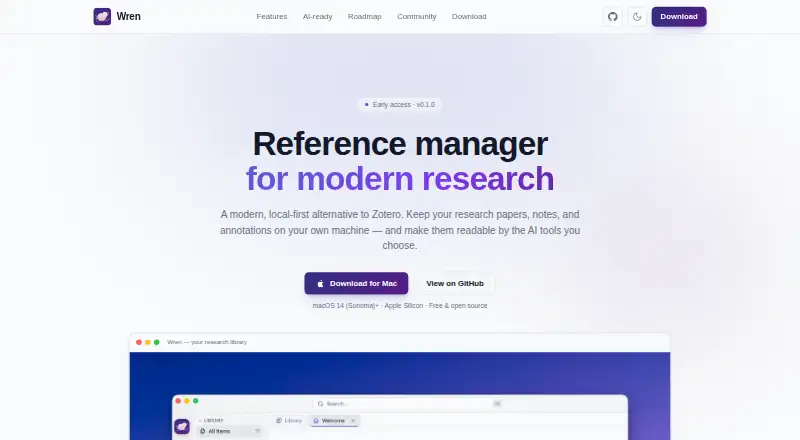
For research papers, notes and annotations, Wren provides a local-first reference library. It is presented as an open alternative to Zotero.
What it does
Structured bibliographic fields and creator information are available across more than 40 item categories. Local attachments can include PDFs, EPUBs, HTML snapshots, images, notes and web links.
Its readers cover PDF and EPUB files, with features such as search, outlines or chapters, zoom or font controls, themes and annotation tools. Highlights and other PDF annotations are kept separately and can be exported into PDF copies.
Math, code highlighting, reference links, anchored comments and automatic backlinks are supported by the Markdown editor. Search works across document text and semantic content, with semantic hits connected to their source passages.
PDFs, including scanned papers, can be processed offline on the device through layout analysis, OCR and table extraction. Collections, colorable tags, saved smart filters and duplicate merging help organize a library.
How it connects
With one click, the Chrome connector captures references, PDFs and snapshots. It follows the Zotero connector workflow and communicates with Wren's local server.
A library folder can be mirrored through iCloud Drive, Dropbox, Google Drive, OneDrive or another sync service you already use, with no Wren account or hosted Wren server required.
You may connect your own model through OpenAI, Anthropic, Google Gemini, Ollama or Apple MLX, and a fully local setup can run without a key. Wren says AI enrichment remains on disk and that it offers no chat or answer-generation feature.
A local REST interface lets other tools list items, search and retrieve citations, while wren:// URLs can target entries or particular PDF pages and annotations. BibTeX, BibLaTeX, CSL-JSON and portable archives are supported for import and export. The application uses the MIT License; its browser connector uses AGPL-3.0.
Good fit
Researchers who prefer local files, offline PDF processing and a Zotero-style bibliographic model may find Wren suitable. It can bring reading, annotation, notes and document search into one library.
It also fits people who already sync folders with a supported cloud drive, want optional AI from their own provider, or need a local API and deep links for other tools.
Watch for
At present, the desktop app runs on Apple Silicon Macs with macOS 14 Sonoma or later. Windows and Linux versions remain future work, and no mobile apps have shipped.
Bundle sharing, peer-to-peer encrypted sync and a documented plugin or automation API are listed as roadmap items, not current features. The project is identified as early development and early access.
Source builds require macOS, Rust 1.96 or newer, Node.js 20 or newer and Xcode Command Line Tools.
Pricing
Wren is free. The listed Free plan includes the Apple Silicon desktop app for macOS 14 Sonoma or later and is marked early access.
Verdict
Choose Wren if you use a supported Mac and want a local, open-source library for references, reading, notes and offline document processing. Its folder sync, browser capture, import and export formats, and local API make it practical for an individual workflow.
Look elsewhere if you need Windows, Linux, mobile apps, built-in collaboration or a shipped plugin system. Researchers comparing it with other Reference Management Software should also weigh its early-development status and Mac-only availability.
Our take
Wren is a sensible choice for Mac users who want their reference files and AI enrichment kept on their own storage. It covers the core research cycle: capture sources, read and annotate PDFs or EPUBs, write linked notes, search documents and export citations. The free plan is available at no cost. Platform coverage and project maturity are the main constraints: today it targets Apple Silicon Macs on macOS 14 or newer, while mobile, Windows, Linux, collaboration and plugin plans remain unavailable.
- No-cost plan for Apple Silicon Macs on macOS 14 or later
- Open-source application with local files and a local database
- Offline OCR, layout analysis and table extraction for PDFs
- Folder synchronization needs neither a Wren account nor Wren servers
- Local REST API, wren:// links and optional local AI providers
- Current desktop availability is macOS-only
- Windows and Linux builds are future work
- No mobile apps are currently shipped
- Sharing, encrypted peer sync and plugin API are roadmap items
- Early-access release
- Pick it ifMac-based researchers managing papers, notes and annotations; People who prefer local files and folder-based sync; Users who want to connect their own AI provider
- Skip it ifYou need a Windows, Linux or mobile reference manager today; You require built-in collaboration or a shipped plugin API
Pricing
Wren has one listed Free plan: it costs nothing for the Apple Silicon desktop app on macOS 14 Sonoma or later and is marked early access.
- FreemacOS 14 Sonoma+ · Apple Silicon desktop app · v0.1.0 early accessFree
As wrenapp.dev lists them, checked 15 Oct 2026.
Questions
Is Wren free?
Yes. The listed Free plan costs nothing and covers the Apple Silicon desktop app for macOS 14 Sonoma or later.
Where does Wren store my library?
The library is stored on your machine as plain files and a local database. Its folder can be mirrored through iCloud Drive, Dropbox, Google Drive, OneDrive or another folder-sync service.
Does Wren work on Windows or Linux?
Not currently. The available Mac app requires macOS 14 Sonoma or later and Apple Silicon; Windows and Linux builds are listed as future work.
Can Wren import and export citation files?
Yes. BibTeX, BibLaTeX, CSL-JSON and portable archives are available for import and export.
Which AI providers can Wren use?
You can optionally connect OpenAI, Anthropic, Google Gemini, Ollama or Apple MLX. Local use can run without a key.
Does Wren have a public API?
Wren has a local REST interface for listing items, searching and fetching citations. Its wren:// URLs can open entries and particular PDF pages or annotations.
Are mobile apps or collaboration available?
No mobile apps are currently shipped. Bundle sharing and peer-to-peer encrypted sync are roadmap features rather than current capabilities.