Zint Barcode Generator
zint.org.uk · checked 8 Oct 2026
Create barcodes with Zint's desktop software, command-line utility, or programming library.
How it plugs in
Signal on Barcode Generators6.6#2 of 21
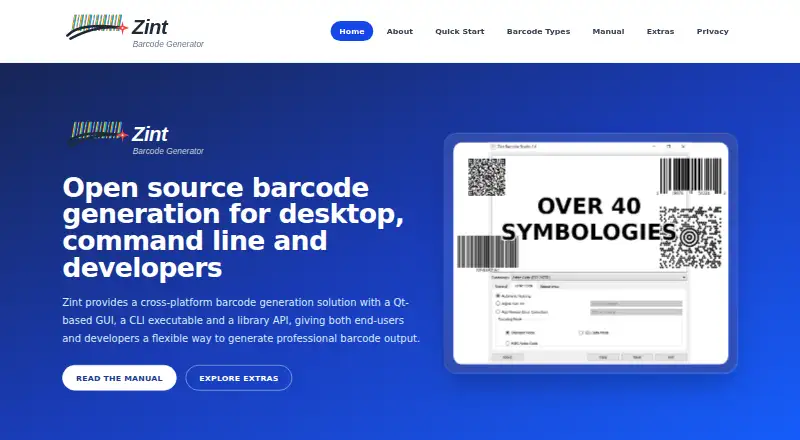
Zint Barcode Generator is a free, open-source project that produces barcode images. It includes Barcode Studio, command-line utilities, and library APIs. Windows, macOS, Linux, and self-hosted deployments are supported, along with over 50 symbologies and multiple image outputs.
Review
In a line
Zint Barcode Generator is an open-source tool for creating barcode images. People can use its desktop application, command-line program, or software library.
What it does
Its formats span linear, stacked, postal, and matrix designs, including QR Code, Code 128, EAN, UPC, Data Matrix, and PDF417.
Barcode Studio provides a graphical interface, while the command-line tool supports scripted workflows. The library can generate images for applications, with controls for size, color, error correction, and orientation.
The project supports data import and batch printing. Image output from the library includes BMP, EMF, EPS, GIF, PCX, PNG, TIF, and SVG.
How it connects
Zint provides a library API for adding barcode creation to software. C and C++ applications can use its C API, while the manual also describes Qt and Tcl interfaces.
The code is open source. For versions 2.5 onward, libzint is under the BSD 3-clause license, and the graphical and command-line programs use GNU GPL version 3 or later.
gLabels label-design software supports the Zint libraries. The project also lists OkapiBarcode as a Java port and ZintNet as a C# port.
Installation information covers Windows, macOS, Linux, and BSD. The Tcl backend can also be built on Android.
Good fit
Zint suits developers, technical users, researchers, and businesses making labels or internal tools. It also fits people who prefer open-source software.
Choose it when you need barcode generation in a desktop workflow, a command-line process, or an application through an API.
Watch for
Zint is aimed at desktop, command-line, and developer use rather than a hosted web service. Check that this matches how your team wants to create and manage barcodes.
Windows downloads include unsigned executables. The manual says fresh releases may show a Microsoft Defender SmartScreen warning because the project cannot afford Microsoft's application signing.
On macOS, the manual documents Homebrew installation for the command-line tool and library; building the graphical app uses source instructions. Linux users may need to compile Zint and install Qt for Barcode Studio.
Support is community-based through SourceForge and GitHub for releases, source code, issues, discussions, and help.
Pricing
Zint is free. The project lists a free plan and no paid plans.
Verdict
Zint is a sensible choice for people who want open-source barcode creation on their own computers or inside their software. Its range of barcode types, image outputs, and APIs covers both manual and automated work.
It is less suitable if you want a hosted service with a simple browser interface, or if unsigned Windows downloads and manual installation steps are a concern.
Our take
Choose Zint for free, open-source barcode generation through desktop software, command-line workflows, or a programming library. It handles formats such as QR Code, Code 128, EAN, UPC, Data Matrix, and PDF417, with several image-output choices. Businesses can use it for labels or internal tools, while developers can add generation to applications. Look elsewhere if you need a hosted web product, a polished label-design suite, or signed Windows binaries without warnings.
- Free and open-source project
- Desktop, command-line, and library API options
- Supports more than 50 barcode symbologies
- Exports BMP, PNG, SVG, and other image formats
- Runs on Windows, macOS, Linux, and BSD
- Windows files may trigger a SmartScreen warning
- Linux setup may require compiling and installing Qt
- Community support is provided through SourceForge and GitHub
- Pick it ifDevelopers adding barcodes to applications; Businesses making labels or internal tools; Technical users who prefer open-source software
- Skip it ifYou need a hosted browser service instead of local tools; You require signed Windows downloads; You want a dedicated label-design suite
Pricing
Zint is free, with a free plan and no paid plans stated.
- ZintFree and open-source barcode generation project; no paid plans statedFree
As zint.org.uk lists them, checked 8 Oct 2026.
Questions
Is Zint Barcode Generator free?
Yes. Zint is available at no cost as an open-source barcode generation project, and no paid plans are stated.
Which barcode types does Zint support?
More than 50 symbologies are available, among them QR Code, Code 128, EAN, UPC, Data Matrix, and PDF417.
How can I use Zint?
Barcode images can be generated with Barcode Studio, the command-line utility, or the library API.
What image formats can Zint create?
The library outputs BMP, EMF, EPS, GIF, PCX, PNG, TIF, and SVG images.
Does Zint have an API?
Yes. C and C++ programs can call the C API, and the manual covers Qt and Tcl interfaces as well.
Which operating systems can run Zint?
The manual documents installation on Windows, macOS, Linux, and BSD; the Tcl backend can also be built on Android.
Does Zint work with label software?
Yes. gLabels, a desktop label-design application, supports the Zint libraries.
Will Windows show a security warning?
A fresh Windows release may prompt a Microsoft Defender SmartScreen warning because the project binaries are unsigned.
Near it
All alternatives →- PPrintSpirit#1 on this board
- Z
 ZPLab#3 on this board
- E
 EASYLABEL#4 on this board
- TTechnoRiverStudio#5 on this board
- NNitroLabel#6 on this board
- OS
 Open Source Label Designer#7 on this board
- B
 BarTender#8 on this board
- L
 Labeljoy#9 on this board
- TDTFORMer Designer#10 on this board
- BW
 Brady Workstation#11 on this board