Design, Video & Audio·Standings
DJ Software: Compare Features and Plans
DJ software lets you mix tracks and manage a set; compare supported operating systems and the mixing features you need.
This board compares free plans, starting paid prices, deck count, DVS support, stem separation, video mixing and cloud library sync. Its signal score is out of 10; marks show whether a product has a public API, open-source code or a free tier.
- 29 platforms
- 18 with a free tier
- Checked 23 Sept 2026
- 1 D
 djayalgoriddim.com
djay is DJ software for mixing local and streaming music, performing live, and creating automated mixes.
- 2 V
 VirtualDJvirtualdj.com
DJ software for live mixing, with a tool to pull vocals, instruments, drums and hi-hats apart.
- 3 R
 rekordboxrekordbox.com
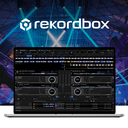
DJ software for track preparation and performance, with Dropbox library syncing across devices.
- 4 MMixxxmixxx.org
Mixxx provides tools for DJs to perform creative live mixes with digital music files.
- 5 YYouDJyou.dj
DJ software for beginners, with a free plan and music from YouTube, local files and cloud drives.
- 6 CD
 Cross DJmixvibes.com
DJ mixing app with real-time separation of beats and vocals, available on mobile and Mac.
- 7 R
 Remixlivemixvibes.com
Music app for making beats and performing, with modes for looping, sequencing and songs.
- 8 CP
 ClubDJ Proclubdjsoftware.com
DJ software for desktop, iOS and browser use, with dual-deck audio and video tools.
- 9 SDSerato DJ Proserato.com
DJ software for supported hardware, with deck waveforms shown horizontally or vertically.
- 10 D
 DJUCEDdjuced.com
DJ mixing software with free lessons, from basic skills to advanced techniques.
- 11 EM
 edjing Mixedjing.com
Mobile DJ mixing app with two decks, effects and AI tools to isolate vocals, drums or bass.
- 12 WWeDJpioneerdj.com
DJ app for phones and tablets, with two-channel controls and effects for track mixing.
- 13 OOtsTurntablesotsturntables.ots7.com
DJ mixing software for Windows that works with MP3s, WAVs, Ots files and CDs.
- 14 D
 Deejaysystemdeejaysystem.com
Deejaysystem is a series of digital audio and video mixer applications for professional DJs and VJs during live or automated mixing sessions.
- 15 FDfuture.dj proxylio.com
DJ, video and karaoke mixing software with manual or automatic beat matching.
- 16 TTaudjplayerpro.com
DJ software with stems, MIDI controls, and syncing with Ableton Link.
- 17 DP
 DJ ProMixerdjpromixer.com
DJ ProMixer is free DJ software for mixing and organizing a music library, with recording for DJ sets.
- 18 MP
 MegaSeg Promegaseg.com
MegaSeg Pro is Mac DJ software for professional mobile and club DJs, VJs, radio stations, and businesses.
- 19 PD
 PCDJ DEX 4pcdj.com
DJ software that handles karaoke sets and video tracks, with AI stem separation and beat-grid mixing.
- 20 VDVirtual DJ Studiovdj.net
Windows DJ software for mixing music, video and karaoke, with lyrics displayed over video or images.
- 21 ODOtsAV DJotsav.ots7.com
Windows media playout system with automated fade mixing; some editions add beat mixing.
- 22 UUltraMixerultramixer.com
DJ music software that imports iTunes, Apple Music or M3U playlists and records mixes as MP3s.
- 23 DS
 DJ.Studiodj.studio
Timeline app for shaping and exporting mixes; it is not designed for live sets.
- 24 DMDJ Mixer Prodjmixersoft.com
DJ software that syncs tracks and records mixes in WAV or AIFF; MP3 recording needs an added library.
- 25 SDSerato DJ Liteserato.com
Places #1, #2, #3, #4, #5 on this board are open to sponsors. Take #1 · Other ways to advertise
How to choose
Which operating system does it need to run on?
Start with the computer or mobile device you plan to use. The board covers Windows, macOS, iOS, Android, web and Linux support.
Windows and macOS are the most widely listed platforms here, while web and Linux support appear less often. Check a product's supported systems before comparing its other features.
Which mixing features should I compare?
Compare deck count, DVS support, stem separation and video mixing against the kind of set you want to build. DVS support concerns using digital DJ software with vinyl-style turntables; stem separation lets you isolate parts of a track.
The board also tracks cloud library sync, which matters if you want your music library available across devices.
Can I use DJ software for free?
Several products offer a free plan, and the board shows whether one is available and the starting paid price where listed. A free trial is a separate option, so check both before deciding.
For example, VirtualDJ lists a free plan and paid pricing from $4 per month. Prices and plans can differ, so check the product's current offer.
Should I check the API or open-source status?
Check the API mark if you need a public way for other software to connect to the product. Open-source code means its code is available under a licence; consider that mark if you need to inspect or change the software.
The board also marks free tiers, which can help you see whether you can try a product without paying.
Questions
What DJ software has a free plan?
The board marks whether a free plan is available. Examples include VirtualDJ, rekordbox and Mixxx; check the product listing for current plan details.
Which DJ software works on Windows or Mac?
The board compares support for Windows and macOS, as well as iOS, Android, web and Linux. Confirm the operating system on the individual product listing.
What does DVS support mean in DJ software?
DVS support refers to using digital DJ software with vinyl-style turntables. The board compares this feature across products.
How do I compare DJ software features?
Compare deck count, DVS support, stem separation, video mixing and cloud library sync, then check that the software supports your operating system.
Does DJ software offer a free trial?
The board tracks free trials separately from free plans. For example, djay lists a 7-day trial and DJUCED lists a 15-day trial; check current terms.
Some top positions on this board can be paid placements, standing where they were sold. The facts on each platform are not for sale. How we rank · Disclosure