ActivTrak: Workforce Analytics, Features and Pricing
activtrak.com · checked 14 Oct 2026
A workforce analytics platform for digital activity, productivity, schedules, and AI-use data.
How it plugs in
Signal on Activity Tracking6.7#1 of 24
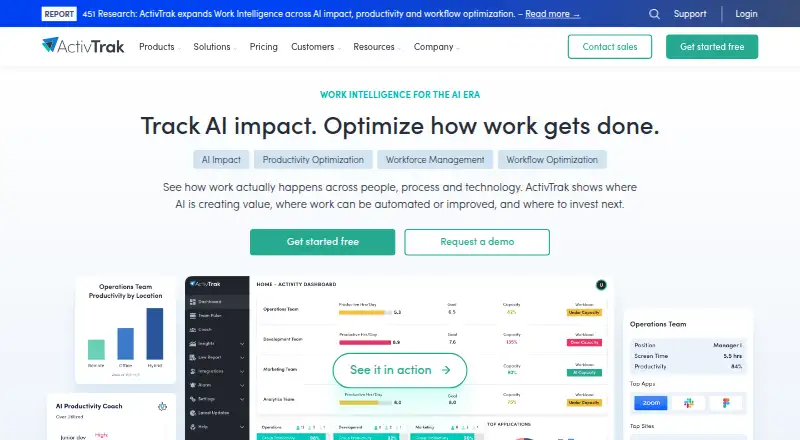
ActivTrak provides hosted analytics for workforces operating in offices or remotely. It analyzes activity, productive and unproductive time, schedules, website visits, and AI adoption. Plans include automatic time tracking and team summaries. The free tier covers three workers, while paid tiers provide longer history and additional workforce or productivity capabilities.
Review
In a line
Founded in 2009, ActivTrak is a workforce analytics and intelligence platform. It analyzes digital work activity to help organizations understand work in offices or remotely.
What it does
Workforce Management offers live visibility into the workforce, productivity patterns, and adherence to schedules and locations. Automatic time tracking and activity summaries cover users and teams, with daily, weekly, and monthly views of productive and unproductive time.
Website-usage reports show which sites employees visit and for how long. Productivity Optimization classifies time as productive, unproductive, or offline to highlight improvement opportunities.
AI Insights extends Workforce Management and Productivity Optimization. It covers AI usage, compliance, adoption maturity, benchmarks, productivity effects, and optimization opportunities.
How it connects
Microsoft Outlook and Google Calendar connect for calendar and paid-time-off data, while Microsoft Entra ID and SCIM handle user management. ActivTrak is proprietary, not open source, and runs through web, Windows, macOS, Linux, extensions, and an API.
With ActivConnect, customers can query live and historical data through API or SQL, using templates for Power BI, Looker Studio, and Tableau. Its help center documents setup, data fields, SQL access, SCIM, calendar, human-resources, and identity-management connections.
Agents are offered for Windows, macOS, and ChromeOS. On Linux systems, the ChromeOS agent runs inside Chrome and captures browser activity only. The Assist Browser Extension works with the Windows or Mac desktop agent for more detailed URL data.
Good fit
ActivTrak suits organizations that need workforce visibility, productivity reporting, schedule checks, website-use analytics, or capacity planning for office and remote work.
According to its stated privacy design, the platform omits keystroke logging, email monitoring, camera access, personal-device monitoring, and video recording. By default, it does not take or retain screenshots.
Watch for
Mac installations require users to grant accessibility and screen-recording permissions. ChromeOS coverage is limited to activity inside Chrome, not applications outside the browser.
Screenshots are available only with the optional Screen Details add-on. Purchases involving more than 50 licenses require a paid support plan. Free accounts without a login for 30 days are marked inactive and receive an email about pending deletion.
Documented minimum agent requirements are 4 GB of RAM, a dual-core 2 GHz-or-faster processor, and 4 Mbps upload and download bandwidth.
Pricing
The Free tier has no annual-contract requirement, supports 3 workers, retains 30 days of data, and offers limited application functionality. A 14-day trial is also available.
Work Activity Tracking is priced at $10 per worker each month with annual billing. It retains six months of history and emphasizes working hours and technology compliance.
Workforce Management is $15 per worker per month with annual billing, six months of history, and utilization and efficiency features. Productivity Optimization is $17 per worker per month with annual billing, one year of history, and productivity and capacity optimization.
Verdict
Choose ActivTrak if you need activity-based workforce reporting with schedule signals, website analytics, or optional AI measurement. The free tier can cover a very small deployment, while paid plans extend history and add management or optimization features.
Check agent coverage and installation permissions before rollout, especially on ChromeOS and Mac. Organizations with larger license counts should budget for paid support.
Our take
ActivTrak fits employers that want measurable work patterns without keystroke, email, camera, personal-device, or default screenshot monitoring. Its plans range from three free workers to paid per-worker tiers with longer history and added management or optimization tools. Check whether ChromeOS browser-only capture meets your needs, and plan for Mac permission steps. Purchases above 50 licenses require paid support. It is less suitable when you need broad application capture on ChromeOS or a fully open-source product.
- Free plan covers 3 workers with 30 days of history
- Tracks productive, unproductive and offline time
- Native Outlook, Google Calendar, Entra ID and SCIM connections
- API or SQL access available through ActivConnect
- No keystroke logging, email monitoring or camera access
- ChromeOS agent does not capture apps outside Chrome
- Mac setup requires accessibility and screen-recording permissions
- Purchases involving more than 50 licenses need a paid support plan
- Free accounts become inactive after 30 days without a login
- The optional Screen Details add-on is required for screenshots
- Pick it ifSmall teams needing basic activity and productivity reporting; Organizations checking schedules, websites and workforce utilization; Buyers needing optional AI-use measurement and data access
- Skip it ifYou need application capture outside Chrome on ChromeOS; You require open-source software; You want screenshots included without an add-on
Pricing
The Free tier requires no annual contract and is limited to 3 workers and 30 days of history. Paid tiers cost $10 to $17 per worker monthly and use annual billing. A 14-day trial is available.
- Freeannual contract not required · 3 workers · 30 days data history · limited application functionalityFree
- Work Activity Trackingannual contract, priced per worker/month · 6 months data history · working-hours and technology-compliance focus$10/mo
- Workforce Managementannual contract, priced per worker/month · 6 months data history · utilization and efficiency features$15/mo
- Productivity Optimizationannual contract, priced per worker/month · 1 year data history · productivity and capacity optimization$17/mo
As activtrak.com lists them, checked 14 Oct 2026.
Questions
Does ActivTrak have a free plan?
Yes. The Free tier covers 3 workers, retains 30 days of data, provides limited application functionality, and does not require an annual contract.
What does ActivTrak measure?
It reports work activity, productive and unproductive time, offline time, schedules, locations, website use, and AI usage when AI Insights is added.
Does ActivTrak take screenshots or log keystrokes?
By default, screenshots are neither taken nor retained; the optional Screen Details add-on enables them. ActivTrak says it does not use keystroke logging.
Which services integrate with ActivTrak?
Microsoft Outlook, Google Calendar, Microsoft Entra ID, and SCIM are native integrations. ActivConnect provides API or SQL access plus templates for Power BI, Looker Studio, and Tableau.
What happens if a free account is unused?
After 30 days without a login, a Free account is marked inactive and receives an email about pending deletion.
How much do paid plans cost?
Work Activity Tracking costs $10 per worker monthly, Workforce Management $15, and Productivity Optimization $17. All use annual billing.