Amimica: Offline Code Clone Detection
github.com · checked 7 Oct 2026
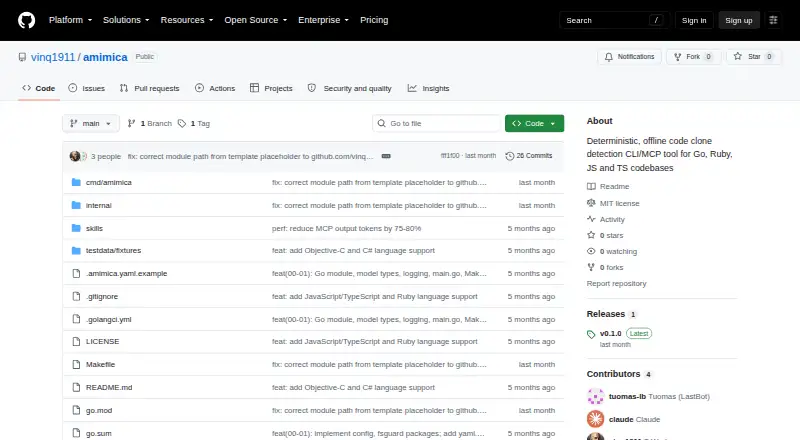
Amimica is a local repository scanner for repeated and structurally alike code, available through a CLI and MCP server.
How it plugs in
Signal on Code Clone Detection Tools5.8#19 of 23
Amimica is a free, offline tool for finding repeated code in repositories. It detects exact copies, renamed fragments, near duplicates, and recurring patterns. Use the command-line program directly, or attach its MCP service to Claude Code, VS Code, or another compatible editor. Results can be reviewed by people before refactoring decisions.
Review
In a line
Amimica scans code repositories for repeated or structurally similar sections. The tool is deterministic, works offline, and combines multiple detection techniques.
What it does
Clone detection covers exact copies, renamed sections, near duplicates, and recurring patterns. Go, JavaScript, TypeScript, Ruby, Objective-C, and C# projects are supported.
Its command-line interface can return text or JSON, including output written to a file. You can set clone score and size thresholds, exclude tests, choose deeper analysis, control caching, and load configuration files.
The project describes these findings as evidence for a person to decide whether and how to refactor code.
How it connects
Amimica offers both a standalone CLI and an MCP service that works with Claude Code, VS Code, and other editors supporting MCP. MCP is a way for compatible tools to exchange requests with the server.
The MCP server uses standard input and output for communication. It offers scanning, finding lists, explanations, and source-region comparisons. During a server session, scan results reside in memory and are removed when that session ends.
The project is open source under the MIT license and can be self-hosted. The README documents building from a Git checkout and installing to GOPATH/bin. A source build needs Go 1.25 or newer.
Project or global YAML settings are supported, with environment variables able to override them.
Good fit
Amimica suits developers and teams that want an offline way to inspect repositories for repeated code. It fits workflows using a command line or MCP-compatible editors such as Claude Code and VS Code.
Its thresholds, normalization, test-file handling, caching, and thorough-analysis controls help users tune scans for different projects.
Watch for
There is no listed CI integration or built-in IDE integration. The MCP server is the documented editor connection, and it uses stdio transport.
A Go 1.25-or-newer toolchain is needed for source compilation. The repository page shows no release assets, so check whether the build-and-install process suits your setup.
MCP scan data is temporary: it disappears when the server stops. The README describes offline operation but does not state a security certification or compliance standard.
Pricing
Amimica is free. There is a free plan and no free trial because the project does not list a paid plan.
Verdict
Choose Amimica if you need repository-wide clone detection that stays offline and you are comfortable running a CLI or self-hosting an MCP server. Its language coverage and adjustable scan settings support varied codebases.
Look elsewhere if you require documented CI workflows, packaged release downloads, persistent MCP results, or a stated compliance certification. Teams should also confirm that Go 1.25 or later is available when building from source.
Our take
Amimica is a practical fit for people who want a no-cost, local scan of a code repository and can work with command-line output or an MCP connection. It covers several common languages and can distinguish more than simple copy and paste. The trade-offs are setup and operations: source builds need a recent Go release, and MCP findings vanish when the session ends. Organizations needing automated CI checks, permanent scan records, or formal compliance claims should verify those needs before choosing it.
- Free plan with no paid tier listed
- Runs offline and can be self-hosted
- Detects exact copies, renamed sections, near duplicates, and recurring patterns
- CLI supports text, JSON, thresholds, caching, and config files
- Its MCP interface works with Claude Code, VS Code, and other compatible editors
- Source compilation needs Go 1.25 or newer
- No documented CI integration
- No built-in IDE integration is listed
- MCP scan results disappear when the server stops
- The repository page lists no release assets
- Pick it ifOffline repository clone checks; CLI users and MCP-compatible editor workflows; Teams reviewing clone findings before refactoring
- Skip it ifYou need documented CI automation or packaged release downloads; You require scan results to persist after an MCP server stops; You need a stated security certification or compliance standard
Pricing
Amimica is free with a free plan. No paid plan or free trial is listed.
Questions
Is Amimica free?
Yes. Amimica has a free plan, and no paid plan or free trial is listed.
What languages does Amimica support?
The README names Go, JavaScript, TypeScript, Ruby, Objective-C, and C# among its supported languages.
How can I run Amimica?
Run the standalone CLI, or use the MCP service with Claude Code, VS Code, and other editors that support MCP.
What kinds of code clones can it find?
Detection includes exact copies, renamed fragments, near duplicates, and recurring patterns.
Does Amimica send code to a cloud service?
The project describes Amimica as offline. Its README does not state a security certification or compliance standard.
What happens to MCP scan results?
Results stay in memory for the server session, then are discarded when the MCP server stops.
What is needed to build it?
Go 1.25 or newer is required for a source build. The README documents building from a Git clone and installing to GOPATH/bin.