
AssemblyFlow Worship Planning Software Review
assemblyflow.net · checked 15 Oct 2026
Worship-service planning, projection, livestream output, and stage display in one Windows app.
How it plugs in
Signal on Worship Planning Software6.7#2 of 24
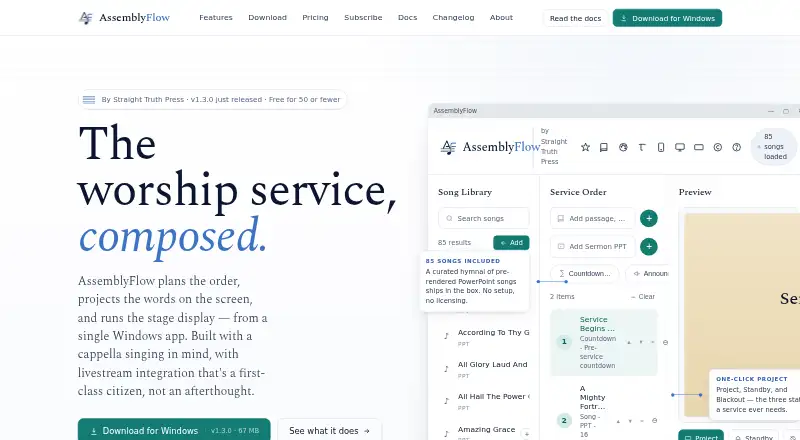
AssemblyFlow combines worship planning, song and scripture handling, screen projection, stage display, and livestream controls. It runs on Windows and stores service data locally, continuing offline after activation. A free plan covers congregations of 50 or fewer members; paid plans add livestream, multiple operators, campuses, and broadcast features.
Review
In a line
AssemblyFlow is a Windows application for planning worship services, projecting content, running stage displays, and sending outputs to livestream tools. It was built with a cappella singing and local congregations in mind.
What it does
The planner uses drag-and-drop service orders, templates, autosave, undo, and seven item types: songs, scripture, sermon PowerPoint files, countdowns, announcements, video, and images.
It includes 85 pre-rendered shape-note SATB hymns. You can add lyrics or import TXT, ChordPro, OnSong, Markdown, and related text files in bulk. Song leader mode offers a starting pitch, hymn-book references, keys, tempos, leader notes, and verse selection.
Projection supports fullscreen multi-monitor output, themed backgrounds, transitions, standby, blackout, and logo screens. Stage Display shows the current and next slides, a clock, elapsed time, and private notes. Local videos and YouTube URLs can play; YouTube downloads use yt-dlp.
BSV, KJV, and ASV Bible texts are bundled for offline use. ESV and api.bible translations need external API keys and are cached locally after retrieval.
How it connects
AssemblyFlow offers an OBS Browser Source endpoint, OBS WebSocket controls, NDI output for vMix and Wirecast, and a virtual webcam for Zoom and Teams. OBS controls can switch scenes, manage streaming and recording, adjust audio, and create scenes.
A web remote runs on the church Wi-Fi and can be installed as a PWA on iOS and Android. It binds to local network addresses, rejects outside connections, and does not require port forwarding.
PowerPoint files are rendered through PowerPoint COM, so a licensed PowerPoint installation is required; the free viewer and LibreOffice do not provide that interface. CCLI logs can be exported as date-range CSV files, with usage data kept locally.
Services, songs, backgrounds, caches, settings, and CCLI logs stay in the Documents/AssemblyFlow folder. The maker says there is no telemetry, analytics, phone-home behavior, or transmitted user data. There is no native synchronization between machines; the maker suggests a shared folder service such as OneDrive, Dropbox, or a file share.
Good fit
AssemblyFlow suits congregations that want planning, projection, stage notes, and livestream output in one Windows program. Its offline operation can fit a church laptop that must continue working after activation.
The free plan is aimed at congregations of 50 or fewer members. Larger setups can use plans with sanctuary livestreaming, multiple simultaneous operators, web-remote permissions, multiple campuses, NDI broadcast, and hardware switcher integration.
Watch for
There are no Mac or Linux desktop versions in the 1.x line; only the browser remote works on those systems. Service data does not sync natively between computers.
PowerPoint rendering depends on a licensed desktop PowerPoint installation. ESV and api.bible access also depends on outside API keys, with documented limits of 5,000 verses per day for the ESV key and 5,000 api.bible calls per month on its non-commercial Starter plan.
Version 1.x does not include click tracks and has no promised delivery date for them.
Pricing
A free plan is available for congregations of 50 or fewer members. It includes the full app for the main worship assembly, with one operator.
Standard costs $20 a month or $200 a year. It covers the main worship assembly, sanctuary plus livestream, OBS, YouTube and Zoom integration, unlimited songs and services, and one operator.
Church costs $40 a month or $400 a year, adding Bible classes, youth meetings, weddings, funerals, special events, multiple simultaneous operators, and web-remote role permissions. Multi-campus costs $80 a month or $800 a year, adding unlimited physical campuses, NDI broadcast across the LAN, hardware switcher integration, and priority email support. Paid-plan email support is within 24 hours.
Verdict
Choose AssemblyFlow if your congregation wants a local Windows tool that combines service planning with projection, stage notes, and broadcast connections. The free tier gives smaller congregations a complete starting point, while higher plans address extra rooms, operators, and campuses.
Look elsewhere if your team needs native Mac or Linux desktop software, built-in machine-to-machine syncing, or click-track support. Check PowerPoint licensing and external Bible API requirements before selecting a workflow.
Our take
AssemblyFlow is a sensible match for congregations centered on Windows and offline operation. Smaller groups can start without a subscription, while growing ministries have clear upgrades for extra meetings, operators, campuses, and broadcast hardware. Its local storage and LAN-only remote may appeal to teams that avoid transmitted data. The main blockers are the lack of Mac and Linux desktop apps, no native synchronization, PowerPoint’s licensing requirement, and no click tracks in version 1.x. Confirm your Bible API access and projection setup before committing.
- Free full app for congregations of 50 or fewer members
- Works offline after activation with local data storage
- Projection, stage display, OBS, NDI, and virtual webcam outputs
- Imports TXT, ChordPro, OnSong, Markdown, and related song files
- LAN web remote works on phones, tablets, and laptops
- No Mac or Linux desktop app in the 1.x line
- No native synchronization between machines
- Licensed PowerPoint is required for PPTX rendering
- Click tracks are not included in version 1.x
- Some Bible translations require external API keys
- Pick it ifWindows-based congregations planning worship services; Teams needing projection and livestream controls together; Small congregations wanting a free full-app plan
- Skip it ifYou need a native Mac or Linux desktop application; Your workflow depends on built-in machine synchronization; You require click tracks or lack licensed PowerPoint
Pricing
Free for congregations of 50 or fewer members.
- Free (50 or fewer members)Full app · main worship assembly · one operator · free for congregations of 50 or fewer membersFree
- Free50 or fewer members · full app · main worship assemblyFree
- Standard$20 / month · main worship assembly · sanctuary plus livestream · OBS / YouTube / Zoom · unlimited songs and services · one operator$20/mo
- Church$40 / month · Bible classes · youth meetings · weddings · funerals · special events · multiple simultaneous operators · web-remote role permissions$40/mo
- Multi-campus$80 / month · unlimited physical campuses · NDI broadcast across LAN · hardware switcher integration · priority email support$80/mo
- Standard (annual)$200/yr — save $40 vs. monthly · Main worship assembly · sanctuary and livestream · OBS / YouTube / Zoom integration · unlimited songs and services · one operator at a time$200/yr
- Standard annual$200/yr — save $40 vs. monthly · main worship assembly · sanctuary plus livestream · OBS / YouTube / Zoom · unlimited songs and services · one operator$200/yr
- Church annual$400/yr — save $80 vs. monthly · Bible classes · youth meetings · weddings · funerals · special events · multiple simultaneous operators · web-remote role permissions$400/yr
As assemblyflow.net lists them, checked 4 Oct 2026.
Questions
Is AssemblyFlow free?
Yes. The free plan includes the full app for the main worship assembly and is for congregations of 50 or fewer members.
What devices can run AssemblyFlow?
The desktop app runs on Windows. Android and iOS can use the web remote, and a browser remote also works on Mac and Linux.
Can it work without internet?
After activation, the app works offline. Bible verses fetched through supported APIs are cached locally for later offline use.
Does AssemblyFlow connect to OBS?
Yes. It provides an OBS Browser Source endpoint and OBS WebSocket controls for scenes, streaming, recording, audio, and automatic scene creation.
Can I import my own songs?
Yes. You can create songs or bulk-import TXT, ChordPro, OnSong, Markdown, and related text formats.
What does the Church plan add?
The $40 a month Church plan covers additional activities such as classes, youth meetings, weddings, funerals, and special events, with multiple operators and remote role permissions.
Near it
All alternatives →- AAvidemux#1 on this board
- O
 OnStage#3 on this board
- PC
 Planning Center#4 on this board
- CSc-SPOT#5 on this board
- SWServeFlow: Worship Planner#6 on this board
- MO
 Ministry Order#7 on this board
- WCWorshipTeam.com#8 on this board
- W
 WorshipMetrics#9 on this board
- W
 Worshipful#10 on this board
- A
 Assemblea#11 on this board