Remote Monitoring and Management Software
Atera: Cloud IT Management Suite Review
atera.com · checked 16 Nov 2026
Cloud platform for device oversight, service support, ticket handling, updates, workflows, invoicing and analytics.
How it plugs in
Signal on Remote Monitoring and Management Software6.3#8 of 39
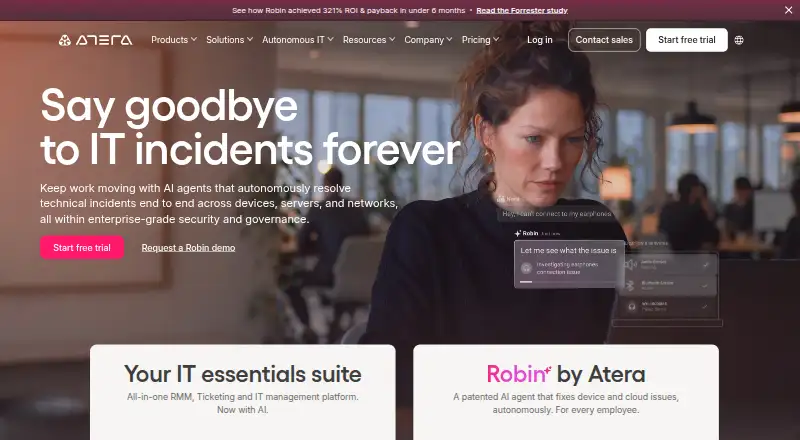
Atera delivers online IT operations for managed providers and in-house technology groups. Its tools cover remote oversight, help desk work, tickets, updates, workflow automation, asset records, billing and analytics. Windows, macOS and Linux endpoints are supported alongside SNMP-discoverable network equipment. A 30-day trial requires no card, although subscription-only capabilities stay disabled.
Review
In a line
Atera brings endpoint oversight, support requests, ticket handling, patching, workflow automation, invoicing and analytics together in one hosted service.
Because the platform is cloud-native, customers do not have to run or maintain a local server.
What it does
The RMM component observes devices continuously, sends alerts, deploys software and enables unattended sessions via Splashtop, AnyDesk, TeamViewer or ScreenConnect.
Its PSA and help-desk functions handle email-created tickets, repeating requests, templates, customer portals, knowledge bases, contracts, invoicing and time records. Additional capabilities include patching, asset records, network discovery, scripting, automations and reporting.
Every plan includes AI Copilot. It assists technicians with ticket resolution, script creation and knowledge-base drafts. Robin is a separate autonomous agent that is sold outside the core suite.
How it connects
Atera's agents run on Windows, macOS and Linux devices. Network equipment can be discovered over SNMP, HTTP, TCP or ICMP, and agents need internet access.
Atera lists connections to Acronis, Bitdefender, IT Glue, Splashtop, Domotz, Keeper and Zapier. Its HTTPS REST API follows OpenAPI 3.0 and uses token authentication, with documented areas including devices, alerts, tickets, billing and contracts.
Subscriptions include API access, whereas trials do not. Support is limited to documented endpoints, and Atera does not troubleshoot custom connections. The product is proprietary rather than open source.
Good fit
Separate editions target managed service providers and internal IT departments. Atera fits teams seeking one hosted system for oversight, ticketing, patching, invoicing and automation.
Multi-tenant administration, unattended sessions and script automation are useful for service groups managing numerous customers or endpoints. AI Copilot handles routine ticket and documentation tasks.
Watch for
The no-card 30-day evaluation excludes API access, certain integrations, custom assets, SSO and the complete AI ticketing capability until an upgrade.
Agents need internet connectivity and supported operating systems. Minimum agent specifications listed by Atera include Windows 7 SP1 or later, macOS 10.13 High Sierra or later, 100 MB storage and 512 MB memory.
Before choosing a plan, verify the remote-session product, report options, asset categories, audit-log duration and support tier you require. Robin must be bought separately.
Pricing
Atera does not provide a free tier; instead, it offers a 30-day evaluation without a credit card.
Annual per-technician pricing for IT Essentials starts at $149 for Professional. Expert is $189 annually and Master $219 annually, while Enterprise requires a quote.
Pro, Growth, Power and Superpower are the managed-service-provider editions, each quoted individually. Endpoint allowances, reports, asset categories, transfer capacity and audit-log retention vary among them.
Verdict
Atera is suited to teams wanting a single hosted workspace for endpoint oversight, service requests, updates, automation and invoicing on Windows, macOS and Linux. Its API, integrations, tenant management and bundled AI Copilot broaden the available workflows for providers and internal technology groups.
Consider alternatives if you need a free tier, API access during evaluation, open-source software or Robin included with the main product. Check remote-session behavior, reporting, integrations and audit-log duration before subscribing. IT help desk software offers a comparison point.
Our take
Atera suits IT groups that prefer hosted operations over maintaining a management server. It handles alerts, remote sessions, tickets, patches, contracts and invoicing, with separate editions for providers and internal teams. Buyers should allow for a paid subscription, confirm required integrations and work within evaluation limits on the API and other capabilities. Organizations seeking open-source software, a permanent free tier or Robin bundled with the base service should look elsewhere.
- Unifies endpoint oversight, support, tickets, patching, invoicing and analytics
- Works with Windows, macOS, Linux and SNMP-discoverable network equipment
- AI Copilot comes with all plans at no additional charge
- Provides a REST API plus numerous listed integrations
- Cloud-native deployment avoids customer-side server maintenance
- No free tier; continued use requires a paid subscription
- Evaluation accounts lack API access and some integrations
- Robin is purchased separately from the core editions
- API assistance is limited to documented endpoints
- Several capabilities and prices require a quotation
- Pick it ifManaged providers overseeing multiple customer environments; Internal IT groups seeking monitoring and service-desk functions together; Teams automating tickets, scripts, patching and endpoint operations
- Skip it ifYou need open-source software or a permanent free tier; Trial-time API access or Robin bundled with the core product is essential; You need fully published pricing without requesting a quote
Pricing
Atera has no free tier but provides a 30-day, no-card trial. Professional costs $149 annually, Expert $189 and Master $219, each billed per technician on annual terms. Enterprise and the four managed-service-provider editions require pricing requests.
- Prounlimited endpoints · 2 concurrent Splashtop sessions · 1 month audit-log retentionOn request
- Growthunlimited endpoints · 5 custom asset types · 15 GB file transfer per month · 6 months audit-log retentionOn request
- Powerunlimited endpoints · 10 custom reports · 20 custom asset types · 50 GB file transfer per month · 12 months audit-log retentionOn request
- Superpowerunlimited endpoints · 7-year audit-log retention · 100 GB file transfer per monthOn request
- Professionalbilled annually per technician · remote management and monitoring · Splashtop remote access (2 concurrent sessions) · helpdesk/SLA · service portal · mobile app · 1-month audit log · Azure AD · Windows/macOS/Linux · AI Copilot$149/yr
- Professionalbilled monthly per technician · remote management and monitoring · Splashtop remote access (2 concurrent sessions) · helpdesk/SLA · service portal · mobile app · 1-month audit log · Azure AD · Windows/macOS/Linux · AI Copilot$169/mo
- Expertbilled annually per technician · Professional features · AnyDesk/Splashtop unlimited sessions · ticket scheduling · AI ticket tagging · 6-month logs · analytics · 5 asset types$189/yr
- Masterbilled annually per technician · Expert features · custom reports · 12-month logs · 10 asset types · data recovery$219/yr
As atera.com lists them, checked 20 Sept 2026.
Questions
Does Atera have a free plan?
No. Atera is paid software, with a 30-day trial that does not require a credit card.
Which operating systems does Atera support?
Agents run on vendor-supported Windows, macOS and Linux versions. Network equipment may be monitored via SNMP, HTTP, TCP or ICMP.
Can I use Atera's API during the trial?
No. The API is available with subscriptions, not trials, and support covers documented endpoints only.
Is AI Copilot included?
Yes. All Atera plans include AI Copilot for ticket assistance, script generation and knowledge-base drafting.
Is Robin part of Atera's main plans?
No. Robin is a standalone purchase separate from the IT Essentials suite.
What integrations does Atera list?
Atera lists Acronis, Bitdefender, IT Glue, Splashtop, Domotz, Keeper and Zapier integrations.
Do I need to install a server?
No. Atera describes the service as cloud-native, so customers need no on-premises server installation or maintenance.
Near it
All alternatives →- MR
 MSP360 RMM#7 on this board
- NNinjaOne#9 on this board
- CRCinch RMM#6 on this board
- N
 Naverisk#10 on this board
- IR
 ITarian Remote Desktop#5 on this board
- LI
 Level.io#11 on this board
- M
 MeshCentral#4 on this board
- NRNetLock RMM#12 on this board
- MR
 ManageEngine RMM Central#3 on this board
- TRTactical RMM#13 on this board