BarcodeLabelGen: Free Self-Hosted Barcode Labeling
github.com · checked 3 Oct 2026
Create barcode-label PDFs from spreadsheet or database rows with a self-hosted web tool.
How it plugs in
Signal on Barcode Labeling Software6.4#10 of 35
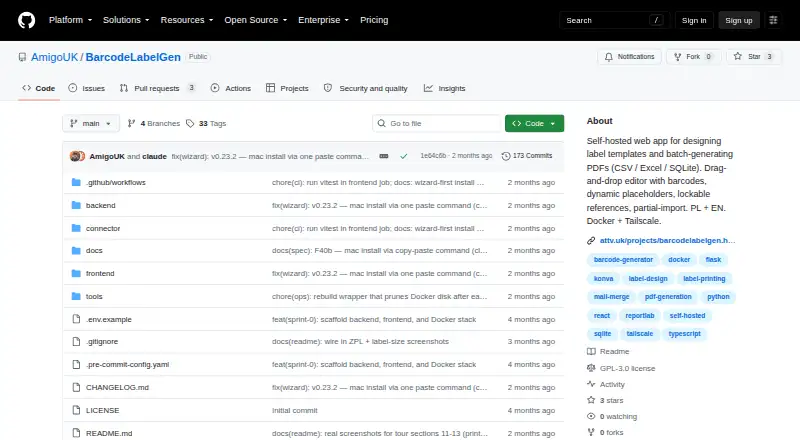
BarcodeLabelGen is a free, GPL-3.0 self-hosted web app for designing label templates and generating PDF batches. It reads CSV, Excel, or SQLite data, supports common barcode and QR formats, and can send ZPL to compatible printers through a local connector. Docker Compose handles deployment across Windows, macOS, Linux, and web environments.
Review
In a line
Use BarcodeLabelGen's self-hosted interface to lay out labels and turn CSV, Excel, or SQLite records into barcode-label PDF runs.
What it does
A drag-and-drop workspace lets you add text, text blocks, shapes, images, tables, barcodes, and other objects, then align them, order their layers, or lock them in place.
Series generation merges variable values into template placeholders. Runs support up to 1,000 labels, with checksum checks for EAN-13, EAN-14, GTIN, Code 128, GS1-128, and QR formats.
The service keeps generated files for 30 days, then removes them. You can package a template as a portable .blg-template.json file and import it into another BarcodeLabelGen installation.
How it connects
Data can come from CSV, Excel, or SQLite. CSV and Excel files are limited to 10 MB, and SQLite files to 50 MB. SQLite is opened read-only: imports permit one SELECT and reject data-changing or multi-statement queries.
ZPL and ZPL II can be imported and exported, while TSPL/TSPL2 output is available for TSC and desktop Toshiba printers. A local connector delivers ZPL over RAW TCP port 9100 and returns job status. Connector binaries are listed for Windows, macOS, Linux, and Raspberry Pi variants.
The project offers API access and administrator, editor, and viewer roles, and its source is GPL-3.0 licensed. Docker Compose is used for deployment; production guidance recommends Tailscale Serve.
Good fit
Variable-data imports and batch printing support repeated designs with changing records.
Teams can combine text, graphics, tables, barcodes, alignment, layers, and locked objects within one editor. The interface is available in English and Polish and includes in-app help plus FAQ documentation.
Watch for
Hosting and maintenance are your responsibility. Verify that your printer handles the available ZPL or TSPL output and that your environment can run the local connector on port 9100.
A generation run cannot exceed 1,000 labels. CSV and Excel uploads max out at 10 MB, SQLite at 50 MB, and generated files disappear after 30 days.
The public demo gives visitors a private workspace that resets after 30 minutes without activity, so it should not be treated as permanent storage.
Pricing
BarcodeLabelGen is available at no cost with a free plan. The repository lists the software under GPL-3.0.
Verdict
Consider BarcodeLabelGen when you need self-managed template creation, imports from spreadsheets or databases, barcode checking, and printer output without a license charge.
It is a weaker choice for hosted deployment or runs larger than 1,000 labels. Confirm printer formats, connector OS support, and your ability to operate Docker Compose before adopting it.
Our take
BarcodeLabelGen fits organizations able to host software and produce recurring labels from CSV, Excel, or SQLite records. Role controls, portable templates, and printer connectors support a self-managed workflow without licensing fees. You remain responsible for deployment, printer compatibility, connector configuration, and storage limits; the 1,000-label ceiling and automatic deletion can constrain larger jobs. If those requirements are acceptable, it provides a practical route to variable-data labels; otherwise, a hosted or simpler option may suit better.
- Free plan with GPL-3.0 source
- CSV, Excel, and SQLite imports
- EAN, Code 128, GS1-128, and QR formats
- Connector reports printing job status
- Portable JSON template export
- Self-hosting and Docker Compose are required
- Each batch tops out at 1,000 labels
- Uploads max at 10 MB or 50 MB
- Printer use depends on ZPL or TSPL compatibility
- Generated files are deleted after 30 days
- Pick it ifOffice teams producing runs from existing data; Authors who need detailed template control; Self-hosted environments with compatible label printers
- Skip it ifYou want a hosted service without deployment tasks; Your runs require more than 1,000 labels; Your printer lacks the supported output formats
Pricing
A free plan is available, and the source is identified as GPL-3.0 licensed.
Questions
What is BarcodeLabelGen?
It is a self-hosted browser app that designs label templates and creates PDF runs from CSV, Excel, or SQLite records.
How many labels can one batch create?
One generation run can contain no more than 1,000 labels.
Which data files can it import?
It accepts CSV and Excel files up to 10 MB, plus SQLite files up to 50 MB.
Which barcode formats are supported?
Supported types are EAN-13, EAN-14, GTIN, Code 128, GS1-128, and QR, with checksum validation.
Can it print to label printers?
The local connector delivers ZPL to compatible printers via RAW TCP port 9100, while the app can output TSPL/TSPL2 for TSC and desktop Toshiba printers.
What operating systems have connector binaries?
Downloadable connector builds are listed for Windows, macOS, and Linux, with Raspberry Pi variants included.
How does BarcodeLabelGen handle SQLite safety?
SQLite opens in read-only mode and allows a single SELECT; modifying statements, ATTACH, PRAGMA, and multi-statement queries are refused.
Where can I get help?
The FAQ points users to the help guide or to [email protected] for questions.
Near it
All alternatives →- DC
 DYMO Connect#9 on this board
- Z
 ZPLab#11 on this board
- C
 Cloudlabels#8 on this board
- OBOnBarcode Barcode Generator#12 on this board
- ZBZint Barcode Generator#7 on this board
- LT
 Label Toolkit#13 on this board
- CCloudlabel#6 on this board
- LLabelForge#14 on this board
- M
 MarkMagic#5 on this board
- E
 EASYLABEL#15 on this board