
Batch File Renamer
berndhagen.github.io · checked 15 Oct 2026
Browser-based, open-source batch renamer with previews, rule chains, validation, and ZIP export.
How it plugs in
Signal on File Renaming Software7.3#2 of 31
Batch File Renamer is a free, open-source web workspace for renaming many files at once. It runs in the browser, keeps files local, previews proposed names, validates common filename problems, and exports selected renamed copies in a ZIP archive. It supports ordered operations, reusable presets, folders, and several filename formatting methods.
Review
In a line
Batch File Renamer is a browser workspace for applying several rename rules to many files. It creates renamed copies rather than changing the original files on disk.
What it does
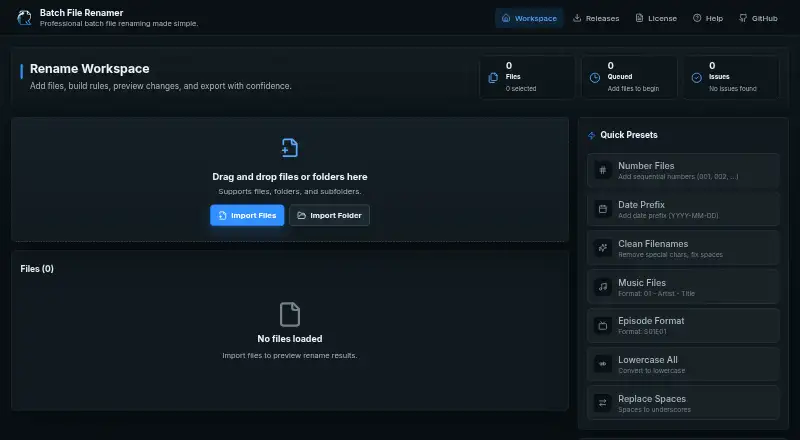
Import individual files, folders, or supported dropped folders, then build an ordered chain of rename operations. You can combine, disable, and reorder rules from top to bottom.
Operations cover find and replace, prefixes and suffixes, character removal, case conversion, numbering, dates and times, regular expressions, cleanup, and extension changes. Built-in presets handle tasks such as music names, episode formatting, numbering, and replacing spaces.
A live table shows original names, proposed names, file sizes, statuses, and validation messages. Changes can be undone or redone through a history of up to 50 operation states.
How it connects
Files are processed in the browser and are not uploaded to a server. The project is a static React application with no backend service, public web API, or SDK.
Export creates a browser-generated ZIP containing selected valid renamed copies. Custom operation chains and the advanced-mode preference are saved in browser local storage; imported files are not persisted.
The project is MIT licensed, allowing personal and commercial use, modification, and distribution subject to the license notice.
Good fit
It suits people who need to number files, clean names, format music or episode files, change case, or apply repeatable rules to batches.
The preview and validation checks help before export, while selectable files let you leave items in the workspace without including them in validation or export.
Watch for
The app exports copies in a ZIP; it does not rename source files in place. Export stays disabled until files are imported, an operation is configured, at least one selected valid name changes, and every selected file passes validation.
Validation flags empty or invalid names, reserved Windows device names, trailing spaces or periods, names longer than 255 characters, and duplicate selected output names.
Modern browsers support file import. Folder picking works best in Chromium-based browsers, dropped-folder recursion depends on WebKit directory APIs, and save-picker support varies by browser. The listed platform coverage is Windows only.
Pricing
Batch File Renamer is free, with no installation or registration required. There is no separate free trial because the available plan is free.
The project is open source under the MIT license.
Verdict
Choose it when you want local, browser-based batch renaming with previews, regex rules, presets, and ZIP output. It is a practical fit for repeatable filename cleanup without installing software.
Skip it if you need to rename originals directly on disk, use a public API or SDK, rename folders, or rely on browser-independent folder handling. For other options, see File Renaming Software or Advanced Renamer.
Our take
Batch File Renamer is a sensible choice for Windows users who want a free way to prepare large groups of files while keeping processing in the browser. Its ordered rules, presets, validation, and preview reduce mistakes, and the MIT license allows reuse and modification. The main tradeoff is the export model: originals stay untouched and renamed copies arrive in a ZIP. Browser differences also affect folder selection and saving, so it is less suitable for direct disk workflows or automation through an API.
- Free and open source under the MIT license
- Processes files locally without uploading them
- Preview, validation, and up to 50 undo/redo states
- Supports ordered rules, presets, regex, and metadata dates
- Exports selected renamed copies as a ZIP
- Does not rename source files directly on disk
- No public web API or SDK
- Folder picking varies by browser
- Folder renaming is not supported
- Listed platform coverage is Windows only
- Pick it ifBatch filename cleanup and numbering; Music or episode naming workflows; Users wanting local browser processing
- Skip it ifYou need in-place renaming of originals; You require an API, SDK, or folder renaming; Your browser has limited folder or save-picker support
Pricing
Free to use with no installation or registration. It is open source under the MIT license, and there is no separate trial plan.
- Web appNo installation or registration required · Exports renamed copies in ZIP filesFree
As github.com lists them, checked 9 Oct 2026.
Questions
Is Batch File Renamer free?
Yes. The web app is free, requires no installation or registration, and is open source under the MIT license.
Are my files uploaded?
No. The app says files are processed in the browser and are not uploaded to a server.
Does it rename files directly?
No. It exports selected valid renamed copies in a ZIP archive and leaves the source files unchanged.
Can it rename folders?
No. Folder renaming is not supported, although you can import folders and supported nested dropped folders.
Which browsers work best?
Modern browsers support file import. Folder picking works best in Chromium-based browsers, while dropped-folder recursion depends on WebKit directory APIs.
Can I save rename rules?
Yes. You can save reusable operation chains as custom presets in browser local storage.
Does it offer an API?
No public web API or SDK is described. It is a client-side static site without a backend.