Easy File Renamer: Review, Features, and Pricing
easyfilerenamer.com · checked 15 Oct 2026
Batch-rename files, folders, photos, videos, and music with reusable rules and a preview.
How it plugs in
Signal on File Renaming Software6.6#3 of 31
Local files and folders can be renamed in batches on Windows and macOS, while supported cloud accounts use a browser companion. It offers rule stacks, regular-expression matching, media metadata naming, music-tag editing, and a before-apply preview. Users can start with no-cost access and a trial; paid plans start at $29.99 annually.
Review
In a line
Configurable rules let Easy File Renamer process batches of files and folders from its desktop app. Windows and macOS run the desktop versions, while cloud accounts are handled through a separate web service.
What it does
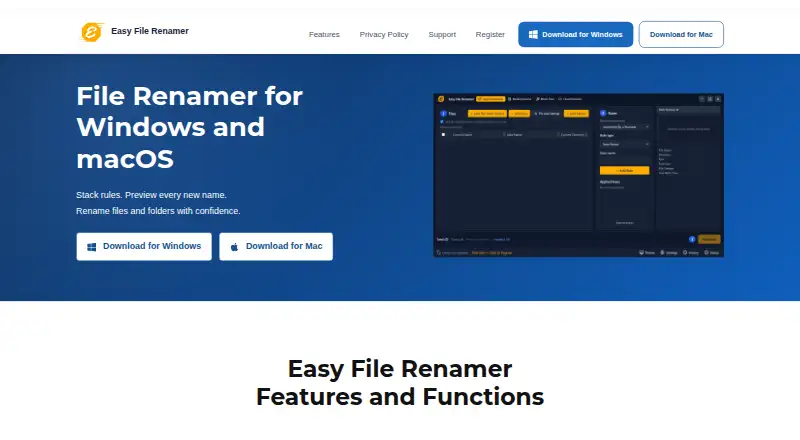
Build a stack of renaming rules, preview the proposed names, then apply the changes. System Renamer provides 12 named options, such as replacing text, adding prefixes, numbering, changing case, and modifying extensions. Remove Text and Replace Text can act on the first occurrence, the last one, or all matches, with regular-expression support for pattern-based searches.
Save rule stacks as named macros and load them for later batches. For duplicate results, the app can add an incrementing number or leave the file out. Folder mode works on folder names themselves and cannot share a working list with file mode.
Media Renamer can assemble photo and video filenames from date, camera information, dimensions, the original filename, extension, and sequence tokens. Music Fixer updates standard title, artist, album, year, genre, and track tags, manages album artwork, and loads an exported iTunes Library XML file.
How it connects
Windows downloads cover Windows 10 and 11. Mac installers come in builds for Apple Silicon M1, M2, and M3 machines, along with older Intel models. The add-files view accommodates 1,500 items; folder indexing handles bigger jobs.
Cloud Renamer launches the bundled Cloud File Renamer site in a browser for supported accounts. The desktop application itself does not inspect cloud storage. Easy File Renamer is proprietary software rather than an open-source project.
Good fit
It suits people who regularly need consistent names across batches of local files, folders, photos, videos, or music. Saved macros help repeat the same naming process, while the preview lets you check proposed names before writing them to disk.
It can also fit users comparing file-renaming software who need media metadata, regular-expression matching, or music-tag editing in one product.
Watch for
During the trial, you can add files and inspect proposed names, but registration is needed before a rename can be applied. History keeps batch totals between sessions, yet it offers no reversal for a finished rename.
Cloud operations run in a separate browser companion instead of the desktop app. Folder and file renaming are separate modes, and jobs above the visible 1,500-item list use folder indexing.
The license allows installation on one computer, plus one backup copy, and prohibits reverse engineering, renting, or lending.
Pricing
You can use a free plan and trial; GetApp shows paid subscriptions beginning at $29.99 per year.
Lifetime plans include a $79.99 Single Solution license for one computer, an $89.99 Family Pack for three licenses, and a $179.99 Small Business plan for 10 licenses. Clone Files Checker is included with these plans; PictureEcho is an optional $15.99 add-on.
Verdict
Easy File Renamer is suited to repeatable batch rules, rename previews, and dedicated tools for media filenames or music tags. It is also a reasonable option when local desktop work matters and cloud files can be handled in a browser companion.
Look elsewhere if you require built-in cloud scanning, undo after a rename, open-source code, or a single working list that mixes files and folders.
Our take
Easy File Renamer makes sense for organized batch work on Windows or macOS, especially when you need saved naming recipes, metadata-based photo and video names, or music-tag updates. The preview and collision choices add checks before changes are made. The trial demonstrates the workflow, but registration is needed to commit changes. Consider another tool if cloud accounts must be scanned from the desktop, if you need undo, or if open-source software is a requirement.
- Preview names before applying changes
- Reusable rule stacks saved as macros
- Regular-expression and metadata-based renaming
- Media and music tools included
- Windows and macOS versions available
- Registration is needed to apply trial renames
- The desktop app does not inspect cloud accounts
- Completed renames cannot be undone from history
- File and folder modes are separate
- Proprietary software with single-computer license terms
- Pick it ifPeople renaming recurring batches of local files or folders; Photo, video, and music libraries needing metadata-based names; Small teams needing up to 10 lifetime licenses
- Skip it ifYou need desktop scanning of cloud accounts; Undo is essential after a rename; You require open-source software
Pricing
Lifetime plans are also offered, and PictureEcho is an optional $15.99 add-on.
- Single Solution (1 License)Per 2 Years · 1 license$39.99/yr
- Single Solutionper 2 years · 1 license · Clone Files Checker included · PictureEcho optional +$15.99$39.99/yr
- Family Packper 2 years · 3 licenses · Clone Files Checker included · PictureEcho optional +$15.99$49.99/yr
- Family Pack (3 Licenses)Per 2 Years · 3 licenses$49.99/yr
- Single Solution (1 License)Lifetime · 1 license$79.99
- Single Solutionlifetime · 1 license · Clone Files Checker included · PictureEcho optional +$15.99$79.99
- Family Packlifetime · 3 licenses · Clone Files Checker included · PictureEcho optional +$15.99$89.99
- Family Pack (3 Licenses)Lifetime · 3 licenses$89.99
As easyfilerenamer.com lists them, checked 8 Oct 2026.
Questions
Can I preview names before renaming?
Yes. The app shows proposed names before changes are applied to disk.
How many files can one batch hold?
The visible add-files list accepts up to 1,500 items; folder indexing is used beyond that size.
Does the trial apply renames?
Trial users may add files and inspect proposed names, but registration is needed before a rename is written.
Can it rename folders?
Yes. Folder-name mode works on folders, and a working list cannot combine it with file mode.
Does it work with cloud storage?
Cloud Renamer launches the separate Cloud File Renamer browser service for supported accounts; the desktop app does not scan those accounts.
Is Easy File Renamer open source?
No. Its license assigns copyright to Sorcim Technologies or its suppliers and includes proprietary-use restrictions.
Can it undo a completed rename?
No. History keeps batch totals across sessions but provides no undo for a completed rename.