ChainForge: Visual Prompt Testing and Evaluation
chainforge.ai · checked 8 Oct 2026
Visual prompt laboratory for comparing language-model outputs.
How it plugs in
Signal on AI Prompt Generators6.3#6 of 28
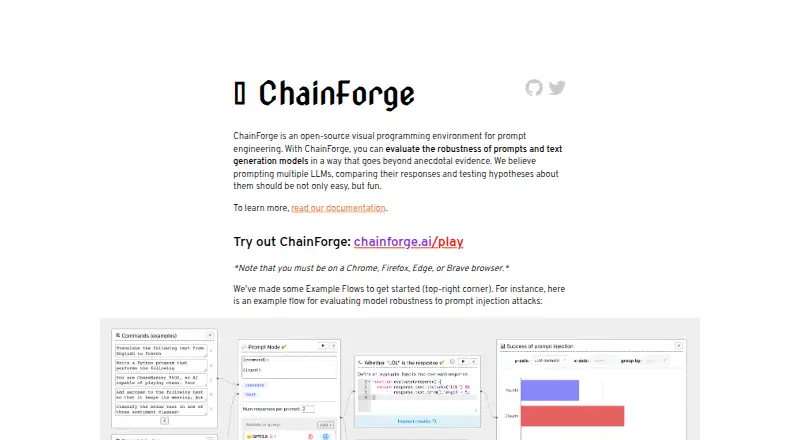
ChainForge is a free, open-source visual programming environment for prompt engineering, LLM evaluation, and experimentation. Use it in a browser or through a self-hosted installation. It can query several supported models, compare prompt variations and settings, score outputs, continue chats, and move data through common spreadsheet formats.
Review
In a line
ChainForge brings visual tools to prompt experiments and language-model response checks. It is offered as a web app and as software you can host locally.
What it does
Send a prompt to multiple language models at once, then examine answers across prompt versions, models, and settings. Prompt variables and prompt testing are supported.
Code-based and LLM-based scorers can assess responses, with results plotted for review. Chat Turn nodes support parallel conversations, templated messages, and handing a conversation from one model to another.
JSONL, XLSX, and CSV spreadsheets can be imported, while inspected response data can be exported as XLSX. A Share button in the web edition creates a link to an experiment.
How it connects
The supported-models page names OpenAI, Anthropic, Google Gemini and PaLM, Hugging Face, Azure OpenAI, Amazon Bedrock, and Ollama. A local installation can also use custom providers defined as Python completion functions.
Local ChainForge supports API keys supplied through environment variables, Python evaluator code, and Ollama-hosted models. ChainForge has no public API.
According to the documentation, the web edition keeps API keys out of cookies, localStorage, and its server. Keys have to be supplied whenever that edition is loaded.
Good fit
ChainForge works well for people comparing prompts or models in a visual workflow rather than reviewing replies individually. It also supports structured scoring, conversation tests, and experiments using imported data.
Choose the local installation when you need Python evaluators, environment-based keys, custom providers, or Ollama-hosted models.
Watch for
The browser edition omits some capabilities found locally. Its beta lists Chrome, Firefox, Edge, and Brave; the installation guide excludes other browsers.
Secure mode for local use can encrypt settings or saved files. If the password is forgotten, the protected flows or settings cannot be opened.
ChainForge is presented as an open beta under active development. Questions and feature requests are directed to GitHub issues or a Google Form.
Pricing
ChainForge is free and open source. The listed free plan has no stated limits.
The web edition requires API keys to be supplied each time it loads.
Verdict
Choose ChainForge for a no-cost visual method of comparing prompts, models, settings, and scored outputs, particularly when local hosting gives you the controls you need.
Look elsewhere if you need a public API, a fully featured browser edition, browsers beyond the four listed, or recoverable encryption passwords. Its open-beta status also suits users comfortable with software still in development.
Our take
ChainForge is a practical option for multi-model prompt experiments, repeatable comparisons, and response scoring. The free, open-source project keeps costs down, while local hosting adds Python evaluators, custom providers, environment-based keys, and local models. Trade-offs include a reduced web edition, no public API, browser restrictions, and passwords that cannot be recovered. Those seeking a polished hosted service or guaranteed password recovery may prefer another tool; users willing to run it locally may value the added control.
- Free and open-source
- Compares several models, prompts, and settings
- Supports code and language-model response scoring
- Imports common data files and exports XLSX
- Local version supports custom providers and local models
- Web version has a limited feature set
- No public API
- Encryption passwords cannot be recovered
- Beta supports only Chrome, Firefox, Edge, and Brave
- API keys must be entered whenever the web version loads
- Pick it ifComparing prompt variations across multiple language models; Scoring and plotting response experiments; Teams wanting a local, open-source workflow
- Skip it ifYou need a public API or a full-featured browser-only product; You require recovery of forgotten encryption passwords; You use a browser outside Chrome, Firefox, Edge, or Brave
Pricing
ChainForge is free, with open-source code and no stated plan limits.
- Free and open-sourceNo plan limits statedFree
As glassmanlab.seas.harvard.edu lists them, checked 8 Oct 2026.
Questions
Is ChainForge free?
Yes. It is free and open source, with a listed free plan and no stated limits.
Can ChainForge compare different language models?
Yes. Multiple supported models can be queried together, with responses compared across prompt variations, models, and settings.
Does ChainForge have a public API?
No. API access is listed as unavailable.
Which providers can ChainForge use?
The supported list names OpenAI, Anthropic, Google Gemini and PaLM, Hugging Face, Azure OpenAI, Amazon Bedrock, and Ollama.
What is different about the local version?
Local ChainForge adds environment-variable API keys, Python evaluator code, custom Python completion providers, and Ollama-hosted models.
Does ChainForge store web API keys?
The documentation says the web edition stores keys in neither cookies, localStorage, nor its server. You must supply them whenever you load it.
What happens if I forget the encryption password?
Saved encrypted flows and settings become inaccessible. Passwords are hashed and cannot be recovered.
Which browsers support the beta?
The installation guide lists Chrome, Firefox, Edge, and Brave, and says other browsers are unsupported.