
Choppity: AI Video Clips for Social Media
choppity.com · checked 15 Oct 2026
AI video editor that turns podcasts and long videos into short social clips.
How it plugs in
Signal on Podcast Clip Makers6.6#4 of 30
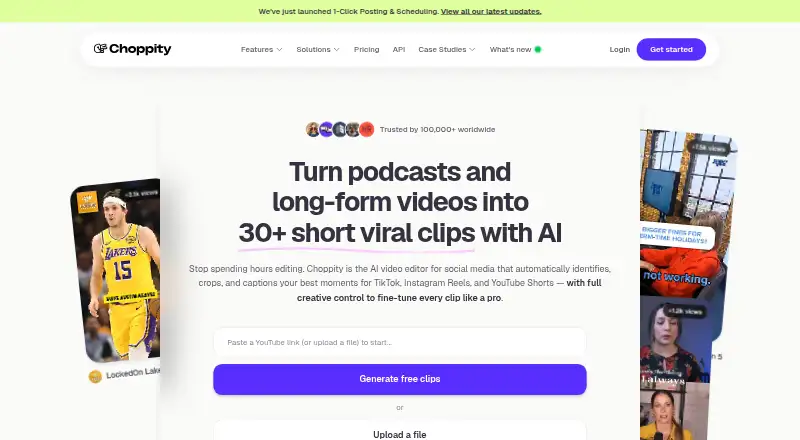
Choppity is a browser-based AI editor for turning podcasts, webinars, interviews and other long videos into short social clips. It finds moments from transcripts, adds captions and reframes footage for social formats. You can edit by changing transcript text, add media and schedule posts on supported social accounts.
Review
In a line
Choppity is a hosted AI video editor that converts long videos and podcasts into short clips for social media. It runs in a browser and also offers Windows, macOS and API access.
What it does
Paste a YouTube link or upload MP4, MOV or MP3 files. The service transcribes the material, identifies notable moments and can produce many clips with captions, framing and platform formats.
You can cut footage by editing the transcript, then add B-roll, images, music, sound effects and overlays. Animated captions support custom styles and manual wording or timing changes. Automatic reframing creates 9:16, 1:1 or 16:9 versions, while speaker tracking adjusts framing for multi-speaker videos.
Natural-language Moment Search finds sections by keyword or request. Profanity can be beeped, muted or masked.
How it connects
Paid plans can post and schedule to connected YouTube, TikTok, Instagram and LinkedIn accounts. Native Facebook and Threads publishing and scheduling are listed in the September 2026 changelog. Free users do not get downloads or social posting.
Choppity has a versioned public API for generating clips from URLs or uploads, rendering MP4 files, creating posts and publishing them. It accepts uploads up to 5 GB, supports webhooks, and allows 60 requests per minute per root team. Documentation covers Zapier, n8n and MCP; a remote MCP server is available for assistants such as Claude and ChatGPT.
The product is proprietary hosted software, not open source. Uploaded content is processed privately and is not published by Choppity unless you direct publication or distribution.
Good fit
Choppity suits creators and content-led businesses that need to turn long recordings into social clips. Listed audiences include podcasters, agencies, churches, ecommerce teams, course creators, marketers and coaches.
It is a fit for transcript-led editing, automatic captions, vertical reframing and scheduled social publishing. You can compare it with AI video repurposing tools or podcast clip makers if you need a wider shortlist.
Watch for
Uploads are limited to 4 GB and three hours in the help article. 4K files wider than 1,920 pixels must be under 60 minutes. Choppity recommends Chrome, current Windows 10 or newer, macOS 12 or newer, or Chrome OS, with at least 8 GB of RAM and a 1,280-pixel-wide display.
The Free plan has one AI analysis hour each month, 2 GB of storage, one seat, one transcript, one YouTube clipping and no downloads or social scheduling. Check the plan limits before moving a regular production workflow.
Trustpilot reviews include reports of failed clip jobs, audio and video sync issues, analysis time used by failed jobs and unanswered support tickets.
Pricing
Choppity has a free-forever plan and no free trial. Free users receive help-center support; paid users get chat support. Refund requests must be made within 14 days of payment for evaluation.
Free: billed free forever, with 1 AI Analysis Hour/month, 2 GB storage, 1 seat, 1 transcript/month and 1 YouTube clipping/month. There are no downloads or social posts/scheduling.
Starter: $13.30 a month with annual billing (30% off), or $19/month billed monthly. It includes 3 AI Analysis Hours/month, 40 GB storage, 1 seat, 1 brand template, 5 transcripts/month, 5 YouTube clippings/month, unlimited downloads and social posting/scheduling.
Pro: $20.30 a month with annual billing (30% off), or from $29/month billed monthly. It includes 5–100 AI Analysis Hours/month, 100 GB storage, up to 2 seats, 4 brand templates, unlimited transcripts and YouTube clippings, unlimited downloads and social posting/scheduling.
Creator: $32/month monthly or $22.4/month yearly, with 1 seat, 5 hours of AI video analysis, 100 GB cloud storage, forever project storage, 3 social accounts, 1 brand template and API access. Team: $48/month monthly or $33.6/month yearly, with unlimited seats, 5 analysis hours, 200 GB storage, forever project storage, 10 social accounts, 5 brand templates and a shared workspace.
Enterprise uses custom pricing and includes unlimited AI, uploads, storage, seats and sub-teams, plus API, iframe and custom integrations, white-labeling, SSO and priority Slack support.
Verdict
Choose Choppity if you want one browser workflow for finding moments in long recordings, editing through transcripts and preparing social formats. Its API and MCP support also suit teams building automated clip or publishing processes.
Look closely at analysis hours, storage, seats and social-account limits before selecting a plan. The free tier is mainly for trying the workflow, while regular publishing requires a paid plan.
Our take
Choppity is a practical option for creators and small content teams that need to turn long recordings into captioned, platform-shaped clips without starting on a paid plan. Its transcript editing, moment search, speaker tracking and publishing tools cover much of the basic repurposing workflow. Buyers should budget for paid access when they need downloads, scheduled posting, more analysis time or multiple seats. Teams automating production can use the public API, webhooks and MCP server, but should check upload limits and the reported reliability and support complaints first.
- Free-forever plan available
- Transcript-based cutting and natural-language moment search
- Automatic captions, reframing and active-speaker tracking
- Public API, webhooks and MCP server
- Paid plans support social posting and scheduling
- Free plan has one analysis hour per month and no downloads
- Uploads are limited by size, duration and 4K width
- Some reviews report failed jobs and sync problems
- Support complaints include unanswered tickets
- Pick it ifCreators repurposing podcasts, webinars and interviews; Teams scheduling clips across several social accounts; Workflows that need API or MCP automation
- Skip it ifYou need open-source software; You require unlimited free exports or social scheduling; Your source files exceed the stated size or duration limits
Pricing
Creator and Team use separate seat and storage structures, while Enterprise is custom priced.
- Freefree forever · 1 AI Analysis Hour/month · 2 GB storage · 1 seat · 1 transcript/month · 1 YouTube clipping/month · no downloads · no social posting/schedulingFree
- Starterannual billing (30% off); $19/month billed monthly · 3 AI Analysis Hours/month · 40 GB storage · 1 seat · 1 brand template · 5 transcripts/month · 5 YouTube clippings/month · unlimited downloads · social posting/scheduling$13.30/mo
- Profrom, annual billing (30% off); from $29/month billed monthly · 5–100 AI Analysis Hours/month · 100 GB storage · up to 2 seats · 4 brand templates · unlimited transcripts and YouTube clippings · unlimited downloads · social posting/scheduling$20.30/mo
- Creator$32 /m monthly; $22.4 /m yearly · 1 seat · 5 hours AI video analysis · 100GB cloud storage · forever project storage · 3 social accounts · 1 brand template · API access$32/mo
- Team$48 /m monthly; $33.6 /m yearly · Unlimited seats · 5 hours AI video analysis · 200GB cloud storage · forever project storage · 10 social accounts · 5 brand templates · shared workspace$48/mo
- Enterprisecustom pricing · unlimited AI, uploads, storage, seats and sub-teams · API/iframe/custom integrations · white-labeling · SSO · priority Slack supportOn request
As help.choppity.com lists them, checked 15 Oct 2026.
Questions
Does Choppity have a free plan?
Yes. Free is billed free forever and includes 1 AI Analysis Hour/month, 2 GB storage, 1 seat, 1 transcript/month and 1 YouTube clipping/month. It has no downloads or social posting/scheduling.
What files can I upload?
The help article lists MP4, MOV and MP3 uploads up to 4 GB and three hours. 4K files wider than 1,920 pixels must be under 60 minutes.
Which social networks can it publish to?
Paid plans support connected YouTube, TikTok, Instagram and LinkedIn accounts. The September 2026 changelog lists native Facebook and Threads publishing and scheduling.
Does Choppity offer an API?
Yes. The public v1 API can generate clips from URLs or uploads, render MP4 files, create posts and publish them. It supports webhooks and allows 60 requests per minute per root team.
Is Choppity open source?
No. It is presented as proprietary hosted software from Mizko Media Pty Ltd, with no open-source license published.
How does Choppity edit video?
You can cut by changing transcript text, adjust caption wording and timing, add B-roll and effects, search for moments in natural language and reframe videos to 9:16, 1:1 or 16:9.
What support do paid plans include?
Paid users receive chat support. Enterprise customers receive priority support through a direct Slack channel, while free users use the help center.