Vizard: AI Video Repurposing for Social Clips
vizard.ai · checked 17 Nov 2026
Vizard converts lengthy footage into captioned social-ready clips.
How it plugs in
Signal on Podcast Clip Makers6.6#1 of 30
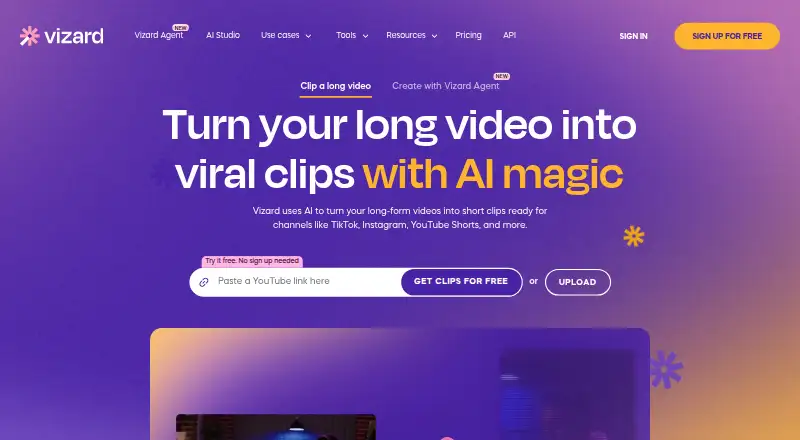
Through its web app, Vizard repurposes video with AI. It detects notable passages in extended recordings, formats them as vertical clips, supports transcript or timeline editing, translates captions, and sends posts to leading social platforms. Access is provided on the web, Android, iOS, and via an API. Users can start on a free tier, with Creator and Business subscriptions also offered.
Review
In a line
Long-form footage can be reshaped in Vizard's browser into short clips for social channels. Its AI spots compelling sections and adjusts framing around speakers for vertical output.
What it does
Upload video, then let Vizard identify highlights and create clips. Transcript text can be removed to edit the video, or you can work directly on a timeline, alter the aspect ratio, and share project links.
The editor offers caption translation in more than 100 languages. Speaker detection and automatic reframing keep important faces centered when a video changes shape. Brand Kit holds logos, custom fonts, brand colors, outros, and reusable templates. Stock video, images, and music are available through the Pexels and Storyblocks libraries.
How it connects
Vizard can publish through links to TikTok, YouTube, LinkedIn, X, Instagram, and Facebook Pages. Supported upload formats include MP4, MOV, 3GP, AVI, MP3, WAV, and M4A.
Paying customers can call a REST API to automate clipping, subtitles, customization, and social optimization. Sources may be remote files or content from YouTube, Google Drive, Vimeo, and StreamYard. API usage consumes video-upload minutes; its documentation sets limits of 600 minutes per video, 10GB per file, and 4K resolution. Public documentation includes quickstarts, references, guides, polling, webhooks, and code examples.
Vizard is not open source. The service works in a browser and lists Android, iOS, and API access as well. Vizard says videos are stored on AWS servers in California with AES-256 encryption, and customer videos are not used to train its models.
Good fit
The service is aimed at content marketers and also lists creators, podcasters, coaches, and agencies. It suits people who need several short social clips from longer recordings, with captions, translated text, and consistent branding.
Its social publishing connections and reusable brand tools can help teams prepare recurring posts. For other options, see AI video editing software and social media video makers.
Watch for
Vizard does not provide a separate trial. The free tier offers 60 monthly credits, 720p output, and three-day storage; uploads are limited to 60 minutes and 1GB. Vizard automatically removes free-user videos seven days after upload, and recovery is unavailable once a project is deleted.
API access is paid-only and consumes upload minutes. Check the 600-minute, 10GB, and 4K API limits before automating large files.
Pricing
A no-cost Vizard tier is available. Its allowance is 60 credits per month, one social account, 720p exports, three-day storage, uploads of up to 60 minutes, and a 1GB size cap.
The Creator plan is priced at $29 per user each month. It begins with 600 credits monthly, permits six social accounts, removes the watermark, supports exports through 4K, includes 100GB storage, and accepts 600-minute uploads up to 30GB.
Business is $39 per user per month. The plan starts with 600 credits monthly, allows 20 social accounts, shared workspaces, and Brand Kit, offers unlimited storage, and retains the 600-minute and 30GB upload limits. All plans include basic email support; paid team plans add priority support.
Verdict
Vizard fits workflows that begin with lengthy recordings and produce social posts regularly. Transcript editing, automatic reframing, caption translation, publishing connections, and brand controls are combined in one browser service.
The free tier is mainly for trying the process, since storage, export quality, upload size, and social accounts are limited. Teams should compare the per-user Creator and Business costs, while developers should confirm that paid API minutes and file limits match their automation needs. If you need a conventional editor instead, compare video editing software.
Our take
Vizard suits marketers, creators, podcasters, coaches, and agencies that derive numerous social clips from long videos. Its free tier allows workflow testing, but three-day storage and 720p output restrict continued use. Creator raises quality, storage, and social-account allowances; Business adds shared workspaces and unlimited storage. Teams should budget per user. Developers need a paid plan because API access is not included for free users, and automated jobs consume upload minutes.
- AI finds notable moments and keeps speakers centered in vertical clips
- Both transcript-based and timeline editing are supported
- Caption translation covers more than 100 languages
- Publishing connections cover leading social platforms
- Free tier available
- There is no separate trial beyond the free tier
- Free storage is limited to three days
- Free output tops out at 720p
- API features are reserved for paid users
- Deleted projects cannot be restored
- Pick it ifContent teams turning lengthy videos into short clips; Creators and agencies posting across social platforms; Teams requiring captions, translation, and brand templates
- Skip it ifYou need open-source software; You require long-term free storage or high-resolution free exports; API access is required without subscribing to a paid plan
Pricing
A free tier covers basic use with 60 monthly credits and tight storage, upload, and export limits. Creator runs $29 per user monthly; Business runs $39 per user monthly. Paid plans expand social-account counts, storage, upload size, and output quality.
- Free60 credits/month · 1 social account · 720p export · 3-day storage · 60-minute uploads · 1GB upload sizeFree
- Businessper user, per month · From 600 credits/month · 20 social accounts · shared workspace · brand kit · unlimited storage · 600-minute uploads · 30GB upload size$39/mo
- CreatorMonthly or Yearly options shown; price not rendered on page · Credits shared between clipping and Agent; no-watermark high-quality videosOn request
As vizard.ai lists them, checked 14 Oct 2026.
Questions
Is a free Vizard tier available?
Yes. The free offering includes 60 monthly credits, one social account, 720p exports, three-day storage, uploads of up to 60 minutes, and a 1GB cap.
Does Vizard offer a trial period?
No. Vizard lists a free tier but no separate trial.
Where can Vizard publish videos?
Publishing links support TikTok, YouTube, LinkedIn, X, Instagram, and Facebook Pages.
Are caption translations supported?
Yes. Vizard's editor supports caption translation into more than 100 languages.
Is an API available from Vizard?
Yes. Paid users can call its REST API for clipping, subtitles, customization, and social optimization; each submission uses video-upload minutes.
How long are free-user videos retained?
Vizard removes videos from free accounts seven days after upload, and a deleted project cannot be recovered.
Does Vizard publish an open-source license?
No. The public site does not publish an open-source license.