CompreFace Review: Open-Source Face Analysis API
github.com · checked 15 Oct 2026
Self-hosted face analysis through an open-source API and Docker.
How it plugs in
Signal on AI Image Recognition Software7.7#2 of 37
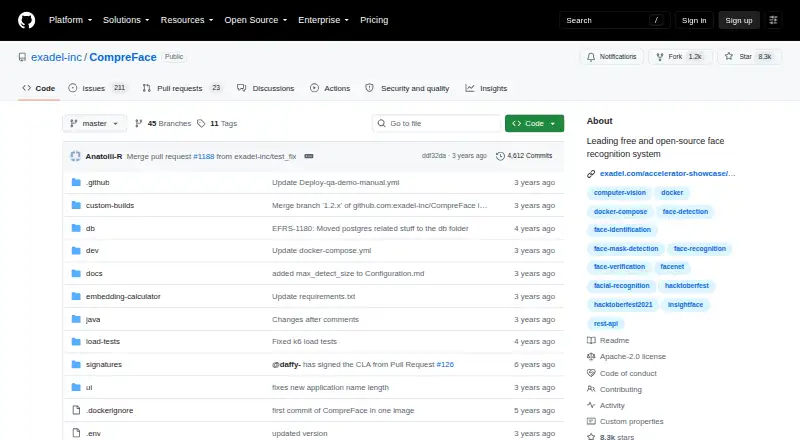
CompreFace offers open-source face analysis at no charge, for deployments you host yourself or place in the cloud. Through its API, it handles recognition, verification, detection, landmarks, masks, head pose, age and gender. Docker Compose packages the service for Windows, macOS and Linux, with model options for CPU and GPU systems. SDK repositories cover JavaScript, Python and .NET.
Review
In a line
CompreFace analyzes faces through a free, open-source service. It can run as a standalone server on premises or in the cloud, with API endpoints exposing its face services.
What it does
Submitted images can be used to find enrolled people, check whether two faces match, and locate faces. Plugins add facial-landmark detection, mask analysis, head-pose estimation, age recognition and gender recognition.
Custom models are supported. A web panel provides role management, so administrators can control access to face-recognition services.
How it connects
Face-analysis and subject-management functions are available through REST endpoints. The documentation includes endpoint examples for recognition, verification, detection, embeddings and base64 images.
Repositories for JavaScript, Python and .NET SDKs are linked. CompreFace is released under Apache 2.0 and distributed as Docker Compose configuration. Contributors are invited to add SDKs, plugins and integrations such as Home Assistant or DreamFactory; these are not described as built-in integrations.
Setup guidance addresses Windows, macOS and Linux and uses Docker with Docker Compose or Docker Desktop. Deployment may be self-hosted, on premises, hybrid or in the cloud.
Good fit
CompreFace suits teams that need face recognition under their own control, including applications that need recognition, verification or detection through an API.
The project says setup does not require prior machine-learning knowledge. CPU and GPU model variants are documented, and the service can connect to a custom recognition application through its API.
Watch for
Getting started calls for Docker and Docker Compose or Docker Desktop, together with an x86 processor supporting AVX. That excludes many ARM devices, while container deployment may be impractical where containers are unavailable.
Response speed may be a concern in some use. Check whether your hardware, container setup and expected traffic suit the service before committing.
Pricing
There is no charge for CompreFace, and its code is open source. The named CompreFace plan provides Docker deployment with CPU and GPU support at no cost.
The separate Free plan lists recognition, verification, detection, landmark, mask, age, gender and head-pose plugins, along with the REST API and Docker deployment, also without a fee.
Verdict
Choose CompreFace if you want face-analysis features behind an API while keeping deployment and face data under your control. It is a practical fit for self-hosted, on-premises or cloud setups that can run Docker and meet the x86 AVX requirement.
Look elsewhere if you cannot use containers, need ARM hardware support, or require predictable response speed without tuning your own deployment. For a wider starting point, browse AI Image Recognition Software.
Our take
CompreFace suits developers and teams adding face capabilities to an existing application when self-hosting and data control are priorities. Its no-cost license, API endpoints and SDK links lower the entry barrier, while Docker packages the service. You still need an x86 AVX environment, must operate the containers, and may encounter response delays. Organizations without Docker access, ARM-only hardware or tolerance for those delays should consider another option.
- Apache 2.0 software available at no cost
- REST access to recognition, verification and detection
- Supports self-hosted, on-premises, hybrid and cloud deployment
- Plugins extend the service with landmarks, masks, age, gender and head-pose analysis
- JavaScript, Python and .NET SDK repositories are linked
- Docker and Docker Compose or Docker Desktop are required
- The documented hardware includes x86 with AVX
- Containers may be unsuitable in some environments
- Some uses may experience slower responses
- Pick it ifTeams seeking API-based face analysis they can host themselves; Projects able to run Docker on x86 AVX hardware; Applications requiring multiple face-analysis plugins
- Skip it ifYou need ARM support or cannot run containerized software; You prefer a managed service over operating the deployment; Your workload cannot tolerate possible response delays
Pricing
Neither listed plan charges a fee. CompreFace combines open-source software, Docker deployment and CPU/GPU support; Free includes the face-analysis plugins, REST API and Docker deployment.
- CompreFacefree and open-source; Docker-based deployment; CPU and GPU supportFree
- Freeface recognition · verification · detection · landmark, mask, age, gender and head-pose plugins · REST API · Docker deploymentFree
As github.com lists them, checked 4 Oct 2026.
Questions
Is CompreFace free?
Yes. Both listed plans are free, and the software uses the Apache 2.0 open-source license.
What can CompreFace recognize?
It can find enrolled people, compare faces for identity verification and detect faces. Plugins add landmark, mask, head-pose, age and gender analysis.
How do I connect an app to it?
Call the REST endpoints for face analysis and subject management. JavaScript, Python and .NET SDK repositories are also linked.
Where can CompreFace run?
It can run as a standalone server on premises, in the cloud or in a hybrid arrangement. Docker installation guidance covers Windows, macOS and Linux.
What hardware and setup does it need?
The quick start relies on Docker and Docker Compose or Docker Desktop. Requirements include an x86 processor with AVX support, with model choices for CPU and GPU.
Does it offer access control?
Yes. Its UI panel and role-management system let users administer roles and limit access to face-recognition services.
Are there other tools to review?
For a broader list, see AI Image Recognition Software.