Contour Rig Tools review
notionalpipe.com · checked 15 Oct 2026
A spline-based character-rigging plug-in for Autodesk Maya.
How it plugs in
Signal on 3D Rigging Software6.6#2 of 27
Contour Rig Tools adds spline-based character rigging to Autodesk Maya. Its deformation system preserves volume through bends and twists, and joint chains can lessen weight-painting work. It includes IK, constraints, stretch, bone control points and a Python API. A free animator mode is available; rig creation requires a paid subscription.
Review
In a line
For Autodesk Maya, Contour Rig Tools provides spline-based character-rigging capabilities. It is aimed at animation production workflows.
What it does
The volume-aware spline system is built to retain curvature through bends and twists while limiting pinching and candy-wrappering. A Contour joint chain can act as one deformer influence, which may reduce weight-painting work.
Contour Bones include built-in length and stretch. Bone CVs add control points along generated splines, either during setup or later. Its IK system provides stretch and anti-pop behavior, while aim handles can stretch for cartoony rigs.
Integrated constraints can control transforms and relationships between Contour chains. Conventional Maya joints can also be driven for workflows that require game-engine export.
How it connects
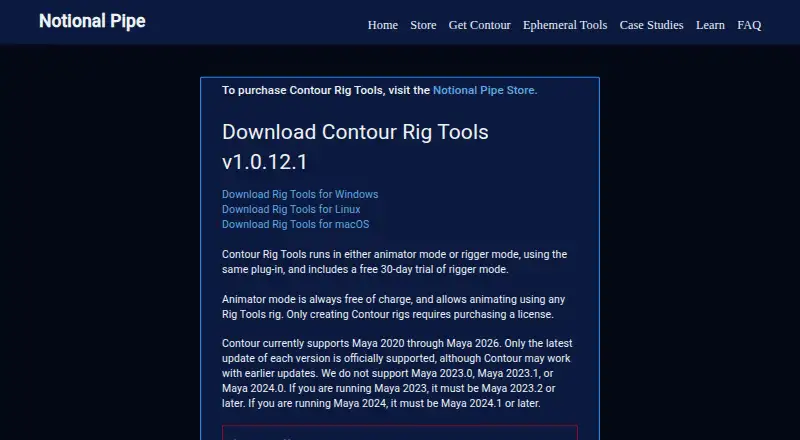
Contour runs inside Maya on Windows, Linux and macOS. Version 1.0.12.1 covers Maya 2020 through Maya 2026, with Maya 2023.0, 2023.1 and 2024.0 left out; Maya 2023 needs 2023.2 or later, and Maya 2024 needs 2024.1 or later.
Its Python API can create, change and query Contour nodes. Inputs may be strings, pyNodes or MObjects. The HTML manual covers installation, licensing, tutorials, rigging techniques, API functions and caveats.
Windows and macOS have installer or manual setup options; Linux setup is manual. GUI use requires PyMEL. Paid node-locked licenses need activation and intermittent internet access, with a stated seven-day offline grace period. Floating licenses need a separately configured license server.
Good fit
Contour suits technical directors and animation teams building character rigs in Maya. It is useful when spline controls, stretch, constraints and reduced weight-painting work fit the rigging process.
Users who only animate or render existing Contour rigs can use the free animator-only mode. Rigs made with Contour can be redistributed and animated by users of that mode.
Watch for
The maker documents Cached Playback problems, including crashes and evaluation errors in some Maya versions. Workarounds or disabling the feature may be required.
There is no perpetual license option. The maker also says it has no concrete plans to port Contour to other digital-content tools or game engines. The manual warns that incorrect graph connections in the small pre-deprecated API can cause evaluation errors.
Check your Maya patch level, PyMEL setup and licensing network needs before committing. Support is available at [email protected].
Pricing
Animator Mode is free. It can animate Contour rigs and add bone CVs, but cannot create or modify rigs.
Rigger Mode costs $40 a month billed $40.00 / month for twelve months, $45 a month billed $45.00 / month for six months, or $50 a month billed $50.00 / month for one month. These plans create and modify Contour rigs and offer node-locked or floating licensing. A 30-day trial is available.
Verdict
Choose Contour Rig Tools if your work is centered on Autodesk Maya and you want spline-based deformation, built-in stretch and IK, constraints, or a Python-controlled rig. The free animator mode is suitable for people who only need to animate or render supplied rigs.
Look elsewhere if you need a permanent license, a different digital-content tool, or reliable Cached Playback without documented workarounds. Confirm your Maya version, PyMEL availability and internet or license-server requirements before paying.
Our take
Contour Rig Tools is a focused option for Maya-based character rigging. Its spline deformation, joint-chain influences, stretch, IK, constraints and bone control points address common rig-building tasks, while the API supports scripted node work. The free mode covers animation and rendering of existing rigs, but creating or changing rigs requires a subscription. Cached Playback issues, Maya patch exclusions, PyMEL requirements and license connectivity add checks for a pipeline. It is not a fit for buyers seeking a perpetual license or a plug-in for another digital-content tool.
- Spline deformation accommodates bends and twists while retaining volume.
- Joint-chain splines can reduce weight-painting work.
- Built-in IK, stretch, constraints and bone CV controls.
- Python API supports creating, modifying and querying Contour nodes.
- Free animator mode can animate and render existing rigs.
- Cached Playback can cause crashes or evaluation errors.
- No perpetual license option is stated.
- Maya 2023.0, 2023.1 and 2024.0 are unsupported.
- Linux installation is manual only.
- Paid node-locked licenses need activation and periodic internet access.
- Pick it ifMaya technical directors building character rigs; Animation teams using spline controls and stretch; Animators working with existing Contour rigs
- Skip it ifYou need a permanent license instead of a subscription.; Your pipeline depends on unsupported Maya patch releases.; You need a plug-in for another digital-content tool or game engine.
Pricing
The free Animator Mode covers animation and bone CV additions. A 30-day trial is available.
- Animator ModeAnimate Contour rigs · add bone CVs · no rig creation or modificationFree
- Rigger Mode — twelve months$40.00 / month for twelve months · Create and modify Contour rigs · node-locked or floating licensing$40/mo
- Rigger Mode — six months$45.00 / month for six months · Create and modify Contour rigs · node-locked or floating licensing$45/mo
- Rigger Mode — one month$50.00 / month for one month · Create and modify Contour rigs · node-locked or floating licensing$50/mo
As notionalpipe.com lists them, checked 15 Oct 2026.
Questions
What is Contour Rig Tools?
It provides spline-based character-rigging capabilities inside Autodesk Maya.
Which Maya versions are supported?
Version 1.0.12.1 covers Maya 2020 through Maya 2026, leaving out Maya 2023.0, 2023.1 and 2024.0. Maya 2023 needs 2023.2 or later, and Maya 2024 needs 2024.1 or later.
Is there a free plan?
Yes. Animator Mode is free for animating Contour rigs and adding bone CVs. It does not create or modify rigs.
How much does rig creation cost?
Rigger Mode is $40 a month for twelve months, $45 a month for six months, or $50 a month for one month. A 30-day trial is available.
Does it have a Python API?
Yes. The API supports creating, modifying and querying Contour nodes, with strings, pyNodes and MObjects accepted as inputs.
What systems can run it?
The supported Maya versions run on Windows, Linux and macOS. Linux installation is manual.
Can Contour rigs be used for game-engine export?
Conventional Maya joints can be driven when a workflow needs game-engine export.
Does it require internet access?
Node-locked paid licenses need activation and intermittent internet access. The stated offline grace period is seven days; floating licenses require a configured license server.