
Cortex AI IDE: An AI Coding Workspace
cortex-ide.app · checked 15 Oct 2026
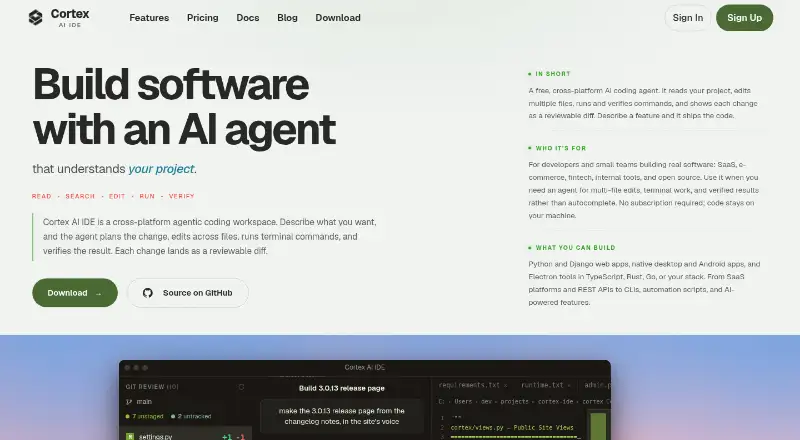
An open-source coding workspace where AI agents can plan work, change code, run commands, and verify the results.
How it plugs in
Signal on AI Code Editors7.6#1 of 26
Cortex AI IDE lets developers use AI agents to plan code changes, edit several files, run terminal commands, and review the resulting diffs. Windows and Linux builds are available; macOS users need to build the app from source. The core IDE is free with your own provider key, while optional subscriptions offer services including web search, voice input, and semantic code search.
Review
In a line
Cortex AI IDE is an open-source workspace for agent-assisted coding. Agents can plan and make code changes, with diffs available for review.
What it does
Cortex offers Agent mode for code edits, Ask mode for read-only investigation, and Plan mode for outlining work without changing files. Its agent can edit across files, use terminal commands and search tools, and track tasks.
The workspace includes a code editor, project file explorer, and terminal shared with the agent. You can also give the agent access to an SSH session. Project memory and chat history stay on the local machine in each project.
How it connects
For AI use, you provide a key and pay the provider you select. Built-in connections cover Xiaomi MiMo, DeepSeek, Anthropic, OpenAI, OpenRouter, Alibaba Qwen, Google Gemini, and InferenceHub. Compatible custom services are supported too, including local Ollama and vLLM servers.
Cortex supports MCP servers, which add external tools and services, and has an extensions system. Its desktop source is under the Apache License 2.0. Cortex says API keys reside in the operating system's secure credential store, and BYOK requests travel directly to the selected provider over TLS.
Good fit
Cortex is aimed at developers and small teams making SaaS, e-commerce, fintech, internal tools, or open-source projects. Its workflow can help with multi-file edits, debugging, refactoring, and documentation.
It may also suit people who want to choose their own AI provider or use a local model service. The included skills cover tasks such as SEO and design reviews as well as coding workflows.
Watch for
AI features require an internet connection and at least one supported API key. Model use is billed by the provider, not included with Cortex's free plan.
Windows has Microsoft Store builds and Linux has .deb and .rpm packages. No ready-made Mac installer is available, so installation on macOS means building the app from source. Requirements differ across the product information: one set lists 4 GB of RAM and 200 MB of free disk space, while the repository recommends 8 GB of RAM and lists about 2 GB of disk space.
Pricing
The Free plan costs nothing and includes the core IDE, agent workflow, codebase indexing, terminal and Git tools, compatible providers, and community support. You supply your own provider key and pay that provider for model use.
Pro Monthly is priced at $5 a month per seat, though $10 is also displayed as its monthly price. It adds web search, voice prompts, semantic code search, and MCP connections. Pro Yearly costs $40 a year per seat and includes those monthly-plan services plus priority support and early access features.
Verdict
Cortex is worth considering if you want an AI coding workspace and control over which provider handles model requests. Its free BYOK plan gives you the core IDE without a Cortex charge for model tokens, and its agent can work across files and use a terminal.
Check provider costs and the Mac installation steps before choosing it. Paid plans add hosted services, but building the Mac version may be a hurdle if you expect a ready-made installer.
Our take
Cortex is a reasonable choice for developers who want an AI agent to plan and change code while choosing and paying their own AI provider. The free plan includes the central IDE and agent workflow, so the core product does not require a paid Cortex plan. Before committing, check your preferred provider's costs and whether your computer meets the requirements. Mac users should be comfortable building the app from source; those who need a ready-made Mac installer should look elsewhere.
- Free plan includes the core IDE and agent workflow.
- Agent can edit multiple files and present diffs for review.
- Supports eight built-in AI provider integrations.
- Accepts compatible hosted and local AI services.
- Desktop source is released under Apache License 2.0.
- AI features require an internet connection and a supported API key.
- You pay your chosen AI provider directly for model use.
- There is no prebuilt Mac installer; installation requires a source build.
- Published system requirements differ on memory and disk space.
- Pick it ifDevelopers who want an AI agent for multi-file coding work; People who want to bring their own provider key; Small teams creating software projects
- Skip it ifYou need a prebuilt Mac installer; You want AI model usage included in the IDE price; You do not want to supply a provider API key
Pricing
The core IDE is free with your own provider key, and model charges go directly to the provider. Pro Monthly is $5 a month per seat, though $10 is also shown; Pro Yearly is $40 a year per seat. Paid plans add services and support, not model usage.
- Free (BYOK)Free · whole IDE · agent loop · codebase context/indexing · terminal/Git/file tools · OpenAI-compatible providers · local semantic-search fallback · community supportFree
- Pro Monthly$10 $5 /seat/month · web search · voice prompts · semantic code search · MCP connections · all LLM models via BYOK · full IDE$5/mo
- Pro Yearly$120 $40 /seat/year · everything in Pro Monthly · priority support · early-access features · stated $80 annual saving$40/yr
As cortex-ide.app lists them, checked 15 Oct 2026.
Questions
Does Cortex AI IDE have a free plan?
Yes. The Free plan includes the core IDE and agent workflow. Bring your own provider key and pay the provider for model use.
Which operating systems does Cortex support?
Cortex offers native Windows and Linux builds. There is no prebuilt macOS installer; Mac users need to compile it from source.
Which AI providers can Cortex use?
Built-in options include Xiaomi MiMo, DeepSeek, Anthropic, OpenAI, OpenRouter, Alibaba Qwen, Google Gemini, and InferenceHub. Compatible custom endpoints are supported as well.
Does Cortex include AI model usage?
No. Supply a provider key and pay the selected provider directly for model use.
What does Pro add?
Pro includes services such as web search, voice prompts, semantic code search, and MCP connections. The yearly plan also provides priority support and early-access features.
Can Cortex use local AI services?
Yes. Cortex Connect accepts compatible endpoints, including local or self-managed Ollama, vLLM, and LM Studio servers.