Cutout.Pro background remover review
cutout.pro · checked 18 Nov 2026
Background removal with batch processing, API connectivity, and credit-based billing.
How it plugs in
Signal on Photo Editing Software7.9#1 of 159
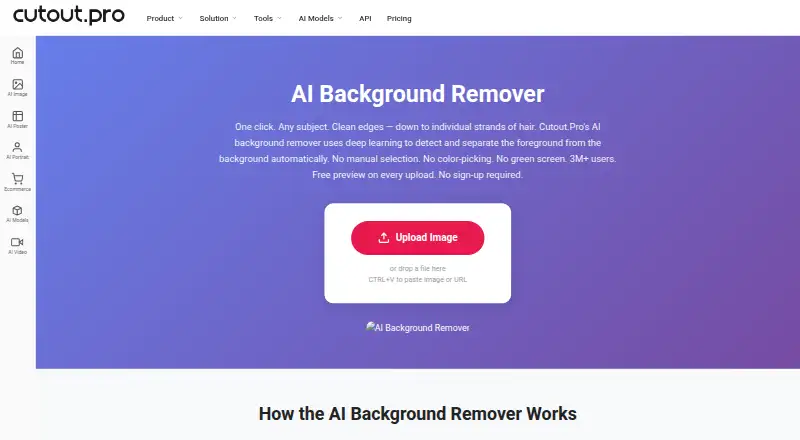
With Cutout.Pro, you can remove a background, substitute a new one, and refine the result manually. The service is offered through web, mobile, desktop, Linux, and an API. JPG, PNG, WEBP, and BMP uploads are supported, up to 15 MB and 4096 × 4096 pixels. A free preview needs no account, while paid use runs on credits.
Review
In a line
Founded in 2018, Cutout.Pro is the Hong Kong-based company behind this image background removal service.
What it does
Background removal is the core function, with tools for adding a replacement backdrop. The Erase & Restore brush helps repair missed background or accidentally clipped foreground.
Uploads may use JPG, PNG, WEBP, or BMP. Finished files can be PNG or JPG and reach 4096 × 4096 pixels.
How it connects
Web, iOS, Android, Mac, Windows, and Linux clients are available, along with an API for linking other software. Folder-level batch processing is supported by the Windows and Mac desktop apps.
Uploaded images are processed securely, deleted automatically, and not stored or shared.
Good fit
This is suited to people handling numerous background removals, especially those wanting folder batches on desktop or an API-based process.
The free preview is useful for checking a result before spending credits.
Watch for
Each file must stay within 15 MB, and images cannot exceed 4096 × 4096 pixels. Downloading an HD result consumes one credit.
Refund terms depend on the purchase channel: main-platform credits include a 14-day guarantee, whereas Shopify App credit purchases cannot be refunded.
Pricing
Cutout.Pro has a free plan. Every upload gets a low-resolution, watermark-free preview without an account or credits, and a new account gets 5 credits without requiring a credit card.
Monthly subscriptions include $5 for 80 credits, $9.90 for 170, and $16.90 for 300. Higher tiers provide 550 credits for $29, 1000 for $49, or 1450 for $69 each month.
Pay-as-you-go choices list 30 credits at $4.99 a month, 300 at $39, and 900 at $79. The larger listings are 3000 credits for $199, 30000 for $1399, and 5000000 for $37500 monthly.
Credits can be bought in volume and used at your own pace. Subscription credits can roll over up to five times the monthly budget.
Verdict
Choose Cutout.Pro if you need background removal on several operating systems, folder-based desktop batches, or an API. Its no-account preview and signup credits lower the cost of trying it.
Look elsewhere if your files exceed the size or resolution limits, or if you need a purchase model without credits. For related options, see AI background generators and AI image enhancers.
Our take
Cutout.Pro is a practical choice for background cleanup when you value broad device support and batch work. The free preview and five starter credits let occasional users check results before paying. Regular users can select a monthly credit allowance or buy larger credit bundles, with some rollover available on subscriptions. Before committing, confirm that your images fit the 15 MB and 4096 × 4096 limits, and remember that Shopify-bought credits cannot be refunded. An API is available for connecting the service to another product.
- Free, watermark-free low-resolution preview without an account
- Works on web, mobile, desktop, and Linux
- Desktop apps batch-process folders
- Replacement backgrounds and API connectivity
- Manual Erase & Restore brush
- Maximum file size is 15 MB
- Images cannot exceed 4096 × 4096 pixels
- HD downloads use one credit each
- Shopify App credit purchases cannot be refunded
- Pick it ifPeople removing backgrounds from batches of images; Teams needing API access across many platforms; Users who want to preview results for free
- Skip it ifYour images exceed 15 MB or 4096 × 4096 pixels; You need a non-credit pricing system; You plan to buy credits through Shopify and may need refunds
Pricing
A free preview and 5 signup credits cover initial checks. Subscription credits can roll over up to five times the monthly budget.
- Subscription — 80 credits/monthbilled monthly · 80 credits/month$5/mo
- Subscription — 170 credits/monthbilled monthly · 170 credits/month$9.90/mo
- Subscription — 300 credits/monthbilled monthly · 300 credits/month$16.90/mo
- Subscription — 550 credits/monthbilled monthly · 550 credits/month$29/mo
- Subscription — 1000 credits/monthbilled monthly · 1000 credits/month$49/mo
- Subscription — 1450 credits/monthbilled monthly · 1450 credits/month$69/mo
- Pay as you go — 30 credits30 credits$4.99/mo
- Pay as you go — 300 credits300 credits$39/mo
As cutout.pro lists them, checked 23 Sept 2026.
Questions
Can I try Cutout.Pro without an account?
Yes. Uploads can be previewed in low resolution without a watermark, account, or credits.
How many free credits do new accounts get?
Signing up provides 5 credits, and a credit card is not needed.
What file types can I upload?
JPG, PNG, WEBP, and BMP are accepted, with files limited to 15 MB.
What is the largest image size?
Images may be as large as 4096 × 4096 pixels.
Does Cutout.Pro have an API?
Yes. An API is offered in addition to versions for web, iOS, Android, Mac, Windows, and Linux.
How do credits work?
Each HD image download uses one credit. Volume purchases let you use credits at your own pace.
Can I get a refund for credits?
Credits purchased on the main platform have a 14-day refund guarantee; Shopify App purchases are non-refundable.
Near it
All alternatives →- PBPhotoKit Background Remover#2 on this board
- AP
 Adobe Photoshop#3 on this board
- AL
 Adobe Lightroom#4 on this board
- I
 ImageMagick#5 on this board
- LHLuminance HDR#6 on this board
- VB
 VanceAI BGremover#7 on this board
- Ddarktable#8 on this board
- AAvidemux#9 on this board
- GGIMP#10 on this board
- P
 Photopea#11 on this board