PhotoKit Background Remover
photokit.com · checked 14 Oct 2026
AI online photo editor that removes backgrounds and saves transparent PNG cutouts.
How it plugs in
Signal on Photo Editing Software7.9#2 of 159
PhotoKit Background Remover lets you clear image backgrounds online with AI, create cutouts, and export transparent PNGs. Its toolkit also covers retouching, enhancement, effects, collages, cropping, resizing, and rotation. The service works in browsers and offers apps, extensions, and API integrations; commercial projects and batch processing are not supported.
Review
In a line
PhotoKit Background Remover is an AI photo editor whose main task is removing backgrounds. It can turn a selected image into a transparent cutout and save it as a PNG.
What it does
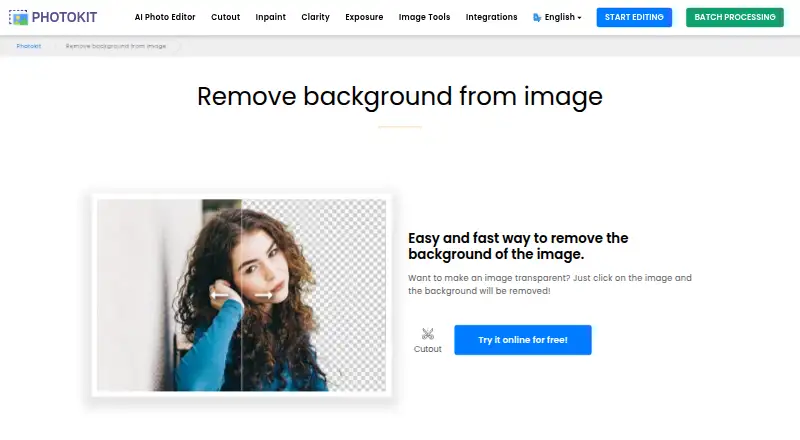
Clicking an image can remove its background. Cutout and shape-clipping tools remove unwanted background pixels, while a magic eraser targets continuous or similar colors before you save a transparent PNG.
Alongside removal, the web editor provides enhancement, portrait retouching, effects, collages, cropping, resizing, rotation, and other basic tools. Its smart brush is promoted for repairing objects, watermarks, wrinkles, blemishes, and old photos.
How it connects
PhotoKit runs in modern browsers without a standard download or installation. Listings also cover Android, iOS, Linux, macOS, Windows, and an extension; the Mac page mentions Progressive Web App installation.
You can embed an editor in a website with an iframe and connect it to a CMS, digital-media project, site builder, or another content project. Its integration material covers Google Drive and a Chrome extension. A REST API is available for background removal, matting, enhancement, OCR, object detection, and other operations.
The JavaScript integration uses postMessage calls to load base64 images and save locally or return base64 data. Image payloads supported by the integration include PNG, JPG, GIF, WebP, BMP, TIFF, ICO, SVG, and JSON. The code is not open source.
Good fit
PhotoKit works for people wanting fast background cutouts together with browser-based photo editing. It can help with transparent product or portrait images, retouching, simple corrections, and collages.
Teams building content tools can use its iframe editor or API. PhotoKit states that its server does not save user pictures or image data, which may matter when choosing an online editor.
Watch for
Use for commercial projects is prohibited. The service does not provide batch processing, so repeated cutouts may require handling images one at a time. VIP access also leaves out the API and batch cutout function.
The free tier includes ads and limits image downloads. Terms allow suspension without notice, give no uptime guarantee, and advise keeping backups. The privacy policy allows personal data to be transferred to or stored in Hong Kong or another jurisdiction and lists Google Analytics, Google Adsense, PayPal, and Funnelll among the website's third-party services.
Pricing
A free PhotoKit tier provides the listed functionalities and future AI tools, but includes ads and limited image downloads. Its background-removal page also offers a free online trial.
The 30-day VIP option is $9.99, while the 365-day option is $29.99. Both remove ads, allow unlimited downloads, include future AI tools and all functionalities, and list 24/7 premium support. A lifetime option costs $99.99 one-time with the same listed benefits.
A VIP code permits sign-in on only one device at a time. VIP also leaves out the API and batch cutout function.
Verdict
Choose PhotoKit for browser-based background removal, transparent PNG output, and extra editing tools, or when you need to embed an editor in a content project. The free tier lets you try the workflow, while VIP removes download limits and ads.
Consider another service if you need commercial rights, batch background cutouts, API access under a VIP plan, or firmer assurances about uptime and where data is stored.
Our take
PhotoKit suits personal or noncommercial cutouts when retouching, enhancement, collages, and basic edits are useful in the same browser tool. Its iframe and REST options can support website and CMS projects, and the free tier makes testing easier. However, the lack of batch processing, limited free downloads, and commercial-use restriction narrow its audience. Check the API terms, one-device VIP rule, privacy details, and service-continuity terms before relying on it for regular production work.
- Background removal can create transparent PNG cutouts
- Includes retouching, enhancement, effects, and collage tools
- Runs in browsers plus mobile, desktop, and extension options
- Offers iframe embedding and REST API access
- Free plan and free online trial are available
- Commercial projects are prohibited
- No batch processing for background cutouts
- Ads accompany the free tier, which also limits image downloads
- VIP does not cover the API or batch cutout functions
- Terms provide no uptime guarantee
- Pick it ifPersonal or noncommercial transparent cutouts; Browser-based photo editing and retouching; Teams embedding an editor in content projects
- Skip it ifYou need commercial rights for finished images; You need batch background removal; You require API access through a VIP subscription
Pricing
The free tier includes ads and download limits. VIP costs $9.99 for 30 days, $29.99 for 365 days, or $99.99 once for lifetime access; the VIP terms leave out the API and batch cutout function.
- Freeall functionalities · future AI tools · ads · limited image downloadsFree
- VIP — 30 days30 days · Full access to all functionalities · Future AI tools · Ad free · Unlimited image downloads · 24/7 premium support$9.99 one-time
- VIP 30 days30 days · all functionalities · future AI tools · ad-free · unlimited downloads · 24/7 premium support$9.99/mo
- VIP — 365 days365 days · Full access to all functionalities · Future AI tools · Ad free · Unlimited image downloads · 24/7 premium support$29.99 one-time
- VIP 365 days365 days · all functionalities · future AI tools · ad-free · unlimited downloads · 24/7 premium support$29.99/yr
- VIP — LifetimeLifetime · Full access to all functionalities · Future AI tools · Ad free · Unlimited image downloads · 24/7 premium support$99.99 one-time
- VIP LifetimeLifetime · all functionalities · future AI tools · ad-free · unlimited downloads · 24/7 premium support$99.99 one-time
As photokit.com lists them, checked 14 Oct 2026.
Questions
Can PhotoKit remove an image background?
Yes. Its cutout tools clear background pixels, and you can save the result as a transparent PNG.
Does PhotoKit support batch processing?
No. The product facts specify no batch processing, and VIP terms exclude the batch cutout function.
Can I use PhotoKit for commercial work?
No. Commercial projects are prohibited.
Is there a free version?
Yes. The free tier offers the listed functionalities and future AI tools, with ads and limited image downloads. The background-removal page also offers a free online trial.
Does PhotoKit have an API?
Yes. It documents REST endpoints and JavaScript iframe communication, although VIP subscriptions do not include the API.
Where can PhotoKit run?
It runs in modern browsers and is listed for Android, iOS, Linux, macOS, Windows, and an extension. Mac users can install it as a Progressive Web App.
What files can its integration accept?
Its integration can receive PNG, JPG, GIF, WebP, BMP, TIFF, ICO, SVG, and JSON image payloads.
Does PhotoKit save uploaded pictures?
The homepage says its server does not save user pictures or image data. Separately, the privacy policy describes collecting personal data and potentially storing or transferring it in Hong Kong or elsewhere.