ddcci Linux Monitor Control
bhuvanchandradv.github.io · checked 9 Oct 2026
An open-source Linux CLI for adjusting monitors via DDC/CI.
How it plugs in
Signal on Monitor Control Software5.0#22 of 24
On Linux, ddcci provides terminal controls for displays that implement DDC/CI. It can query monitor identification data, inspect available controls, read and change settings, save adjustments, and switch inputs. Controls include brightness, contrast, volume, input source, and power. It is free GPL-licensed software distributed as source code.
Review
In a line
On Linux, ddcci provides terminal controls for displays that implement DDC/CI. It is free and open source.
What it does
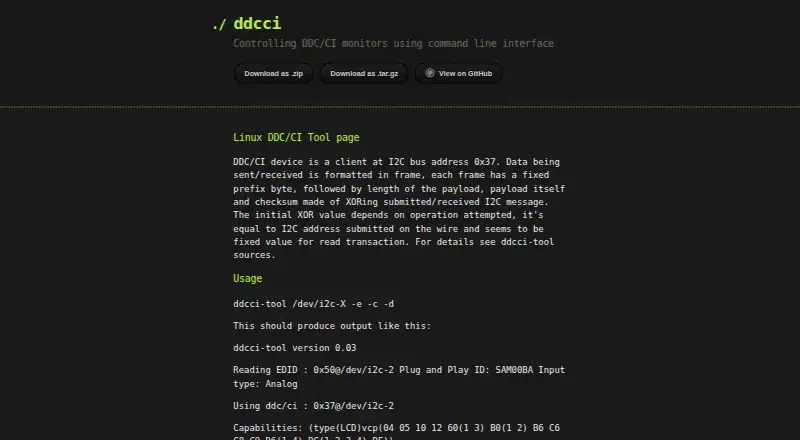
EDID identification data and DDC/CI capabilities are available through the tool's query options. It can search control numbers from 0 through 255, check which ones are valid, and let you read or write a selected control.
The project's listed settings cover brightness, contrast, input source, speaker volume, and power. A save command sends a DDC/CI request to preserve changes made with a write command.
How it connects
ddcci communicates with DDC/CI monitors over I2C. EDID is queried at address 0x50, while DDC/CI capabilities are queried at address 0x37.
The project provides ZIP and tar.gz source downloads and a GitHub repository. Its README describes the code as GPL-licensed.
Good fit
Linux users seeking scripted or terminal monitor control may find ddcci suitable. It is useful for reading monitor data, finding available controls, changing brightness or other listed settings, switching inputs, and saving those adjustments.
Watch for
Symbolic control labels follow Samsung SyncMaster 173T functionality, so they may not be correct on other monitors. Some Samsung displays may need the Samsung enable command before control works.
Capability requests are unsupported by the Mitsubishi Diamond Pro 2060u. The project asks users to inspect the tool or submit patches if it hangs or fails to work, so check your monitor's compatibility first.
Pricing
ddcci is free to use. The project is open source and GPL-licensed, with source archives and a GitHub repository available.
Verdict
Choose ddcci if you run Linux and prefer direct command-line control of a compatible DDC/CI display. It covers common monitor settings and input switching without a license fee.
Look elsewhere if you need a graphical control panel, dependable symbolic names across monitor brands, or support for a display that rejects capability queries.
Our take
ddcci is a practical no-cost option for Linux users who are comfortable entering commands and whose monitors implement DDC/CI. It can identify displays, discover controls, adjust common settings, switch inputs, and preserve changes. Compatibility details matter: control names may not match your monitor, some Samsung models may need an extra enable command, and one Mitsubishi model lacks capability-request support. Because the project distributes source and asks users to investigate failures, it fits technically minded users more than people seeking a polished desktop utility.
- Free and GPL-licensed open-source software
- Runs on Linux
- Reads EDID and DDC/CI monitor capabilities
- Can read, change, and preserve monitor settings
- Supports input switching
- Symbolic labels may not suit non-Samsung monitors
- The Mitsubishi Diamond Pro 2060u does not support capability requests
- Some Samsung monitors may need an enable command
- Project advises inspecting or patching failures
- Pick it ifLinux users automating DDC/CI monitor settings; Terminal-based brightness and input control
- Skip it ifYou need a graphical monitor-control app; Your display does not handle the required DDC/CI requests; You want monitor-independent symbolic control names
Pricing
Free, with GPL-licensed open-source code and source downloads.
Questions
What is ddcci?
On Linux, ddcci provides terminal controls for monitors that implement DDC/CI.
What monitor settings can it change?
Brightness, contrast, input source, speaker volume, and power are among the project's listed controls. It can read or write a selected control and save changes.
Can ddcci switch monitor inputs?
Yes. Input source is one of the listed monitor controls.
How does ddcci identify a monitor?
The tool can request EDID data at I2C address 0x50 and the DDC/CI capabilities string at address 0x37.
Is ddcci free?
Yes. It is free, open source, and GPL-licensed.
Will symbolic control names work on every monitor?
Not necessarily. These labels follow Samsung SyncMaster 173T functionality and may be incorrect for other monitors.
Are there known compatibility limits?
Capability requests are unsupported by the Mitsubishi Diamond Pro 2060u. Some Samsung monitors may require the Samsung enable command.