DocBoy Game Boy Emulator Review
github.com · checked 7 Oct 2026
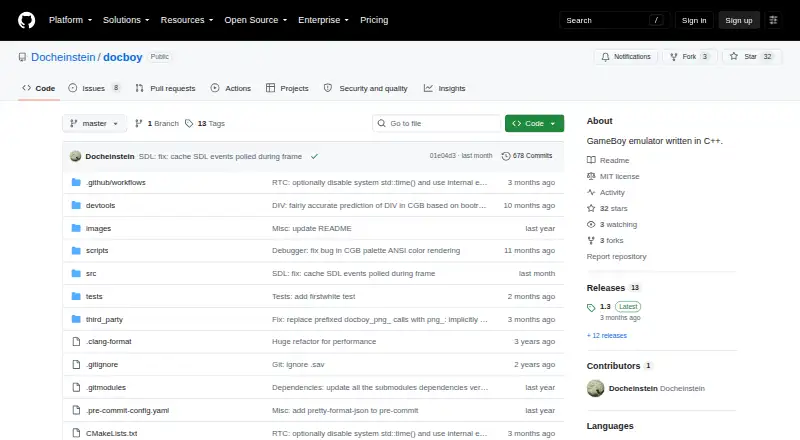
A C++17 emulator for Game Boy and Game Boy Color on desktop and mobile.
How it plugs in
Signal on Game Boy Emulators6.4#4 of 23
DocBoy is a no-cost, open-source emulator for Nintendo's original Game Boy systems. It runs on Windows, Linux and Android, while RetroArch provides an iOS route. Save states, fast-forward, screenshots, configurable palettes and optional debugging tools are included. The project notes that greater accuracy may affect performance.
Review
In a line
DocBoy emulates the original DMG Game Boy and CGB Game Boy Color in C++17. It is available at no cost.
What it does
The emulator covers DMG and CGB hardware, with support for NoMBC, MBC1, MBC2, MBC3, MBC5, MBC7, HUC1 and HUC3 cartridges.
Frontends handle saving and loading, save states, fast-forward, palette configuration, screenshots and an SDL menu. A GDB-style command-line debugger can also provide disassembly, breakpoints, watchpoints, stepping, rewind and memory inspection.
How it connects
The MIT license makes the code open source. DocBoy is usable as a libretro core through RetroArch, and the project describes an Android libretro build; RetroArch supports Android and iOS.
Windows and Linux executable releases are linked from the README. Issues and pull requests are used for bug reports, failing test ROM reports and feature proposals.
Good fit
DocBoy fits people seeking no-cost emulation of Game Boy software on desktop or mobile platforms. Save states, fast-forward, screenshots and palette controls support routine play.
The debugger suits users who need to inspect or step through emulation, while libretro compatibility suits RetroArch setups.
Watch for
Perfect emulation remains a distant project goal, according to the project. It also says that pursuing accuracy may impose a performance cost.
Windows and Linux have executable releases. An Android libretro build is documented, while iOS access is described via RetroArch rather than a dedicated DocBoy release.
Pricing
DocBoy is listed as free and has a free plan. The repository does not state a separate price or offer a trial.
Verdict
DocBoy is worth considering for open-source DMG and CGB emulation, particularly if save states, debugging or RetroArch compatibility matter.
Look elsewhere if you require a stated performance target, guaranteed perfect accuracy or a ready-made mobile app instead of the documented libretro build path.
Our take
For no-cost, open-source Game Boy and Game Boy Color emulation, DocBoy combines broad cartridge coverage, save states and RetroArch compatibility; its optional debugger adds value for technical users. The project cautions that improving accuracy can slow performance. Windows and Linux downloads are available, Android has a documented libretro build, and iOS use goes through RetroArch. It is best suited to users who value openness and control over a turnkey setup.
- MIT-licensed open-source code at no cost
- Covers original Game Boy and Game Boy Color systems
- Save states, fast-forward, screenshots and configurable palettes
- Optional debugger with breakpoints, rewind and memory inspection
- Usable as a libretro core through RetroArch
- Perfect emulation remains a distant goal
- Greater accuracy may reduce performance
- Android support is documented through a libretro build
- iOS access is via RetroArch rather than a listed native release
- Pick it ifPeople seeking no-cost Game Boy or Game Boy Color emulation; RetroArch users and developers who need debugging tools
- Skip it ifYou need guaranteed perfect emulation or a stated performance level; You want a ready-made iOS app instead of RetroArch access
Pricing
DocBoy is free, with a free plan. The repository does not list another price or a trial.
Questions
Which systems does DocBoy cover?
The emulator handles the DMG Game Boy and CGB Game Boy Color.
Where can DocBoy run?
Windows, Linux and Android are listed; RetroArch also offers an iOS path.
Is there a charge for DocBoy?
No. It is listed as free with a free plan, and no separate trial is offered.
Can it preserve game progress?
Yes. Frontends include save/load functions and save states.
Can I use DocBoy inside RetroArch?
Yes. DocBoy can operate through RetroArch as a libretro core.
Which cartridge hardware is covered?
Coverage includes NoMBC, MBC1, MBC2, MBC3, MBC5, MBC7, HUC1 and HUC3.
Are developer tools included?
An optional GDB-style CLI debugger offers disassembly, breakpoints, watchpoints, stepping, rewind and memory viewing.
What should users keep in mind?
Perfect emulation is still a distant goal, and the project says accuracy may carry a performance cost.