Docxtemplater Review
docxtemplater.com · checked 15 Oct 2026
JavaScript library that fills office-document templates with JSON or JavaScript data.
How it plugs in
Signal on Docs Automation7.7#2 of 26
Docxtemplater creates DOCX, PPTX, XLSX and ODT files from templates. Developers connect it through JavaScript, an HTTP API, a command-line package or an Enterprise Docker image, while office users prepare templates in Word or PowerPoint. Its open-source core covers basic templating; paid modules add advanced document features.
Review
In a line
Docxtemplater uses JavaScript to turn JSON-filled templates into Word, PowerPoint, Excel and OpenDocument files.
What it does
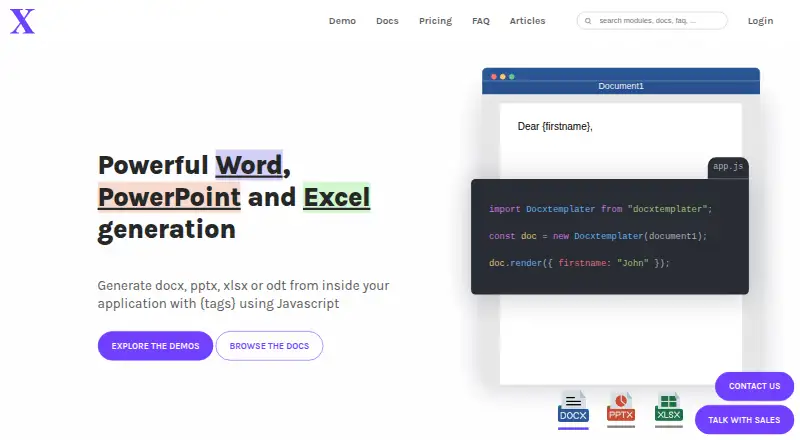
A developer sets up a template with tags such as {user}. Docxtemplater replaces those fields with JSON or JavaScript values and can handle placeholders, conditional sections, loops and custom delimiters.
The open-source core creates DOCX and PPTX files. XLSX output needs the paid XLSX module, and ODT is also supported. Paid modules add options such as images, HTML, charts, tables, slides, subtemplates, styling, metadata and error locations.
It does not render DOCX pages or calculate page breaks and layout. Those tasks are left to tools such as Microsoft Word.
How it connects
JavaScript handles code integration, with examples covering Node.js, browsers, React, Angular, Vue and Next.js. A command-line package can turn an input DOCX and JSON data file into an output document.
The public API includes rendering, asynchronous rendering, ZIP access, option settings, custom parsers and attachable modules. Through an HTTP POST route, the Enterprise Docker image receives a template and JSON data, then produces DOCX, PPTX or XLSX files.
The core library is available under the MIT and GPLv3 open-source licenses. Enterprise SDK and HTTP access support languages including Python, Java, Go, C#, C++, Ruby, PHP, Dart, C, Lua and Rust. Data is processed locally, with no outbound requests during generation.
Good fit
Docxtemplater works for developers automating documents and office users who can build Word, PowerPoint or Excel templates.
It supports web, Windows, macOS, Linux, Android, iOS, self-hosted and API deployments. Full on-premise and air-gapped use is available through the Appliance license.
Watch for
Features beyond basic templating depend on paid modules. The vendor offers 19 paid modules, sold individually, in a four-module PRO pack or through ENTERPRISE; the open-source core remains limited to basic templating.
Check the licensing limits before buying: several plans cap the number of instances. Also confirm that your workflow has another tool for page layout and DOCX rendering.
The JavaScript runtime is tested with active Node.js releases 12 through 24 and common browsers. Security guidance recommends angular-expressions 1.5.2 or newer, csp:true and disabling CallExpression when using the Angular parser.
Pricing
Docxtemplater has a free Open source plan with basic features, MIT/GPLv3 licensing and community support. There is no free trial.
Paid choices are One module at €500 a year, PRO at €1250 a year, ENTERPRISE at €3000 a year, Premium at €9000 a year, and a Perpetual ENTERPRISE feature set at €12250 one time.
One module includes one module and up to five instances. PRO includes four modules and up to five instances. ENTERPRISE includes all 18 modules, a Docker image, an HTTP API and priority email support. Premium adds the full browser version, 25 instances and priority chat, email and phone support.
Verdict
Choose Docxtemplater if your team can work with JavaScript and wants office staff to design reusable templates. The free core is suitable for basic DOCX and PPTX filling, while paid plans cover XLSX and more advanced document features.
Look elsewhere if you need built-in page rendering, or if you want a non-developer tool without a developer-managed library. Compare module needs, instance caps and deployment requirements before selecting a commercial plan.
Our take
Docxtemplater is a fit for organizations that already have JavaScript skills and want templates maintained in familiar office software. Its open-source core keeps basic DOCX and PPTX generation free, and the API, CLI and Docker options support different deployment styles. Budget for paid modules when you need spreadsheets or richer content. It is less suitable when the product must calculate page layout itself or when document creation should be handled without developer setup. Check licensing limits and whether local or air-gapped processing matches your requirements.
- Open-source core with MIT or GPLv3 licensing
- Fills templates using JSON or JavaScript data
- Public API, CLI and Enterprise Docker options
- Processes documents locally without outbound requests
- Supports on-premise and air-gapped deployment
- Advanced functionality depends on paid modules
- XLSX output needs the paid XLSX module
- Does not render DOCX layout or page breaks
- Commercial plans limit licensed instances
- Requires developer setup with JavaScript
- Pick it ifTeams automating office documents from structured data; Organizations with JavaScript developers and office-template users; Self-hosted or air-gapped document generation
- Skip it ifYou need built-in page rendering and layout calculation; You want a no-code document generator; Your workflow cannot accommodate module or instance limits
Pricing
The basic Open source plan is free. A perpetual ENTERPRISE feature set costs €12250 one time.
- Open sourceFree · {tag} replacement · conditions · loops · delimiter changes · community support · MIT/GPLv3Free
- One module500€ per year · 1 module · commercial license · email support under 48 hours · credit-card payment · 2-week money-back guarantee€500/yr
- PRO1250€ per year · 4 modules · commercial license · email support under 48 hours · 2-week money-back guarantee€1,250/yr
- ENTERPRISE3000€ per year · 18 modules · Docker HTTP API image · priority email under 24 hours · custom commercial terms · card or wire payment€3,000/yr
- Premium9000€ per year · 18 modules · full browser bundle · priority chat/email/phone · 4 expert-work days · monthly one-hour call · optional integration from 3000€€9,000/yr
- Perpetual ENTERPRISE feature set12250€ one time · Install on new hosts perpetually · 3 years support · 5 instances max€12,250 one-time
As docxtemplater.com lists them, checked 15 Oct 2026.
Questions
What files can Docxtemplater generate?
It generates DOCX, PPTX, XLSX and ODT files. The open-source core handles DOCX and PPTX; XLSX needs the paid XLSX module.
Does Docxtemplater have a free plan?
Yes. The Open source plan is free and includes basic features under MIT/GPLv3 licensing with community support.
Does it offer an API?
Yes. The public API supports rendering, asynchronous rendering, ZIP access, option settings, custom parsers and attachable modules. Enterprise adds a Docker HTTP API.
Which languages can use the Enterprise Docker image?
The image and SDKs support Node.js, Go, Python, PHP, Ruby, Dart, C#, C, C++, Java, Lua and Rust.
Can Docxtemplater run without sending data elsewhere?
The library processes data locally and performs no outbound network requests during document generation. It supports on-premise and air-gapped deployment.
Does it calculate page breaks and document layout?
No. DOCX rendering, page-break handling and layout calculation are outside its scope and require tools such as Microsoft Word.
What does the PRO plan cost?
PRO costs €1250 a year. It includes four modules, up to five instances per license, email support under 48 hours and a commercial license.