DriftNote podcast summaries and production tools
driftnote.net · checked 15 Oct 2026
AI podcast summaries for listeners and production materials for podcast creators.
How it plugs in
Signal on Podcast Show Notes Software6.3#3 of 22
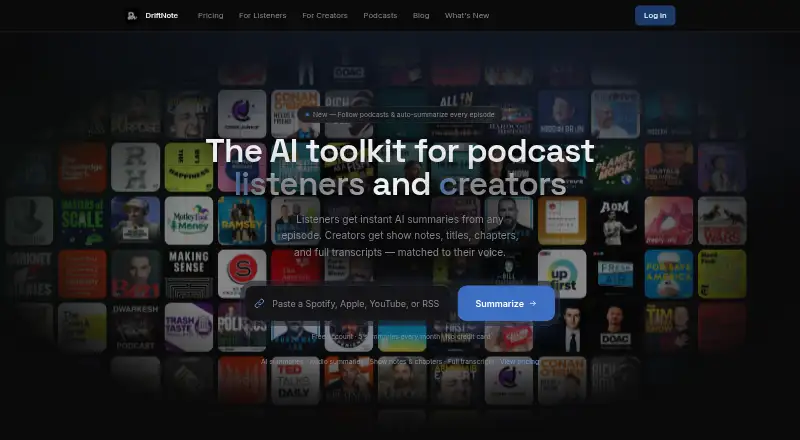
DriftNote is a hosted web and API service for turning podcast episodes into organized notes. Listeners submit links from Spotify, Apple Podcasts, YouTube, RSS, or direct audio. Creators upload audio to produce transcripts, show notes, chapters, titles, and quotes. It can sync with Notion, connect to supported AI assistants, and share results publicly.
Review
In a line
DriftNote uses AI to make podcast summaries for listeners and production assets for creators. It runs as a website and offers an API for connected tools.
What it does
Listeners paste a podcast link and receive an overview, topics, takeaways, notable quotes, and timestamps. Supported sources include Spotify, Apple Podcasts, YouTube, RSS, and direct audio links. Full transcription and summarization normally take about two to five minutes, with no installation or browser extension required.
Producer Studio accepts MP3, MP4, M4A, and WAV files. Producer Pro can create a full transcript, show notes, timestamped chapters, five title ideas, and key quotes. It can also study earlier episodes for naming, tone, vocabulary, and formatting preferences.
Pro listeners can turn summaries into conversational audio using eight voices and four delivery styles. Following a podcast can trigger automatic summaries when new episodes appear.
How it connects
DriftNote can automatically send summaries to a Notion workspace. Users can share results through public links or one-click posts to X and LinkedIn.
Its published web API is documented at /api/v1, with an OpenAPI description at /openapi.json. API access uses bearer keys or OAuth 2.1. An MCP connection can link DriftNote with Claude, ChatGPT, Meta Muse, and other assistants that support connectors.
The service is hosted. The official pages do not describe open-source code or a self-hosting package.
Good fit
DriftNote suits podcast listeners who want structured notes or audio recaps without listening to a full episode. It also fits producers who need repeatable transcripts and publishing materials from uploaded recordings.
Creators with established episodes can use style profiles to keep generated materials closer to their usual wording and format.
Watch for
Free accounts receive five summaries each month and can process three summaries at once. Follow-up questions and podcast follows require Pro, while the free plan allows one followed podcast.
Only some features are tied to paid plans, including unlimited summaries, audio summaries, and priority processing. DriftNote says summaries and personal information are encrypted and not shared with third parties, but there is limited independent review evidence about reliability or support quality.
Check the supported file types, plan limits, and API access needs before choosing a plan.
Pricing
DriftNote has a free plan billed forever with five summaries per month, Notion sync, text transcript processing, one followed podcast, and public sharing. A seven-day trial is available for Producer Pro.
Listener Pro costs $9.99 a month and adds unlimited summaries and follows, audio summaries, AI follow-ups, priority processing, audio fallback, and public sharing. Pro also costs $9.99 a month and includes Notion sync, AI follow-up questions, audio summaries, unlimited follows, priority and audio fallback processing, and public sharing.
Producer Pro costs $24 a month after the seven-day free trial. It includes unlimited episodes, full transcripts, show notes, titles, chapters, key quotes, style profiles, and listener access. All plans use Google Gemini for AI processing.
Verdict
Choose DriftNote if you want one service for podcast notes, creator-ready materials, and assistant connections. The free tier is useful for occasional summaries, while the $9.99 plans target regular listening and publishing. Producer Pro is the plan for ongoing episode production.
Look elsewhere if you need self-hosting or open-source code, since neither is stated. Also review the monthly summary limits and the small amount of independent reliability feedback before depending on it for a large workflow.
Our take
DriftNote is a practical option for turning podcast links or uploaded recordings into organized text and production files. Occasional listeners can start free, while regular users get broader limits, audio recaps, follow-up questions, and automatic podcast following on paid plans. Producers can generate transcripts, chapters, titles, quotes, and other publishing materials, while style profiles learn from existing episodes. The main cautions are plan restrictions, required paid access for some listener actions, and limited independent evidence about service reliability. It is hosted rather than presented as open-source or self-hosted software.
- Free plan includes five summaries each month
- Works with Spotify, Apple Podcasts, YouTube, RSS, and audio links
- Creates transcripts, chapters, titles, quotes, and show notes
- Notion sync and AI-assistant connector support
- Public API with API-key and OAuth access
- Free accounts are limited to five summaries monthly
- Follow-up questions and follows require Pro
- No open-source or self-hosting package is stated
- Limited independent review evidence about reliability
- Pick it ifListeners who want structured podcast notes and audio recaps; Podcast producers creating transcripts and publishing assets; Teams connecting summaries to Notion or AI assistants
- Skip it ifYou need self-hosted or open-source software; You require unlimited free processing or free follow-up questions; You need strong independent evidence about support reliability
Pricing
A permanent free tier covers five summaries per month. Paid Listener Pro and Pro plans are $9.99 monthly, while Producer Pro is $24 monthly after a seven-day trial. Paid plans raise usage limits and add audio, follow-up, or production features.
- Freeforever · 5 summaries/month · Notion sync · text transcript processing · follow 1 podcast · public sharingFree
- Listener Promonthly · unlimited summaries · unlimited follows · audio summaries · AI follow-ups · priority processing · audio fallback · public sharing$9.99/mo
- Promonthly · Unlimited summaries · Notion sync · AI follow-up questions · Audio summaries · Unlimited podcast follows · Priority and audio fallback processing · Public sharing$9.99/mo
- Producer Proafter 7-day free trial · unlimited episodes · full transcripts · show notes · titles · chapters · key quotes · style profile · listener access$24/mo
As driftnote.net lists them, checked 15 Oct 2026.
Questions
Does DriftNote require an app install?
No. The listener workflow runs through the website and does not require an installation or browser extension.
Which podcast sources can I submit?
Listeners can submit Spotify, Apple Podcasts, YouTube, RSS, or direct audio links.
Can DriftNote send summaries to Notion?
Yes. DriftNote can automatically sync summaries to a Notion workspace.
Does DriftNote have an API?
Yes. Public developer documentation describes a web API at /api/v1, with API keys in Settings and OAuth 2.1 support.
What does the free plan include?
The free plan is billed forever and includes five summaries monthly, Notion sync, text transcript processing, one followed podcast, and public sharing.
What files can creators upload?
Producer Studio accepts MP3, MP4, M4A, and WAV audio files.
Which AI assistants can connect to DriftNote?
Its MCP connection can link with Claude, ChatGPT, Meta Muse, and other assistants that support connectors.
How long does processing take?
DriftNote says full-episode transcription and summarization normally takes about two to five minutes.