
EditClips.online: Media Tools, API and Pricing
editclips.online · checked 15 Oct 2026
Browser and API tools for converting, resizing, cutting and enhancing video, audio and photos.
How it plugs in
Signal on Podcast Show Notes Software6.3#2 of 22
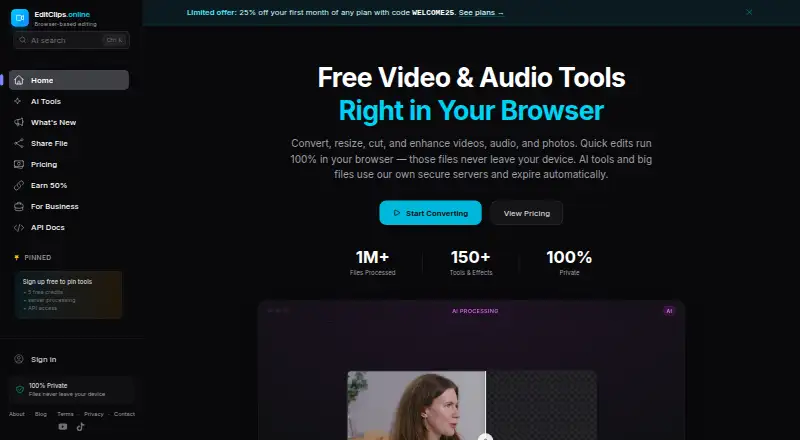
EditClips.online is a browser-based media toolbox with more than 150 tools and effects. It handles video, audio and photos, with AI features such as transcription, background removal, upscaling and clip creation. Basic browser tools run locally without uploads, while server processing has limited free use and API access requires a paid plan.
Review
In a line
EditClips.online is a web and API service for working with video, audio and photos. It combines single-purpose conversion, editing and enhancement tools with AI processing.
What it does
The site offers more than 150 tools and effects for converting, resizing, cutting and enhancing media. Video tools list MP4, WebM, MKV, MOV, AVI and GIF support; audio tools list MP3, WAV, AAC, FLAC and OGG.
Its AI Clip Maker reads a video's transcript, picks moments, crops them to 9:16 and adds animated captions timed to the words. Other AI options include background removal, face and plate blurring, subtitles, dubbing, slow motion, upscaling, voice tools, image generation and audio denoising.
Basic tools can be used without an account and are advertised as producing files without watermarks. Accounts add processing history and paid features.
How it connects
EditClips works in Chrome, Firefox, Edge and Safari on desktop, tablet and mobile devices. Most basic operations run in the browser with FFmpeg compiled to WebAssembly, so the source file is not uploaded.
The service exposes a REST API for programmatic media processing, with documented conversion, editing, effects, extraction and combining tools. API jobs accept public URLs or direct uploads through presigned links, and results use download links valid for one hour. The Lite plan advertises REST API or MCP access; Pro adds HTTP webhooks for completed or failed server jobs.
Server uploads and outputs are automatically deleted after seven days. Shared videos are public to anyone with the link and expire after 24 hours for anonymous users or seven days for registered users. The pages do not state an open-source license.
Good fit
EditClips suits people who need quick media conversions or focused browser tools without installing software. It also fits users who want AI-assisted clips, captions, transcription, denoising or image processing.
Developers can send media through the REST API, while teams needing more credits, larger files, webhooks or higher request limits can choose paid plans.
Watch for
The product pages describe many single-purpose tools but do not document a general multi-track timeline editor. Check whether its focused tools cover your editing workflow.
Browser processing keeps basic files local, but server jobs are stored in Cloudflare R2 until automatic deletion after seven days. Shared links are public while active. API access requires a paid Lite-or-higher plan, and AI endpoints use the same credits as the web app.
The terms do not guarantee uninterrupted service and allow features to be changed, suspended or discontinued.
Pricing
A Free plan is free forever. It includes 100+ browser tools, two server downloads per day for clips up to 30 seconds, five AI credits, no signup and no watermark.
One-time credit packs cost $2.99 for 20 credits, $9 for 100, $29 for 500, or $69 for 1,500; these credits never expire.
Lite costs $5.99/month, or $4.17/month when billed yearly at $49.99/year. Pro is $14.99/month, or $10/month when billed yearly at $120/year. Business is $39/month, or $32.50/month when billed yearly at $390/year. Enterprise pricing is by request.
Lite includes 50 AI credits/month, 500 MB uploads and 100 API requests/minute. Pro includes 300 credits, 20 GB uploads, 200 requests/minute and webhooks. Business includes 1,500 credits, 50 GB uploads, 600 requests/minute, optional zero-retention mode and instant permanent deletion.
Verdict
Choose EditClips.online if you want many focused media tools in a browser, local processing for basic jobs, or an API for automated work. Its free tier is useful for short server clips and limited AI use, while paid plans raise file, credit and API limits.
Look elsewhere if your workflow depends on a documented multi-track editor, customer-controlled hosting or a stated open-source license. Also review sharing and server-retention settings before sending sensitive media.
Our take
EditClips.online is a practical option for quick browser-based media tasks and automated processing through an API. The free tier covers local tools and a small amount of server and AI use, while subscriptions add credits, larger uploads and higher request limits. Its AI clip maker and caption tools may help short-form publishers. It is less suitable for editors who need a documented multi-track timeline, guaranteed uptime, or a self-hosted package. Public sharing links and seven-day server retention deserve attention for private material.
- More than 150 media tools and effects
- Basic browser processing avoids uploading source files
- Free plan includes 100+ tools and five AI credits
- REST API and MCP access are available on paid plans
- AI Clip Maker creates 9:16 captioned clips
- No documented general multi-track timeline editor
- API requires a paid Lite-or-higher plan
- Shared videos are public while links remain active
- Server files are automatically deleted after seven days
- No open-source license is stated
- Pick it ifQuick browser-based media conversions and enhancements; AI-assisted short clips, captions and transcription; Programmatic processing through a REST API
- Skip it ifYou need a documented multi-track timeline editor; You require customer self-hosting or open-source code; Your files cannot use public sharing links or server retention
Pricing
Free forever access is available. Paid choices include monthly plans, yearly billing discounts and one-time credit packs whose credits do not expire. Enterprise pricing is custom.
- Freefree forever · 100+ browser tools · 2 server downloads/day for clips up to 30 seconds · 5 free AI credits · no signup · no watermarkFree
- 20-credit packone-time purchase · 20 AI credits · credits never expire$2.99 one-time
- Lite$5.99/month; $4.17/month when billed yearly ($49.99/year) · 50 AI credits/month · 1080p and 3-minute AI videos · 500 MB uploads · 100 requests/min API · 14-day, 500 MB share links · 5 dynamic QR codes$5.99/mo
- 100-credit packone-time purchase · 100 AI credits · credits never expire$9 one-time
- Pro$14.99/month; $10/month when billed yearly ($120/year) · 300 AI credits/month · 8K and 10-minute AI videos · 20 GB uploads · 200 requests/min API · webhooks · 30-day, 20 GB share links · 25 dynamic QR codes$14.99/mo
- 500-credit packone-time purchase · 500 AI credits · credits never expire$29 one-time
- Business$39/month; $32.50/month when billed yearly ($390/year) · 1,500 AI credits/month · unlimited server resolution and duration · 50 GB uploads · 600 requests/min API · instant permanent deletion · optional zero-retention mode · 90-day, 50 GB share links · unlimited dynamic QR codes$39/mo
- 1500-credit pack1,500 credits · credits never expire$69 one-time
As editclips.online lists them, checked 15 Oct 2026.
Questions
Can I use EditClips without an account?
Yes. Basic browser tools work without signup. Accounts add processing history and paid capabilities.
Does EditClips upload files?
Most basic browser operations run locally with WebAssembly, so the source file is not uploaded. Server jobs are stored and deleted automatically after seven days.
What video and audio formats are supported?
Listed video formats are MP4, WebM, MKV, MOV, AVI and GIF. Listed audio formats are MP3, WAV, AAC, FLAC and OGG.
Is there an API?
Yes. A REST API supports programmatic media processing. API access requires a paid Lite-or-higher plan, and results use download links valid for one hour.
What does the AI Clip Maker do?
It reads a video's transcript, selects moments, crops them to a vertical 9:16 frame and adds word-timed animated captions.
Are shared videos private?
No. Anyone with a shared link can access the video while it is active. Anonymous links expire after 24 hours; registered-user links expire after seven days.
What is the cheapest paid option?
The cheapest monthly plan is Lite at $5.99/month, or $4.17/month when billed yearly at $49.99/year. A 20-credit pack costs $2.99 one time.