Embrace: Mobile and Web User Monitoring
embrace.io · checked 15 Oct 2026
User-focused monitoring for mobile and web apps, with session context for crashes, errors, and performance.
How it plugs in
Signal on Error Tracking6.6#3 of 25
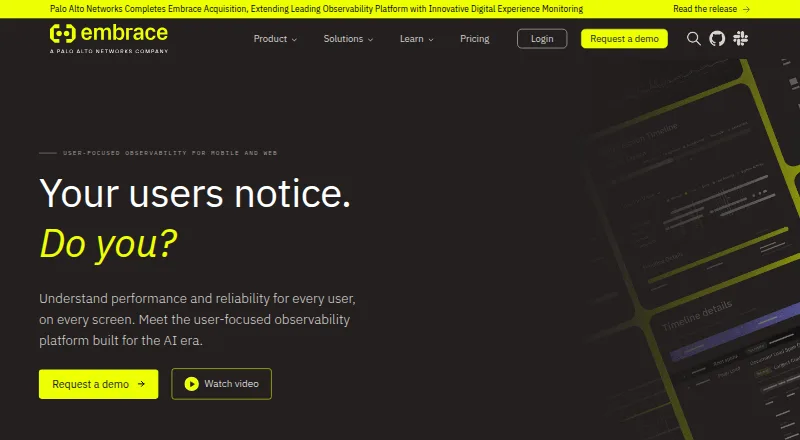
Embrace is a real user monitoring platform for mobile and web applications. It records session timelines and connects crashes, ANRs, network requests, errors, and performance data to what users experienced. Teams can use dashboards, alerts, custom metrics, OpenTelemetry exports, and integrations with other observability tools.
Review
In a line
Embrace is a user-focused monitoring service for mobile and web apps. It links technical problems to the user sessions in which they happened.
What it does
Mobile monitoring records sessions with crash, app-not-responding (ANR), network, and performance details. ANR tools include early detection, stack-trace analysis, and flame graphs.
Web monitoring includes session timelines, Core Web Vitals, exception and error reports, custom metrics, and alerts. Teams can investigate crashes, errors, and slow experiences through detailed user journeys.
Dashboards, custom metrics, service-level objectives, and alert policies help track mobile and web measures. Network telemetry can follow a request from a mobile device through backend services using an injected trace ID.
How it connects
Official instrumentation covers Android, Apple platforms, web, React Native, Unity, and Flutter. The Web SDK installs through npm as @embrace-io/web-sdk or from a CDN script.
Embrace is built on OpenTelemetry. Its APIs support custom-metrics management, PromQL metric queries, metric forwarding, and span forwarding. Data can be sent to destinations such as Datadog, Grafana Cloud, Honeycomb, New Relic, Splunk, Elastic, Chronosphere, and Observe.
Integrations documentation lists Slack and webhooks. Paid plans list Jira, Slack, and PagerDuty, with role-based access controls on Pro and Enterprise. The Grafana app can show Embrace crash sessions, deployments, app health, and trends beside Grafana dashboards.
The Web SDK can send telemetry to a customer- or vendor-hosted OpenTelemetry Collector, while Embrace's analysis platform is delivered as software as a service. Its SDK repositories are licensed under Apache-2.0.
Good fit
Embrace is aimed at frontend and mobile engineers, with support for DevOps and site reliability teams. It suits teams that need session-level detail when diagnosing crashes, ANRs, network failures, and web performance issues.
It can help connect an issue to a user's journey, monitor crash rates and key performance measures, and forward metrics, spans, logs, or traces to other tools.
Watch for
Mobile and web sessions use the same pricing basis, and every session counts toward total consumption. The free tier stops additional data ingestion or users after 1 million sessions per year or 5 users unless you upgrade.
SDK limits include 100 session properties, 100 breadcrumbs, up to 500 custom Android spans, and 1,000 custom iOS spans per session part. Extra data is truncated or dropped.
The analysis service is SaaS rather than self-hosted. Customers can choose United States or European Union data centers. The Web SDK redacts credentials and sensitive query-string values and supports custom scrubbers and ignored URLs.
Pricing
Embrace has a free plan, paid plans from $0.80, and a 30-day trial. The free plan allows up to 1 million sessions per year and 5 users, with errors, exceptions, crashes, basic performance monitoring, basic dashboards and alerting, and 3-day event retention.
Pro costs $0.80 a month, billed at $0.80 per 1,000 sessions, with an $80/month minimum. It includes 10 users, custom dashboards, API access, metrics forwarding, standard support, and 14-day event retention.
Enterprise uses custom pricing with an $80 minimum spend shown. It includes unlimited users, custom metrics, event and span forwarding, tagging and workflow features, gold support, and 30-day event retention.
Verdict
Choose Embrace if your team needs mobile and web monitoring centered on complete user sessions, especially for crash, ANR, network, and performance investigations. Its OpenTelemetry support and forwarding options fit teams that already use several observability systems.
Check session volume, user counts, retention needs, and SDK data limits before selecting a plan. Teams wanting a self-hosted analysis platform should look elsewhere, since Embrace's analysis service is SaaS.
Our take
Embrace fits teams that need to see the user session around a mobile crash, ANR, network request, or web performance issue. Its SDK coverage, OpenTelemetry interfaces, dashboards, alerts, and data destinations support both app-focused and broader reliability workflows. The free plan is useful for small usage, but its session and user caps are strict. Paid pricing is tied to session volume, with an $80 monthly Pro minimum. Consider the SaaS delivery model, retention periods, and per-session data limits before committing.
- Session timelines connect crashes, errors, and performance to user journeys.
- Supports Android, Apple platforms, web, React Native, Unity, and Flutter.
- OpenTelemetry APIs and destinations support forwarding to other tools.
- Free plan includes up to 1 million sessions per year and 5 users.
- United States and European Union data-center choices are available.
- Free usage stops after 1 million sessions yearly or 5 users.
- Pro has an $80/month minimum despite its per-session rate.
- Analysis is SaaS; only telemetry export can use another hosted collector.
- SDK limits can truncate or drop excess session data.
- Enterprise pricing is custom.
- Pick it ifMobile and web teams investigating crashes and slow user experiences; DevOps and SRE teams connecting app issues to user sessions; Organizations already using OpenTelemetry or observability destinations
- Skip it ifYou need a self-hosted analysis platform.; Your usage may exceed the free tier but cannot meet the Pro minimum.; You require more session data than the SDK limits allow.
Pricing
A free tier covers up to 1 million sessions per year and 5 users. Pro is billed per 1,000 sessions at $0.80, with an $80/month minimum. Enterprise is custom-priced with an $80 minimum spend shown. A 30-day trial is available.
- FREEUp to 1 million sessions/year · 5 users · errors, exceptions and crashes · basic performance monitoring · basic dashboards and alerting · 3-day event retentionFree
- PRO$0.80 per 1,000 sessions; $80/month minimum · 10 users · custom dashboards · API access and metrics forwarding · standard support · 14-day event retention$0.80/mo
- ENTERPRISECustom pricing; $80 minimum spend shown · Unlimited users · custom metrics · event and span forwarding · tagging and workflow features · gold support · 30-day event retentionOn request
As embrace.io lists them, checked 15 Oct 2026.
Questions
What is Embrace?
Embrace is a real user monitoring platform for mobile and web apps. It connects technical events to the user sessions where they occurred.
Which platforms does Embrace instrument?
Its documentation covers Android, Apple platforms, web, React Native, Unity, and Flutter.
Does Embrace have a free plan?
Yes. Free includes up to 1 million sessions per year and 5 users, plus basic monitoring, dashboards, alerting, and 3-day event retention.
How is Embrace priced?
Mobile and web sessions share one usage measure. Pro is $0.80 per 1,000 sessions with an $80/month minimum; Enterprise uses custom pricing.
Can Embrace send data to other tools?
Yes. It supports OpenTelemetry interfaces and destinations including Datadog, Grafana Cloud, Honeycomb, New Relic, Splunk, Elastic, Chronosphere, and Observe.
Is Embrace open source?
The product is not open source. Embrace states that its Android, Apple, React Native, Flutter, Unity, and Web SDK repositories use the Apache-2.0 license.
Where can Embrace store data?
Customers can select United States or European Union data centers. The analysis platform itself is SaaS.