
Tax Deduction Tracking Software
Everlance Mileage and Expense Tracking Review
everlance.com · checked 15 Oct 2026
Mileage and expense tracking for workers and businesses, with mobile apps, a web dashboard, and a public business API.
How it plugs in
Signal on Tax Deduction Tracking Software6.6#2 of 49
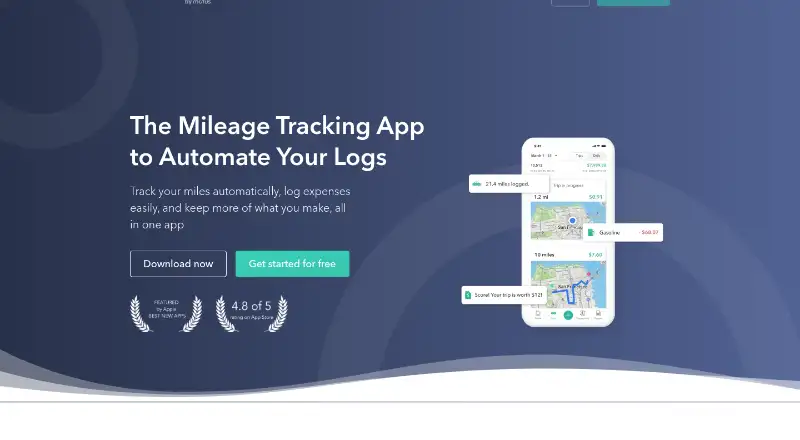
Everlance logs work-related mileage, expenses, reimbursements, and potential tax deductions. GPS can detect drives automatically, while receipt photos and bank or card imports add expense details. Individuals and teams can use its apps and browser dashboard. A free plan is available, with paid tiers adding unlimited automatic trips, reports, bank syncing, and tax-related tools.
Review
In a line
Everlance is a mileage and expense tracker for independent workers, employees, company fleets, and businesses. Android, iOS, browser access, and a business API are available.
What it does
GPS can identify and log business journeys in the background, without requiring users to begin and end each trip manually. A swipe assigns a trip to work or personal use, while Work Hours can apply a schedule-based classification.
Users can photograph receipts, track expenses and revenue, and review transactions that may qualify as deductions. It produces IRS-compliant mileage records and summaries for weekly, monthly, yearly, or custom date ranges.
Business tools let teams monitor expenses and mileage, set reimbursement deadlines with reminders, run fixed-and-variable-rate reimbursement programs, and review driver insurance and driving records.
How it connects
Plaid handles connections to bank accounts and credit cards. Expense management covers more than 1,500 institutions across the United States, Canada, the United Kingdom, Australia, and New Zealand, while transaction imports currently go back only three months.
Trips and transactions can be downloaded as CSV files on Basic. Subscribers also get Excel and PDF output with filters. Imports include MileIQ reports, QuickBooks Self-Employed reports, and custom CSV files; the web dashboard cannot accept custom kilometer files.
The public Business API offers hosted endpoints plus a separate sandbox. Everlance issues bearer tokens when an account manager or support team provides them after a request. Its documentation does not name an open-source licence.
Good fit
Everlance suits self-employed people who need mileage logs, receipt records, and expense summaries for work or tax purposes. It also fits companies that manage employee mileage, reimbursements, or vehicle programs.
Automatic trip detection, route maps, favorite-place detection, custom tags, and one-swipe classification reduce manual logging. Account Owners, Admins, and Managers can use the business dashboard to view team activity together.
Watch for
User reviews report that background GPS can affect phone speed and consume considerable battery. Work Hours currently allows one schedule in a day, not several distinct shifts.
Bank links currently import only the most recent three months of transactions, so check that period against your records.
The iOS app requires iOS 15.0 or later. Everlance says it encrypts data and uses read-only bank access, but buyers should still review their own security and privacy needs.
Pricing
Basic costs nothing. The free tier includes 30 automatically detected trips each month, unlimited manual trips, receipt uploads, manual expense and revenue tracking, and CSV exports.
Starter is priced at $10.99 per month, or $89.99 when billed annually. It provides unlimited automatic trips, Work Hours, and enhanced CSV and PDF reports. The plan comes with a 7-day trial.
Professional is $19.99 per month, or $119.99 on annual billing. Its additions include automatic bank and card expense tracking, TaxSlayer Classic tax filing, and $1 million in audit protection.
Verdict
Choose Everlance if you want one place for GPS mileage, receipts, expense imports, reimbursement workflows, and exportable records. The free plan covers light use, while paid tiers address higher trip volume and connected financial accounts.
It is less suitable if your phone cannot tolerate continual background tracking, if you need multiple work shifts in one day, or if you require older bank transactions to sync automatically. Teams should verify that the dashboard permissions and API availability fit their workflow.
Our take
Everlance is a practical option for people who need mileage and expense records without building a manual spreadsheet system. Its free tier handles basic logging, and paid plans add automatic trips, reporting, financial-account syncing, and tax-focused extras. Businesses get controls for reimbursements, vehicle programs, and driver compliance. Before choosing it, weigh battery impact, the three-month bank-sync window, the single daily Work Hours schedule, and API availability for your account.
- Basic offers manual trips, receipt uploads, and CSV downloads
- GPS can automatically capture and log drives
- Plaid enables bank and card imports
- Business tools address reimbursements and driver compliance
- Public Business API provides hosted and sandbox endpoints
- Background tracking may reduce battery life and phone performance
- Bank transaction imports currently span only three months
- Work Hours permits just one schedule per day
- The web dashboard does not accept custom kilometer imports
- Obtaining API bearer tokens requires an account-manager or support request
- Pick it ifSelf-employed workers tracking mileage and receipts; Businesses managing team mileage and reimbursements; Users who need exportable IRS mileage logs
- Skip it ifYou need multiple separate work shifts in one day; You require automatic imports of older bank transactions; Background GPS tracking is unsuitable for your phone
Pricing
Basic is free with limited automatic trips and unlimited manual records. Starter costs $10.99 monthly or $89.99 annually, while Professional costs $19.99 monthly or $119.99 annually. A 7-day trial is available.
- BasicNo payment required · 30 auto-detected trips/month · unlimited manual trips · unlimited receipt uploads · unlimited manual expense and revenue tracking · unlimited CSV exportsFree
- Starter$10.99 monthly or $89.99 annually · unlimited automatic trips · Work Hours · advanced CSV/PDF reports$10.99/mo
- Professional$19.99 monthly or $119.99 annually · Starter features · automatic bank/card expense tracking · TaxSlayer Classic tax filing · $1 million audit protection$19.99/mo
As help.everlance.com lists them, checked 15 Oct 2026.
Questions
Does Everlance have a free plan?
Yes. The Basic tier costs nothing and provides 30 auto-detected trips per month, unlimited manual trips, receipt uploads, manual expense and revenue tracking, and CSV exports.
Which devices can run Everlance?
Everlance is available on Android, iOS, and the web. Apple’s listing requires iOS 15.0 or later.
Can Everlance connect to bank accounts?
Professional users can connect bank accounts or credit cards through Plaid. Coverage exceeds 1,500 institutions in the United States, Canada, the United Kingdom, Australia, and New Zealand, with imports limited to the latest three months.
Does Everlance offer an API?
Yes. The public Business API includes hosted endpoints and a separate sandbox. A bearer token is needed, and Everlance supplies one after an account-manager or support request.
Can I import data from another mileage app?
MileIQ and QuickBooks Self-Employed reports can be imported, as can custom CSV files. The web dashboard does not support custom kilometer imports.
What does Professional add?
Professional includes automatic bank and card expense imports, TaxSlayer Classic tax filing, and $1 million in audit protection.