FileManagerTUI Review: Free Terminal File Manager
github.com · checked 28 Sept 2026
Keyboard-led terminal file manager, available on Linux, macOS, and Windows, with open-source code.
How it plugs in
Signal on Terminal File Managers7.6#2 of 29
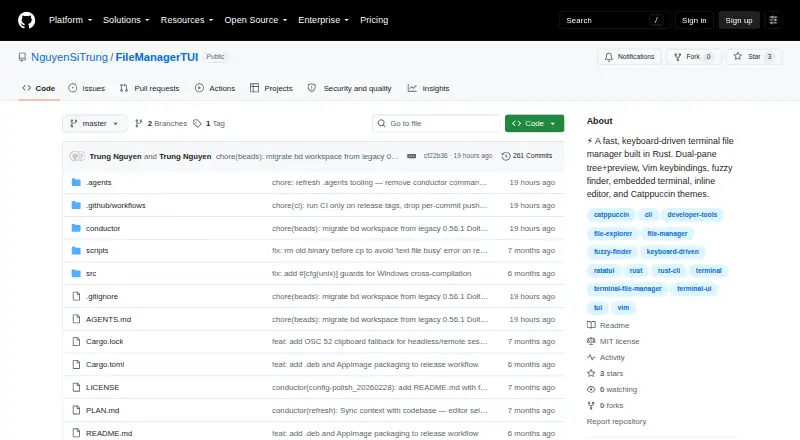
FileManagerTUI is free software that operates as a terminal file manager on Linux, macOS, and Windows. Its workspace pairs two file panes with previews, Vim-like controls, an editor, file operations, and a shell panel. With the AWS CLI and valid credentials, it also opens Amazon S3 in view-only mode.
Review
In a line
FileManagerTUI focuses on keyboard use inside a terminal. Its folder view and live preview share two panes, with builds for Linux, macOS, and Windows.
What it does
You can move through folders with Vim-style keys, arrow keys, or an inline directory filter. A Ctrl+P action menu searches project files. File actions cover creation, renaming, deletion, copying, cutting, pasting, and undo.
The built-in editor offers syntax highlighting, find and replace, undo and redo, auto-indent, text selection, and mouse cursor positioning. An embedded shell panel uses a PTY with VT100 terminal emulation.
Notebook files can show their cells with syntax highlighting. Large files beyond a configurable threshold are previewed from their beginning and end rather than loaded in full.
How it connects
The project is open source under the MIT License and is built with Rust and Ratatui. You can use listed binaries for Linux x86_64, Linux .deb, Linux AppImage, macOS Intel, macOS Apple Silicon, and Windows, or install from the Git repository with Cargo.
Its remote file feature browses Amazon S3 buckets through the AWS CLI. S3 mode requires that tool and valid AWS credentials, and it only permits viewing: create, rename, delete, and paste actions are disabled.
Good fit
FileManagerTUI suits people who prefer keyboard control in a terminal and need the same file tool across Linux, macOS, and Windows. It fits work that combines folder management, quick previews, project-file search, and light text editing.
The dual-pane layout, built-in shell, notebook preview, and configurable themes can help users keep file navigation and related terminal work in one screen.
Watch for
S3 access is browse-only, so it cannot change bucket contents. That mode also depends on the AWS CLI and working credentials.
Building from source requires a Rust toolchain. The MIT license grants broad reuse and resale rights, while supplying the software without warranty or liability.
Pricing
FileManagerTUI is free. Its MIT-licensed free plan permits use, copying, modification, distribution, sublicensing, and selling copies, subject to the license terms.
Verdict
Choose FileManagerTUI if you want an open-source terminal workspace with file operations, previews, an editor, and an integrated shell on any of its three supported operating systems. It is also suitable for viewing S3 files when read-only access is enough.
Look elsewhere if you need to write to S3, avoid installing Rust for a source build, or prefer a graphical file manager. The tool’s terminal-first design and MIT license make it a practical no-cost option for users comfortable with command-line interfaces.
Our take
FileManagerTUI suits people seeking one keyboard-led file workspace on Linux, macOS, or Windows at no cost. Its editor, previews, shell panel, and standard file actions cover more than simple folder browsing. S3 support is useful only for viewing, since changes to buckets are blocked. Buyers should also account for Rust when compiling and the AWS CLI plus credentials for S3 mode. Choose another tool if you require graphical controls or full remote-file write access.
- Free software released under the MIT License
- Available on Linux, macOS, and Windows
- Two-pane tree with live previews and notebook rendering
- Inline editor includes search, replacement, and undo/redo
- Embedded terminal panel with VT100 emulation
- S3 mode is read-only; write actions are disabled
- Source builds require a Rust toolchain
- S3 mode needs the AWS CLI and valid credentials
- Designed for terminal use rather than a graphical interface
- Pick it ifKeyboard-led file work inside a terminal; People using Linux, macOS, or Windows; Read-only browsing of S3 buckets
- Skip it ifYou need to create, rename, delete, or paste files in S3; You want a graphical file manager; You cannot install Rust for a source build
Pricing
There is one free plan under the MIT License. It allows use, modification, distribution, sublicensing, and resale, with no warranty.
- MIT-licensed softwareuse, copy, modify, merge, publish, distribute, sublicense, and sell copies · provided as-is without warrantyFree
As github.com lists them, checked 28 Sept 2026.
Questions
What operating systems support FileManagerTUI?
Binaries are listed for Linux, macOS, and Windows, including Linux x86_64, .deb, and AppImage packages plus Intel and Apple Silicon builds for macOS.
Is FileManagerTUI free?
Yes. It is free software released under the MIT License.
Can it edit files?
Yes. Its inline editor has syntax highlighting, undo and redo, find and replace, auto-indent, text selection, and mouse cursor positioning.
Does it support Amazon S3?
It can browse S3 buckets through the AWS CLI. You need valid AWS credentials, and S3 mode does not allow create, rename, delete, or paste operations.
How can I install it from source?
The project can be installed with Cargo from its Git repository. Building from source requires a Rust toolchain.
Does it preview large files?
For files over a configurable threshold, it shows head and tail sections instead of reading the entire file. Jupyter notebook cells can also be rendered with syntax highlighting.