superfile: Free Terminal File Manager Review
superfile.dev · checked 28 Sept 2026
Free, open-source terminal file management for Linux, macOS, and Windows.
How it plugs in
Signal on Terminal File Managers6.6#7 of 29
Built with Go and Bubble Tea, superfile brings file management to the terminal. It offers dual panes, previews, archive handling, search, bulk file actions, themes, and remappable keys. Linux, macOS, and Windows are listed as supported platforms, with Windows support still incomplete. This MIT-licensed project costs nothing to install and accepts community plugins.
Review
In a line
Inside a terminal, superfile provides a free and open-source way to manage files. It targets people who handle much of that work from the command line.
What it does
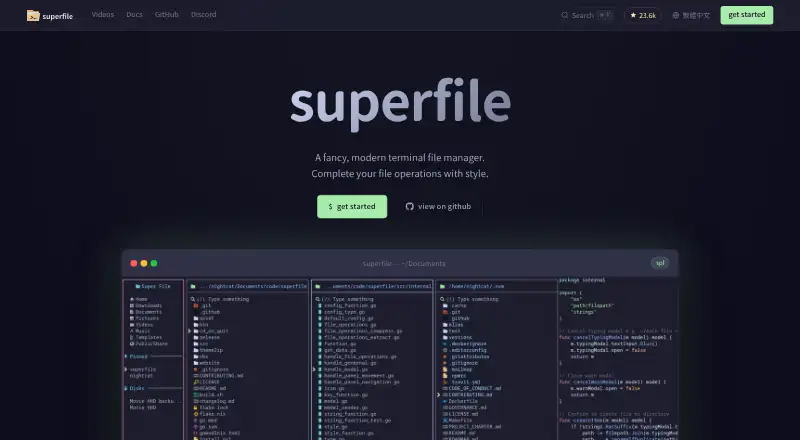
Two directory panes form the default layout; users can create additional panes and transfer files between them. Images can appear in a preview pane, and archive files are supported.
Copying, moving, deleting, renaming, fuzzy search, and bulk actions are included. Every keyboard shortcut can be changed, while themes, borders, and colors are adjustable. More than 20 built-in themes are listed.
How it connects
You install this MIT-licensed open-source software on your own computer. Its community plugins provide Git status, system monitoring, custom commands, metadata via exiftool, MD5 checksums, and zoxide-based directory jumping.
Installation is available through Linux and macOS shell scripts, PowerShell, Winget, Scoop, Homebrew, Arch, NixOS, Pixi, and X-CMD. The terminal setup guide suggests a Nerd Font, though superfile can run without one.
Good fit
Developers who spend their working time in the terminal can use it for routine file and directory tasks without switching environments. Panes, previews, search, and bulk operations address common file-handling needs.
Linux, macOS, and Windows users have installation paths. Linux and macOS are listed with support; Windows appears on the list but remains only partially supported.
Watch for
The overview frames superfile as a lightweight tool for file and directory work rather than a feature-heavy terminal manager. Compare terminal file managers if you need a broader tool.
Its checksum plugin reads the chosen file, which can make processing large files take longer. Windows support remains incomplete, and the project points users to Discord, GitHub issues, and discussions for assistance.
Pricing
superfile is free. Its sole listed plan, Open-source superfile, is an MIT-licensed terminal application that you install yourself.
Verdict
Choose superfile if you want an open-source terminal manager with dual panes, previews, customization, and optional plugins at no cost. It is a sensible match for terminal-focused developers on Linux or macOS.
Look elsewhere if you need a fully supported Windows release or a terminal manager with a larger feature set.
Our take
superfile makes the most sense for users who already prefer terminal tools and want a visual way to handle everyday files. Its free MIT license removes a purchase decision, while themes, key remapping, panes, and plugins allow personal setup. Linux and macOS users get the clearest fit. Windows users should treat support as unfinished. The project is not aimed at replacing every advanced terminal file manager, so people seeking extensive built-in functions should compare other options first.
- Free software under the MIT license
- Linux, macOS, and Windows are listed
- Dual panes, previews, archives, and bulk actions
- Changeable keys, themes, and community plugins
- Windows remains only partially supported
- A lightweight focus means fewer features than some rivals
- Large-file checksum work can be slow
- The terminal guide suggests using a Nerd Font
- Pick it ifDevelopers who manage files inside a terminal; Linux or macOS users wanting a free dual-pane manager; People who want themes and plugin extensions
- Skip it ifYou need fully supported Windows behavior; You require a feature-heavy terminal file manager; You often calculate checksums for very large files
Pricing
The only listed plan is free: Open-source superfile, an MIT-licensed terminal app that you install yourself.
- Open-source superfileMIT licensed · self-installed terminal applicationFree
As superfile.dev lists them, checked 28 Sept 2026.
Questions
Is superfile free?
Yes. Open-source superfile is the free, MIT-licensed plan listed for self-installation.
Which systems can run superfile?
Linux, macOS, and Windows appear in the project’s platform list, though Windows support is not yet complete.
What file actions does superfile handle?
Its functions include copying, moving, deleting, renaming, fuzzy search, bulk work, image previews, and archive support.
Can I customize the interface?
Every hotkey can be remapped, and the interface offers over 20 built-in themes plus border and color controls.
Does superfile support plugins?
Community extensions cover Git status, system monitoring, custom commands, exiftool metadata, MD5 checksums, and zoxide directory jumping.
What should I know about checksum plugins?
Checksum calculation reads the selected file and can take longer on large files.
Do I need a Nerd Font?
The installation guide recommends one for the terminal, but superfile also runs without a Nerd Font.