floow.design: AI designs for apps and websites
floow.design · checked 15 Oct 2026
AI design tool that turns prompts or screenshots into editable app and website screens.
How it plugs in
Signal on AI UI Design Generators6.3#5 of 22
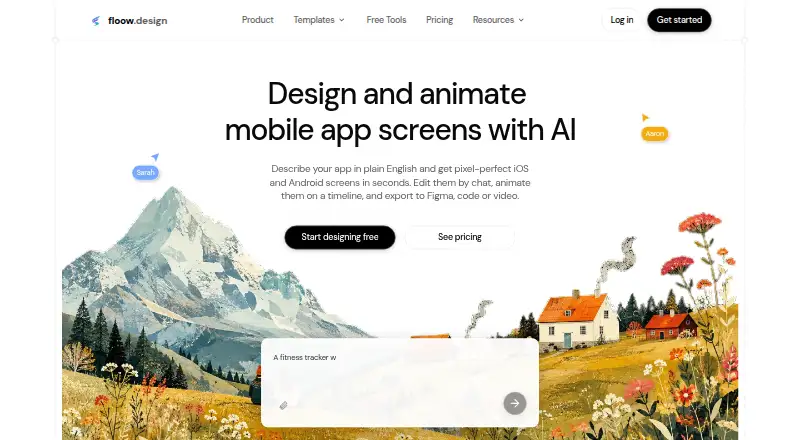
floow.design creates editable iOS, Android, and web designs from text prompts, sketches, or screenshots. It can link screens into flows, apply saved themes, export to Figma or code, and publish static websites with a CMS. Browser tools are available free, while AI generation uses credits on paid or free allowances. REST API and MCP access start on Pro.
Review
In a line
For founders, product teams, and agencies, floow.design uses AI to create editable interfaces. Plain-language instructions or reference images can produce mobile and web screens.
What it does
You can generate real-size iOS, Android, or desktop screens from text, sketches, or screenshots. A generated sequence may connect screens with navigation and loading, empty, or error states. Chat-based editing supports clickable prototypes, while saved themes preserve colors, type, spacing, corner radius, and shadows.
A beta motion editor adds timeline-based animation and video export. Themes support light and dark variants and token export.
How it connects
Figma output keeps real layers and auto-layout; HTML downloads and code exports cover React Native, Flutter, SwiftUI, Jetpack Compose, Tailwind, and plain CSS. It can also send work to AI builders. The generated code covers the interface only; navigation, state handling, and back-end behavior are not included.
Pro and Team plans add a versioned REST API and an MCP server that can work with Claude Code, Cursor, or Codex. The API supports uploads, image-to-HTML, and exports; requests use an fl_-prefixed bearer key, and Free accounts receive a 403. Official TypeScript and Python SDKs are planned, so direct REST calls are the current option.
Good fit
floow.design suits people who need quick app or website concepts, connected screen flows, and a handoff to Figma or code. Its stated audience includes founders, product teams, and agencies or studios.
Static HTML publishing is available for web projects on a floow.page subdomain or connected custom domain, with automatic HTTPS. The built-in CMS stores blog posts and case studies, and publishing provides SEO checks and metadata. Generated screens use 44-point minimum touch targets and WCAG AA color contrast by default.
Watch for
A direct visual canvas remains better for exact spacing, optical alignment, and final polish. Ambiguous prompts can miss states or create accessibility, keyboard, or localization issues, so review screens before relying on them.
Generated code is not proof that a product is ready to ship. Check ownership terms: your designs belong to you, while the platform, models, templates, and interface remain floow.design property. Designs and project files are encrypted in transit and at rest, and personal information is not sold.
Pricing
Signing up is free. The Free plan is a one-time allowance of 150 credits, about three generated screens, one project, and 30 utility tools with unlimited use. A free trial is available, and those browser tools work without an account; AI screen generation and editing draw from plan credits.
Lite costs $7.99 a month, billed yearly (the page also shows $9.99). Starter costs $13.99 a month, billed yearly (also shown as $17.49 and $24.99). Pro costs $39.99 a month, billed yearly (also shown as $49.99). Team costs $55.99 a month per user, billed yearly (also shown as $69.99).
Paid plans increase monthly credits, projects, sites, CMS capacity, and Figma export limits. Pro includes the REST API and MCP server, while Team also provides collaboration, centralized billing, priority support, and higher limits. Refund requests must arrive within three days of a charge and cover only unused credits.
Verdict
Choose floow.design if you want prompt-driven screen creation, editable Figma output, code exports, or static site publishing in one service. The free allowance lets you try the workflow before paying.
Look elsewhere if pixel-level visual finishing, complete application code, or dependable handling of unclear requirements is your main need.
Our take
floow.design is a practical starting point for turning ideas into mobile and web layouts, especially when you need several connected screens and a Figma handoff. Its publishing tools and CMS make it useful for simple static sites as well. The free allowance is enough to see how credit-based generation works. Budget for review work: visual alignment, accessibility, localization, and production behavior still need checking, and exported code stops at the interface layer. Teams needing API or MCP access must choose Pro or Team.
- Creates editable iOS, Android, and web screens from prompts or images
- Generates connected flows with navigation and common loading or error states
- Exports layered, auto-layout Figma files and several code formats
- Publishes static HTML sites with a CMS and custom domains
- REST API and MCP server are available on Pro and Team
- AI screen creation and editing draw on plan credits
- Generated code excludes navigation, state, and back-end behavior
- Ambiguous prompts may miss states or accessibility needs
- Precise spacing and final visual polish may require a direct canvas
- API access is unavailable on Free accounts
- Pick it ifFounders and product teams exploring app or website concepts; Agencies needing screen flows and Figma handoff; Teams publishing simple static sites with a CMS
- Skip it ifYou need production-ready application code from exports; You require exact visual alignment without manual refinement; You need API access on a free plan
Pricing
Free includes a one-time 150-credit allowance and unlimited browser utility tools. With yearly billing, Lite is $7.99 a month, Starter $13.99, Pro $39.99, and Team $55.99 per user. The pricing page also shows higher comparison prices for each paid plan.
- Freeone-time allowance · 150 credits · approximately 3 generated screens · 1 project · 30 utility tools free and unlimitedFree
- LitePer month, billed yearly; page also shows $9.99 · ≈480 screens · 2,000 credits/month · unlimited projects · 1 floow.page site · CMS 50 items · 25 Figma exports/month$7.99/mo
- StarterPer month, billed yearly; page also shows $17.49 and $24.99 · ≈1,920 screens · 8,000 credits/month · 3 published sites · 1 custom domain · CMS 500 items · 100 Figma exports/month$13.99/mo
- ProPer month, billed yearly; page also shows $49.99 · ≈9,600 screens · 40,000 credits/month · 10 sites and custom domains · CMS 5,000 items · REST API · MCP server · 500 Figma exports/month$39.99/mo
- TeamPer user, billed yearly; page also shows $69.99 · ≈14,400 screens per seat · 60,000 credits/month · 25 sites and custom domains · CMS 20,000 items · team collaboration · centralized billing · priority support · 1,000 Figma exports/month$55.99/mo
As floow.design lists them, checked 15 Oct 2026.
Questions
Can floow.design start from a screenshot?
Yes. It accepts reference screenshots, sketches, and text prompts to create editable iOS, Android, and web designs.
What can I export?
Available outputs include layered, auto-layout Figma files, HTML, and code targeting React Native, Flutter, SwiftUI, Jetpack Compose, Tailwind, or plain CSS.
Does the exported code include app behavior?
No. The API documentation describes generated code as interface-only, without navigation, state management, or back-end and API behavior.
Is there a free plan?
Yes. Free is a one-time 150-credit allowance, about three generated screens, one project, and 30 browser utility tools with unlimited use.
Which plans include API access?
The versioned REST API and MCP server come with Pro and Team. Free accounts receive a 403 when calling the API; Lite or higher is required.
Can it publish a website?
Yes. Web projects can publish static HTML to a floow.page subdomain or connected custom domain with automatic HTTPS, and the built-in CMS stores blog posts and case studies.
How do refunds work?
Request a refund within three days of a charge. Refunds are prorated only for credits that remain unused.