Mowgli: AI Design Canvas for Product Screens
mowgli.ai · checked 15 Oct 2026
AI design canvas that turns product ideas into app screens, flows, prototypes and handoff files.
How it plugs in
Signal on AI UI Design Generators6.3#4 of 22
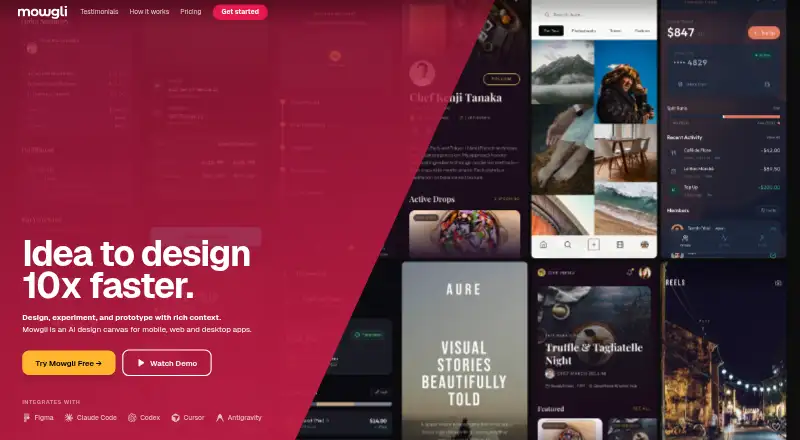
Mowgli is a web-based AI design canvas for mobile, web and desktop products. It asks scoping questions, creates a product requirements document, then generates screens, flows and interface states. You can edit by chat, make interactive prototypes, import or export Figma files, and move designs between Mowgli and code through MCP connections.
Review
In a line
Mowgli is an AI design canvas for planning mobile, web and desktop apps. It turns an idea into product specifications and high-fidelity interface designs.
What it does
The workflow starts with scoping questions, then builds a product requirements document and specification. Mowgli generates screens, user flows and interface states from that plan.
You can select elements and request edits, variations, remixes, new flows or a full redesign in plain language. Designs can become clickable prototypes with navigation, transitions and shareable links that do not require an install or Figma account.
Moodboards include 16 or more visual styles, with color palettes and typography moods. Full version history and branching let you reverse design changes.
How it connects
Mowgli imports Figma files for AI editing and exports designs back to Figma, React components or an AI-ready package. It also accepts sketches or images as input.
An MCP server and agent skill connect Mowgli with Claude, Codex, Cursor and other MCP-capable apps. Agents can push existing screens into Mowgli, pull designs into a codebase and synchronize changes in both directions.
The service is proprietary, not open source, and uses a remote MCP endpoint rather than self-hosting. It does not build backends, databases, APIs or state management, and it does not deploy applications.
Good fit
Mowgli suits builders who want to shape and iterate on a product before implementation. It is useful when a team needs a written specification and a detailed visual starting point from a blank canvas.
Starter includes interactive prototypes and code export. Team adds a shared folder, shared organization credits, real-time collaboration and history attributed to each person.
Watch for
Mowgli focuses on product design and handoff, not working application infrastructure or deployment. Check that its exports and MCP workflow match the codebase you plan to use.
AI features consume credits, and unused credits expire under the rules for the subscription or credit pack. Connecting an agent requires browser approval for account access, though access can be revoked. There is no free trial.
Pricing
A Free plan includes 300 credits, moodboards, wireframes, AI ideation, questionnaires and PRDs, Figma import, coding-agent connection and version history.
Starter costs $12 a month, billed $144/year. It includes 6,000 credits a year, about 360 messages, unlimited AI and image exports, 30-plus-screen app generation, interactive prototypes, Figma export and code export. Pro costs $20 a month, billed $240/year, with 36,000 credits a year, about 2,400 messages and priority support.
Team costs $49 a month, billed $588/year, for 36,000 credits per seat each year plus shared team features and a 12-hour support turnaround. Custom pricing is by request and adds volume discounts, SSO, dedicated support and onboarding.
Verdict
Choose Mowgli if you want to move from an early product idea to documented screens and a navigable prototype without starting from a blank design file. Its Figma exchange and MCP connections make it relevant when design work must travel with an existing codebase.
The Free plan is a way to explore the workflow, while paid plans increase credits and add exports, prototypes, support or team controls. Avoid treating it as an application builder: the service stops at design, specifications and handoff, so implementation and deployment remain elsewhere.
Our take
Mowgli is a fit for product builders who need a structured path from idea to screens, flows and specifications. It is especially useful when Figma files, React output or an agent-connected codebase are part of the handoff. The free tier covers early exploration, while Starter adds the main export and prototype features. Teams should look at Team for shared work and attributed history. Do not choose it as a replacement for backend development, state management or deployment, and account for credit expiration when comparing plans.
- Turns an idea into a product requirements document and interface states
- Imports and exports Figma files, plus React and AI-ready exports
- Creates clickable prototypes with shareable links
- MCP connections support two-way design and codebase synchronization
- Free plan includes 300 credits and core planning tools
- Does not build backends, databases, APIs or state management
- Does not deploy applications
- AI credits expire under subscription or credit-pack rules
- No free trial and no self-hosting option is described
- Real-time collaboration is available on the Team plan
- Pick it ifBuilders shaping product ideas before implementation; Teams handing designs between Figma, agents and code
- Skip it ifYou need a tool that builds or deploys the working application; You require open-source or self-hosted software
Pricing
Free plan available.
- Free300 credits · moodboard · wireframes · AI ideation · questionnaire and PRD · Figma import · coding-agent connection · version historyFree
- Starter$144/year · 6,000 credits/year · ~360 messages · unlimited AI and image exports · 30+ screen app generation · interactive prototypes · Figma export · code export$12/mo
- Pro$240/year · 36,000 credits/year · ~2,400 messages · Starter features · priority support$20/mo
- Team$588/year · 36,000 credits/seat/year · shared team folder · shared organization credits · real-time collaboration · attributed history · 12-hour support turnaround$49/mo
- Customvolume discounts · SSO · dedicated support · onboardingOn request
As mowgli.ai lists them, checked 15 Oct 2026.
Questions
Does Mowgli have a free plan?
Yes. Free includes 300 credits, moodboards, wireframes, AI ideation, questionnaires and PRDs, Figma import, coding-agent connection and version history.
Can Mowgli export to Figma or code?
Yes. It can export Figma files, React components and an AI-ready package. Designs can also be imported from Figma for AI editing.
Which coding agents connect to Mowgli?
Mowgli provides an MCP server and agent skill for Claude, Codex, Cursor and other MCP-capable apps.
Does Mowgli build a complete application?
No. Its canvas-first workflow does not provide backend, database, API or state-management implementation, and it does not deploy apps.
Can I make a clickable prototype?
Yes. Designs can be wired with navigation and transitions, then shared through links that need no installation or Figma account.
What happens to unused credits?
Unused AI credits expire according to the rules for the relevant subscription or credit-pack billing.
Does Mowgli support team collaboration?
The Team plan includes a shared folder, shared organization credits, real-time collaboration and history showing each person's changes.
Is Mowgli open source or self-hosted?
No. The service and its software are proprietary, and its documented agent connection uses a remote MCP endpoint.