GBA Emulator Review
github.com · checked 30 Sept 2026
A no-cost, open-source Game Boy Advance emulator for Linux, macOS, and Windows desktops.
How it plugs in
Signal on Game Boy Advance Emulators6.3#10 of 29
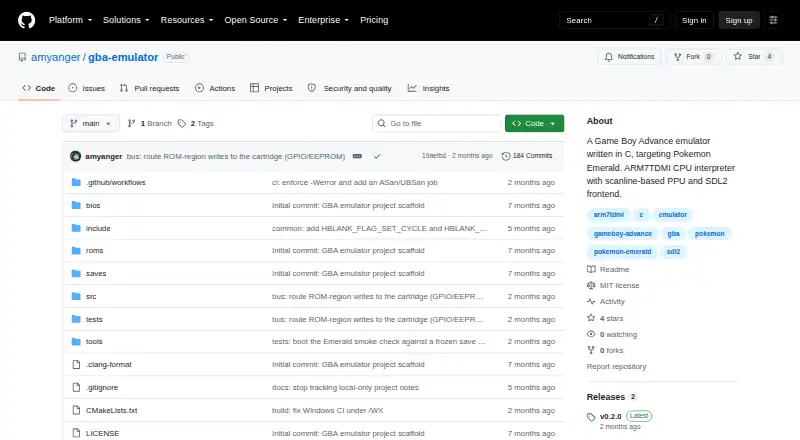
Built from scratch in C with an SDL2 frontend, GBA Emulator runs on desktop systems and focuses on Pokémon Emerald, which the project marks as playable from beginning to end. It offers save states, 60 seconds of rewind, cheat-code files, graphics diagnostics, and local two-player support. You supply your own BIOS and game ROM files.
Review
In a line
This desktop emulator runs Game Boy Advance software on Linux, macOS, and Windows. Written from scratch in C, it presents its interface through SDL2.
What it does
The emulator handles Game Boy Advance instructions, graphics modes, sprites, sound, DMA, timers, interrupts, and flash saves. Its scanline graphics renderer and 32768 Hz stereo audio play through SDL2.
The project focuses on Pokémon Emerald, which its README marks as playable all the way through. Pokémon FireRed reaches the title screen, but a complete playthrough has not been verified.
You get 10 numbered save-state slots and rewind for the previous 60 seconds. Rewind uses compressed snapshots in memory and is limited to 256 MB. Cheats support GameShark, Action Replay v1–v3, and CodeBreaker codes loaded from a .cht file.
Pressing F2 opens Hardware X-Ray, a second window showing graphics layers, tiles, palettes, CPU state, audio, DMA, timers, and interrupts. It adds no overhead when turned off.
How it connects
The code is open source under the MIT license. Two emulator instances on one computer can connect through a UNIX domain socket for two-player, 16-bit multiplayer mode. Internet play is not supported.
Tagged releases provide binaries for Linux x86_64, macOS Apple Silicon, and Windows x86_64. Linux and macOS builds need SDL2 installed; the Windows ZIP includes SDL2.dll.
You must provide your own Game Boy Advance BIOS and ROM files. Neither is included.
Good fit
This suits desktop players focused on Pokémon Emerald who want save states, short rewind, cheat-code support, and detailed views of the emulator's internal activity.
It also fits users who need local two-player support on one computer or prefer open-source software that runs on Linux, macOS, or Windows.
Watch for
Pokémon FireRed boots through its intro to the title screen, and a complete playthrough remains unverified.
There is no internet netplay. Multiplayer is limited to two local instances in 16-bit mode. Intel Mac users do not get a prebuilt binary.
Plan to obtain a compatible BIOS and ROM yourself. SDL2 is an extra requirement on Linux and macOS.
Pricing
GBA Emulator is free, with a free plan and no free trial.
Verdict
Choose GBA Emulator if you want a no-cost, open-source desktop emulator centered on Pokémon Emerald, with diagnostic views, save states, rewind, cheats, and local two-player play.
Look elsewhere if you need broad game compatibility, internet multiplayer, an Intel Mac download, or bundled BIOS and ROM files.
Our take
GBA Emulator makes sense for desktop users who mainly want Pokémon Emerald and value open-source code, rewind, save states, cheats, and local multiplayer. It costs nothing, but setup still requires your own BIOS and ROM files, and Linux or macOS users may need SDL2. Compatibility is not general-purpose: FireRed has only reached its title screen, internet netplay is absent, and Intel Mac binaries are unavailable. Pick it for a focused Emerald setup; choose another emulator for wider coverage or online play.
- Free and open source under the MIT license
- The project marks Pokémon Emerald playable from start to finish
- 10 save-state slots and 60 seconds of rewind
- Hardware X-Ray shows graphics, CPU, audio, and timing details
- Local two-player support through a UNIX socket
- Pokémon FireRed has not had a full playthrough verified
- No internet netplay support
- There is no prebuilt Intel Mac download
- You must supply your own BIOS and ROM files
- SDL2 is required on Linux and macOS
- Pick it ifDesktop players focused on Pokémon Emerald; Users wanting open-source tools with rewind and diagnostics; Local two-player play on one computer
- Skip it ifYou need internet multiplayer or broad compatibility verification; You use an Intel Mac; You want BIOS and ROM files included
Pricing
The software is free with a free plan and no free trial.
Questions
What operating systems does GBA Emulator support?
It supports Linux, macOS, and Windows desktop computers. Prebuilt downloads cover Linux x86_64, macOS Apple Silicon, and Windows x86_64.
Do I need BIOS and ROM files?
Yes. You must supply your own Game Boy Advance BIOS and game ROM files; the repository includes neither.
Can I play Pokémon games with it?
The project marks Pokémon Emerald playable from beginning to end. Pokémon FireRed reaches the title screen, but a full playthrough has not been verified.
Does it support multiplayer?
Two instances on the same computer can connect through a UNIX domain socket for two-player, 16-bit multiplayer. Internet netplay is not supported.
What save and rewind features are included?
There are 10 numbered save-state slots. Rewind covers the previous 60 seconds and stores compressed snapshots in RAM, capped at 256 MB.
Is GBA Emulator free?
Yes. It is free and includes a free plan, with no free trial.