
Ginger Grammar Checker Review
gingersoftware.com · checked 28 Sept 2026
AI grammar and spell checking for English, with rewriting, translation, and apps for web, desktop, and mobile.
How it plugs in
Signal on Grammar checkers7.5#3 of 88
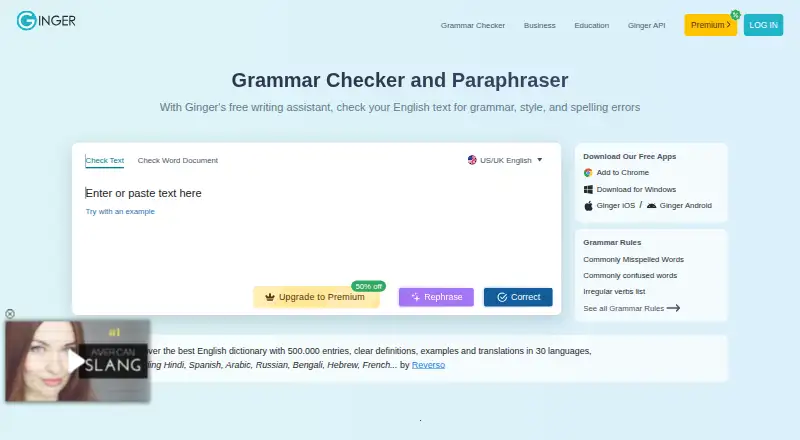
Ginger applies AI to English grammar and spelling checks. Its toolkit covers grammar, spelling, punctuation, rephrasing, proofreading, translation, and essay support. Limited essentials are available free, while subscriptions remove limits and add rephrasing, translation, synonyms, and text-to-speech reading. It runs across browsers, computers, phones, and business systems.
Review
In a line
Ginger is an AI writing assistant centered on English grammar and spelling. It includes correction, rewriting, proofreading, and translation tools for individuals and organizations.
What it does
Ginger checks grammar, spelling, punctuation, and sentences, then suggests corrections and style improvements. Its feature list also covers sentence rephrasing, a synonyms dictionary, text reading, online proofreading, Personal Trainer, and essay checking.
The principal grammar and writing enhancements come in American or UK English. Premium adds translation between more than 40 languages.
How it connects
On Windows, Ginger works with Microsoft Word, PowerPoint, and Outlook. Chrome and Edge extensions work on sites including Gmail, Google Docs, Facebook, and LinkedIn. Users can also access Ginger through desktop, mobile, and web apps.
Ginger offers a business API for high-volume proofreading and connections to learning systems, customer-management systems, and internal tools. The API can be deployed on customers' own servers.
Ginger says text is sent to its correction servers and returned corrected, with no storage or transfer to third parties. Analysis and correction require a stable internet connection. People comparing tools can also review grammar checkers and AI grammar checkers.
Good fit
Ginger serves native and non-native English speakers, students, professionals, and people with writing struggles, including dyslexia.
It fits users who want correction and rewriting across browser, desktop, phone, and Microsoft Office, or organizations that need document proofreading through an API.
Watch for
Core grammar and writing enhancement is limited to English, with American and UK options. Translation beyond English is a Premium feature.
The free version offers essential functions with limits, and no free trial is available. Because text analysis needs a stable internet connection, offline correction is not described.
Pricing
Ginger offers a free plan with limited essential functions. Annual billing brings paid pricing down to $6 a month. There is no free trial.
The listed choices are Premium Monthly at $13 a month, Premium Quarterly at $9.99 a month, Premium Annual at $7.50 a month, and Premium 2 years at $6 a month. A separate Two Years offer is $5.99 a year, charged once at $143.76; Monthly is $7.99 a month, and Annual is $59.88 a year.
Paid plans list unlimited grammar or full-sentence corrections, unlimited rephrasing, unlimited synonyms, and translation to 40 or more languages. Premium plans also list a text reader where specified.
Verdict
Ginger is worth considering if you mainly write in English and want correction, rewriting, and translation in the places you already work. Its Office links, browser extensions, apps, and optional local API cover both individual and organizational use.
Look elsewhere if you need core grammar support for several languages, dependable offline work, or a free trial. Before paying, compare the billing periods carefully because the listed plans use different payment schedules and features.
Our take
Ginger is a reasonable match for English-focused writing help across browsers, Microsoft Office, phones, and computers. The free plan lets buyers start with basic, limited corrections, while paid options add unlimited editing and translation. Its business API and local installation may suit organizations handling large document volumes. The main checks are language coverage, internet dependence, and billing: core grammar support is English-only, correction requires a connection, and the plan list mixes monthly charges with annual or multi-year payments.
- Works in browsers, desktop apps, mobile apps, and Microsoft Office
- Free plan offers essential grammar and spelling functions
- Premium subscriptions include unlimited corrections and sentence rephrasing
- Paid subscriptions translate text across more than 40 languages
- The business API is deployable on a customer's own servers
- Core grammar and writing features support English only
- Free version has limits and there is no free trial
- Text correction requires a stable internet connection
- Paid plans use several billing periods and feature lists
- Pick it ifEnglish learners, students, and professionals; People wanting rewriting across browser, Office, and mobile; Organizations needing API-based document proofreading
- Skip it ifYou need grammar correction in several languages; You require offline writing checks; You want a free trial before paying
Pricing
A limited free plan is available.
- Premium MonthlyBilled every month · Unlimited enhanced Rephrase · Full-sentence corrections · Translation in 40+ languages$13/mo
- Premium AnnualAnnual billing · Unlimited enhanced Rephrase · Full-sentence corrections · Translation in 40+ languages$7.50/mo
- Premium AnnualAnnual billing · Unlimited enhanced Rephrase · Full-sentence corrections · Translation in 40+ languages$7.50/yr
- Premium QuarterlyQuarterly plan · Unlimited enhanced Rephrase · Full-sentence corrections · Translation in 40+ languages$9.99/mo
- Premium 2 yearsTwo-year plan · Unlimited enhanced Rephrase · Full-sentence corrections · Translation in 40+ languages$6/mo
- Premium 2 yearsTwo-year plan · Unlimited enhanced Rephrase · Full-sentence corrections · Translation in 40+ languages$6/yr
- Two YearsBilled as one payment of $143.76 · unlimited grammar check · unlimited rephrasing · unlimited synonyms · translation to 40+ languages$5.99/yr
- Monthlyautomatically renews monthly · unlimited grammar check · unlimited rephrasing · unlimited synonyms · translation to 40+ languages$7.99/mo
As gingersoftware.com lists them, checked 20 Sept 2026.
Questions
Does Ginger check languages other than English?
Its core grammar and writing tools focus on English, with American and UK options. Premium translation supports more than 40 languages.
Is there a free version?
Yes. The free plan includes essential functions with limitations. Ginger does not offer a free trial.
Which apps and sites work with Ginger?
On Windows, Ginger integrates with Microsoft Word, PowerPoint, and Outlook. Chrome and Edge extensions cover sites including Gmail, Google Docs, Facebook, and LinkedIn.
Does Ginger have an API?
Yes. Its business API supports high-volume proofreading, full documents, and links to learning, customer-management, and internal systems. Customers can install it on their own servers.
Does Ginger work offline?
A stable internet connection is required to analyze and correct text.