Glances Review
nicolargo.github.io · checked 15 Oct 2026
Open-source, cross-platform monitoring for live system statistics, processes, containers, and alerts.
How it plugs in
Signal on Process Monitoring Software7.7#1 of 26
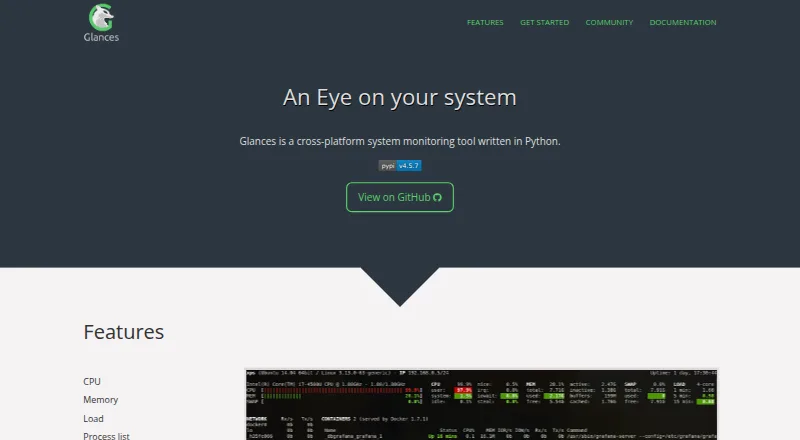
Glances is a free, open-source system monitor for Linux, BSD, macOS, Windows, Android, and self-hosted setups. It shows live CPU, memory, load, processes, network, disks, sensors, filesystems, containers, uptime, and alerts. You can view a local or remote host in a terminal or browser, use APIs, and export statistics to files, databases, brokers, or a REST endpoint.
Review
In a line
Glances is a free, open-source tool for watching system statistics and running processes in real time. It runs across desktop, server, web, Android, and self-hosted environments.
What it does
The monitor covers CPU and memory use, system load, running processes, network activity, disk input and output, filesystem and RAID information, sensor readings such as temperatures and fan speeds, uptime, and alerts with configurable thresholds.
It also supports Docker and Podman monitoring. Client/server mode lets you watch a remote host from a terminal, its built-in Web interface, or an API. A browser can display the Web UI from another device.
How it connects
Glances is open-source software distributed under the LGPL version 3 license. It provides XML-RPC and RESTful JSON APIs, plus a Python API in version 4.4 and later. Version 4.5.1 and later can optionally provide an MCP server so AI assistants can query data through an SSE endpoint.
Statistics can go to CSV or JSON files, databases such as InfluxDB and Prometheus, message brokers such as RabbitMQ and Kafka, or a REST endpoint. Other listed destinations include ElasticSearch, PostgreSQL/TimeScale, Cassandra, ClickHouse, CouchDB, OpenTSDB, StatsD, Riemann, Graphite, ActiveMQ, NATS, ZeroMQ, and more. These options make it suitable for broader process monitoring software and hardware monitoring software setups.
You can install it with pip, pipx, uvx, Homebrew, operating-system packages, or Docker images. The project uses plugins and export modules for extensions. Web, GPU, container, export, and MCP functions may need separate optional dependencies.
Good fit
Glances suits people who want a free monitor for one machine or several remote hosts, especially when they need terminal, browser, or API access. It covers both ordinary system resources and container workloads.
Its export choices fit users sending metrics to databases, brokers, files, or other services. It can also feed custom tools through its public APIs or Python API.
Watch for
Glances 4 needs Python 3.10 or newer and does not support Python 2 or earlier Python releases. The default installation does not include Web interface dependencies, and other features may need their own extras.
The security policy supports updates for version 4.x, not versions below 4.0. A GitHub advisory reports a high-severity, unauthenticated cross-origin information-disclosure issue in REST API versions below 4.5.4, so check the version before exposing that API.
This is an agent-based monitor with configurable script or command alerts. Check your operating system, Python version, desired export destination, and optional dependencies before setup. For broader container monitoring, compare its Docker and Podman coverage with your needs.
Pricing
Glances is free. The Glances plan and the open-source Glances plan both cost nothing, with self-hosted monitoring included.
Optional features can require extra dependencies, but there is no paid tier or free trial listed.
Verdict
Choose Glances if you want open-source monitoring that runs on many operating systems and can be viewed locally or remotely. Its APIs, exports, plugins, and container support give it room to fit existing monitoring workflows.
Look elsewhere if you need a hosted service, a simpler installation with every interface included, or support for Python older than 3.10. Also verify your REST API version and security setup before making remote access available.
Our take
Glances is a sensible choice for people who prefer self-hosted tools and need live visibility into machines, processes, containers, and hardware readings without a license charge. Its browser view, terminal mode, APIs, exports, and optional AI-assistant interface cover many ways to consume the data. Setup needs more attention than a fully bundled service because Python 3.10 or newer and feature-specific extras may be required. Teams exposing the REST API should check that they run a supported, secure version, especially given the advisory affecting releases below 4.5.4.
- Free and open-source under the LGPL version 3 license
- Monitors CPU, memory, processes, disks, sensors, filesystems, and containers
- Remote viewing through terminal, Web interface, XML-RPC, and REST APIs
- Exports data to files, databases, brokers, and REST endpoints
- Runs on Linux, BSD, macOS, Windows, Android, Web, and self-hosted setups
- Glances 4 requires Python 3.10 or newer
- Web, GPU, container, export, and MCP features may need extra dependencies
- Versions below 4.0 do not receive security updates
- REST API versions below 4.5.4 have a reported high-severity advisory
- Pick it ifSelf-hosted monitoring across mixed operating systems; Users who need APIs or exports for existing monitoring systems; Docker or Podman users who want container visibility
- Skip it ifYou need a hosted monitoring service rather than a self-hosted tool; Your environment depends on Python older than 3.10; You want every optional interface and exporter installed by default
Pricing
Both listed plans are free, including the open-source self-hosted option. There is no paid tier or free trial; optional features may require extra dependencies.
- GlancesOpen source system monitoring tool; optional features require extra dependenciesFree
- Open-source Glancesself-hosted monitoring; optional features require extra dependenciesFree
As github.com lists them, checked 29 Sept 2026.
Questions
Is Glances free?
Yes. The listed Glances and Open-source Glances plans are free. No paid tier or free trial is listed.
Which systems can run Glances?
Supported platforms include Linux, BSD, macOS, Windows, Android, Web, API, and self-hosted deployments. Glances 4 requires Python 3.10 or newer.
Can Glances monitor remote machines?
Yes. Client/server mode supports remote monitoring through a terminal, the built-in Web interface, or APIs.
Does Glances monitor containers?
Yes. Its documented container support covers Docker and Podman, with Docker and LXC monitoring described in the project README.
What APIs does Glances provide?
It provides XML-RPC and RESTful JSON APIs. Glances 4.4 and later also provide a Python API, and version 4.5.1 and later can offer an optional MCP server.
Where can Glances send statistics?
It can export CSV and JSON files, databases, message brokers, and REST endpoints. Listed destinations include InfluxDB, Prometheus, Kafka, RabbitMQ, PostgreSQL/TimeScale, and others.
Are older Glances versions supported?
The security policy supports version 4.x, not versions below 4.0. A GitHub advisory reports a high-severity issue in REST API versions below 4.5.4.