Video Customer Support Software
Grypp Universal CoBrowse
grypp.io · checked 9 Oct 2026
Browser co-browsing that helps support agents guide customers through online tasks.
How it plugs in
Signal on Video Customer Support Software5.5#18 of 26
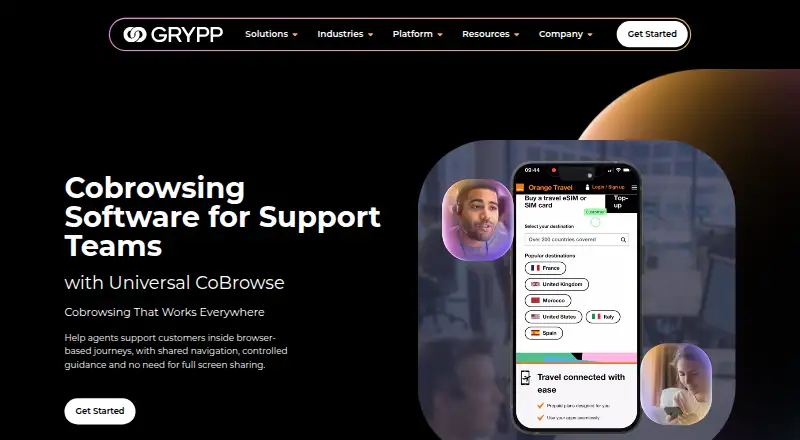
With Grypp Universal CoBrowse, contact-center agents can lead customers through webpages, forms, checkouts, portals, and account areas. Customers enter from a desktop, tablet, or mobile browser with no app installation. Agents follow the shared browser journey, with authentication, session recovery, conversion tracking, and recording tools.
Review
In a line
Grypp Universal CoBrowse is designed for customer-support co-browsing. During a session, the agent can guide the customer’s browser journey without access to the customer’s full desktop, private tabs, or other apps.
What it does
Agents can assist customers as they work through webpages, forms, checkouts, portals, and account tasks in real time. Customers enter via a browser, so downloading software is unnecessary.
A session can be saved for later continuation. Teams can also monitor conversions and inspect recorded pages afterward. Listed capabilities include scriptless co-browsing, real-time authentication, role-based access, and visual annotation.
According to Grypp, sensitive fields are masked, while customer permission and session authentication govern access. The company says Universal CoBrowse complies with PCI DSS and HIPAA.
How it connects
A public API lets teams embed co-browsing in existing workflows. Universal CoBrowse can operate standalone or connect to an established support stack, including native connections to many contact-center platforms.
Grypp’s named contact-center stack examples include NICE CXone, Zendesk, Talkdesk, and Genesys. It also says the co-browsing service can work alongside its video, document-review, signature, and payment products.
Web, Android, and iOS are supported, and customers can participate from desktop, tablet, or mobile devices.
Good fit
This is intended for contact-center support teams helping people finish tasks in a browser. It can help an agent point out fields, walk through checkout steps, or navigate a customer portal while staying within the shared browser journey.
Teams that want a focused browser view may value the save-and-resume option, conversion measurement, and page recordings for follow-up.
Watch for
Universal CoBrowse exposes the shared browser journey rather than the customer’s full desktop or other applications. Make sure that scope covers the support work you handle.
Quotes are based on selected features and customer requirements, so confirm that your contact-center platform is supported or plan to use the API.
Grypp cites ISO 27001 certification, a SOC 2 Type II audit, and CSA STAR registration. Check how those claims and the product’s access controls map to your organization’s requirements.
Pricing
Universal CoBrowse is sold as paid software, with pricing supplied on request. Grypp says the amount depends on the features selected and the customer’s requirements.
The buying process includes a personalized demo, a tailored recommendation, and an ROI estimate after a conversation with Grypp’s team.
Verdict
Universal CoBrowse fits support teams that routinely escort customers through online forms, portals, checkouts, or account pages and want browser-focused guidance. Its API and contact-center connections can slot into an existing workflow, while desktop, tablet, and mobile participation broadens reach.
Consider alternatives if agents need visibility into a complete desktop or other applications, or if you need a public price for fast comparison. Before purchasing, validate the desired integration, security controls, and paid features included in the quote.
Our take
Grypp Universal CoBrowse targets contact centers that help customers complete browser tasks. Customers enter through a browser, while agents receive focused access with session recovery, conversion tracking, and recordings. A public API and named contact-center connections may support existing workflows. The main considerations are its browser-only scope and pricing supplied through sales. Request a demo to assess fit and requirements.
- Browser entry lets customers participate without installing software.
- Agents are limited to the shared browser journey rather than private tabs or other apps.
- Customer participation covers desktop, tablet, and mobile devices.
- A public API and native contact-center connections are available.
- Save-and-resume, conversion tracking, and recording features are included.
- There is no published numeric price; quotes vary with features and requirements.
- The product does not expose the customer’s full desktop or other apps.
- A non-native support platform may require an API connection.
- Pick it ifContact centers helping customers complete browser tasks; Teams seeking focused co-browsing for desktop, tablet, and mobile participants; Support environments that can use native integrations or the public API
- Skip it ifYou need full-desktop sharing or access to other customer applications.; You require a public price before contacting sales.; Your support platform cannot connect through the available integrations or API.
Pricing
Paid software with pricing on request. Grypp bases quotes on selected features and customer requirements.
Questions
Do customers need to install an app?
No. A customer can enter the session in a browser without downloading or installing an app.
What can an agent see?
The agent follows and guides the shared browser journey; Grypp says the full desktop, private tabs, and other apps remain out of view.
Which devices can customers use?
Participation is available from desktop, tablet, and mobile devices.
Does Grypp offer an API?
Yes. Grypp provides a public API for embedding co-browsing in existing workflows and connecting it to a support stack.
Which contact-center systems are named?
Grypp highlights NICE CXone, Zendesk, Talkdesk, and Genesys, and says it has native integrations with many CCaaS platforms.
How much does Universal CoBrowse cost?
It is paid software priced on request. Grypp says the quote reflects selected features and customer requirements.
Does it support screen sharing?
No. Universal CoBrowse focuses on shared browser activity rather than full-desktop screen sharing.
What security and compliance claims does Grypp make?
Grypp describes sessions as encrypted, says sensitive fields can be masked, and cites permission, authentication, and role controls. It also states PCI DSS and HIPAA compliance, alongside ISO 27001, SOC 2 Type II, and CSA STAR credentials.
Near it
All alternatives →- UCUniverx Co-browsing#17 on this board
- V
 ViiBE#19 on this board
- SSupportScreen#16 on this board
- Ggiosg#20 on this board
- C
 CobrowseApp#15 on this board
- FCFullview Cobrowsing#21 on this board
- VViewabo#14 on this board
- HLHelp Lightning Remote Assistance#22 on this board
- XR
 XMReality Remote Guidance#13 on this board
- RRemoteCall#23 on this board