
Heptabase: Visual Knowledge Workspace and AI Notes
heptabase.com · checked 3 Oct 2026
A visual workspace for study, investigation, and keeping personal notes.
How it plugs in
Signal on Notes apps6.6#15 of 83
Heptabase brings together visual boards, cards, writing, journals, PDF markup, and AI that works from sources. It is offered through browsers and device apps, including offline use and shared-board collaboration. Users can start with collaborative access for free, while subscriptions unlock private libraries, journals, tasks, AI tools, and expanded allowances.
Review
In a line
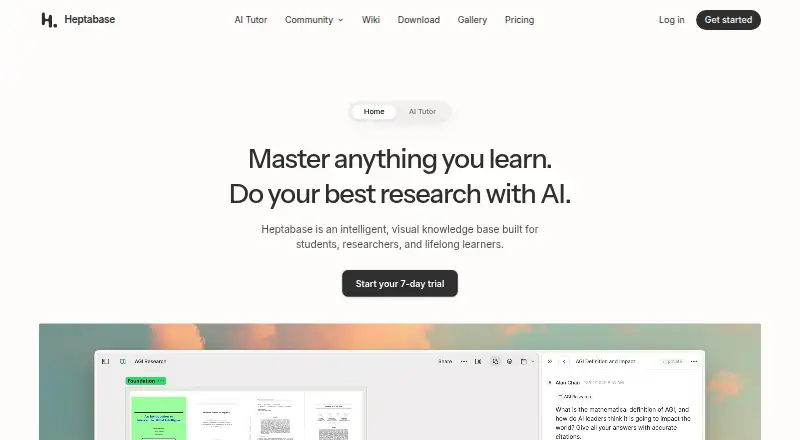
Heptabase presents an intelligent, visual knowledge base aimed at students, researchers, and lifelong learners. Whiteboards and cards provide a way to arrange ideas and source material.
What it does
PDFs, YouTube content, notes, and journals can be gathered in one place; its AI can explain those sources, capture notes, and structure a knowledge base. A block editor, linked cards, PDF markup, daily journals, and a web clipper offer additional working methods.
Shared notes are supported, and real-time collaboration lets people work on the same whiteboards and cards.
How it connects
Access is available through the web, Windows, macOS, Linux, iOS, Android, and a Chrome extension. Local storage in the desktop app enables offline use, while the site says notes and files stay available without an internet connection.
Readwise and Zotero are supported integrations. Heptabase does not provide a public REST API for every operation; MCP and the desktop application's command-line tool can be used for integrations. You can also explore personal knowledge management software and note-taking apps for other connection options.
Good fit
Learners and researchers who bring together reading, notes, and spatial layouts may find Heptabase suitable. Its boards and cards are useful when visualizing relationships helps clarify a project.
It may also work for people seeking shared boards, offline capability, source-oriented AI, and access across desktop and mobile devices.
Watch for
Collaboration is the focus of the free plan: it permits editing of shared whiteboards and cards, while journals, personal libraries, tag databases, tasks, highlights, and AI remain unavailable.
For AWS cloud storage, Heptabase describes encryption both during transfer and while stored, using server-side AES-256 and SSL/TLS; it also notes that this does not provide end-to-end encryption. When a subscription or trial expires, content remains available for access and export, but creating or editing notes requires renewal.
If you need extensive programmatic access, review the API scope because the public REST API omits some app operations.
Pricing
A no-cost plan and a seven-day trial are offered. Annual billing puts paid access at $8.99 per user each month or more.
At $8.99 monthly on annual billing, Pro provides unlimited notes, whiteboards, tags, image uploads, and collaborator invitations, plus 100 AI credits per month and a Gemini-only AI agent.
Premium costs $17.99 per month with annual billing. It includes Pro's features along with unlimited PDF uploading and parsing, unlimited Q&A using basic AI models, an agent that can use GPT, Claude, or Gemini, an AI tutor, and 1,800 monthly AI credits.
Premium+ is priced at $53.99 monthly when billed yearly. This tier retains Premium benefits, grants 8,100 AI credits each month, and reduces AI-credit pricing by 33%.
Verdict
Heptabase is worth considering when learning or research involves source notes alongside visual boards. Offline apps, collaboration, and multiple AI tiers support work that combines reading, organization, and discussion.
Free access is chiefly useful for joining someone else's collaboration. Private journals, libraries, tasks, highlights, and AI require a paid plan. Its incomplete public REST API and cloud-encryption approach are also relevant when fitting it into a broader workflow.
Our take
Heptabase fits people who develop ideas through sources, cards, and spatial arrangements instead of a plain note list. Collaborative free access lets teams work on shared boards, while subscriptions support private knowledge work and greater AI usage. Support across many devices and local offline storage can help with study and travel. Those who need complete public-API automation, end-to-end cloud encryption, or private features without paying should consider alternatives.
- Visual boards and cards help arrange ideas spatially.
- Source-aware AI can explain material, capture notes, and structure a knowledge base.
- Available through browsers, desktop and mobile apps, plus a Chrome extension.
- The desktop application supports working without an internet connection.
- Readwise and Zotero are supported.
- The free tier omits private libraries, journals, tasks, highlights, and AI tools.
- Its public REST API does not encompass every app action.
- Cloud data does not have end-to-end encryption.
- Note creation and editing resume only after renewing once a trial or subscription ends.
- Pick it ifStudents and researchers who arrange source material visually; Learners seeking shared boards with offline capability; People evaluating AI tiers for note-centered projects
- Skip it ifA full public REST API is essential for your automation.; Cloud information must use end-to-end encryption.; You need private journals and AI without paying.
Pricing
Heptabase offers collaborative access at no charge and a seven-day trial. Annual pricing is $8.99 monthly for Pro, $17.99 for Premium, and $53.99 for Premium+. Higher levels provide more AI credits and capabilities.
- ProYearly (Save 25%) · Unlimited notes, whiteboards, tags, image uploads, and collaborator invites · 100 AI credits/month · AI agent (Gemini models only)$8.99/mo
- PremiumYearly (Save 25%) · Everything in Pro · Unlimited PDF uploads and parsing (OCR) · Unlimited Q&A with basic AI models · AI agent (GPT, Claude, Gemini) · AI tutor · 1,800 AI credits/month$17.99/mo
- Premium+Yearly (Save 25%) · Everything in Premium · 33% discount for AI credits · 8,100 AI credits/month$53.99/mo
As heptabase.com lists them, checked 3 Oct 2026.
Questions
Does Heptabase have a free plan?
Yes. Collaboration users can edit shared whiteboards and cards, but journals, personal libraries, tag databases, tasks, highlights, and AI are excluded.
What devices support Heptabase?
You can use Heptabase in a browser, on Windows, macOS, Linux, iOS, or Android, and through its Chrome extension.
Can Heptabase work offline?
Yes. The desktop app keeps data locally, and Heptabase says notes and files remain available when there is no internet connection.
Which services integrate with Heptabase?
Readwise and Zotero appear as integrations. MCP and the desktop-app command-line tool provide additional connection methods.
Does Heptabase offer a public API?
No public REST API spans all app operations. Heptabase instead identifies MCP and its desktop-app command-line tool for integrations.
What happens when a plan or trial ends?
Your content can still be accessed and exported indefinitely, but creating or editing notes requires renewing.
How much does Heptabase cost?
With annual billing, Pro is $8.99 per month, Premium $17.99, and Premium+ $53.99. A free option and seven-day trial are available too.