hledger: Open-Source Plain-Text Accounting
hledger.org · checked 15 Oct 2026
Plain-text bookkeeping with free local tools, reports, and command-line, terminal, and web access.
How it plugs in
Signal on Bookkeeping Software7.7#4 of 75
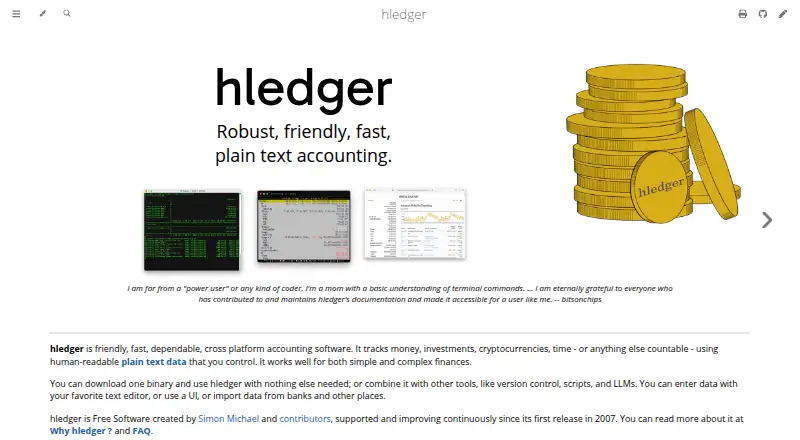
Tracking money, investments, cryptocurrencies, time, and other countable items is the focus of hledger, an open-source project. Editable text journals support multi-currency, double-entry records and reporting. You can work locally or through its web interface, bring in bank CSV data, and export results in several formats. The software carries no purchase or recurring charge.
Review
In a line
hledger records finances and other countable items in human-readable text journals as Free Software.
Command-line, terminal, and web access are available, with local and offline operation supported.
What it does
The accounting engine uses multi-currency, double-entry records. Every transaction has to balance, and file reading includes checks for syntax, balancing, and balance assertions.
Balance sheets, income statements, cashflow reports, budgets, registers, and cross-period summaries are available. Time can also be recorded in timeclock and timedot formats for time reports.
Inventory tracking is supported, while invoice creation is not. The software can track investments, cryptocurrencies, and other commodities as well as ordinary money.
How it connects
hledger is open-source Free Software under GNU GPL version 3 or later. Journals remain editable text, suitable for version control and auditing.
Journal, timeclock, timedot, CSV, SSV, TSV, and rules files can be imported. Exports include text, HTML, CSV, JSON, and SQL, and Ledger and Beancount formats are supported, including Beancount.
Its web interface can provide a JSON API, with routes for accounts, transactions, prices, commodities, and related data, plus a way to add transactions. Bank data is generally brought in through downloaded CSV files and rules rather than direct bank connections.
Good fit
hledger suits personal users and business or institutional accounting. It is intended for both technical and non-technical users who are comfortable keeping records in text files.
It fits people who want local, offline control of financial data, multi-currency records, time tracking, inventory, and detailed reports.
Watch for
Invoice creation is absent, and mobile use runs through the web instead of a native app. Bank feeds usually require downloaded files and import rules.
Official binaries cover Linux x64, macOS x64 and arm64, and Windows x64; there are no official Linux ARM binaries. Building from source needs GHC with Stack or Cabal and may need about 4 GB of memory and 4 GB of disk space.
Lot tracking and capital-gains calculations are listed in the 2.0 preview line, so check the version you plan to use if those details matter.
Pricing
hledger is free. Its Free software plan provides the core program, local files, and command-line, terminal, and web interfaces without purchase or recurring fees.
No free trial is offered because the software has no charge and no paid plan is listed.
Verdict
Choose hledger if plain-text accounting, offline operation, open-source code, and flexible reports match the way you want to work. It can cover personal records through institutional books and offers a web API for connected workflows.
Look elsewhere if you need built-in invoice creation, native mobile apps, or direct bank connections. For broader comparisons, see General Ledger Software and Bookkeeping Software.
Our take
hledger is a strong match for people who want transparent, locally stored accounting records and do not mind working with text journals. Its reports, currencies, time formats, imports, exports, and web API cover a wide range of bookkeeping workflows without subscription costs. Invoices are unsupported, mobile access is web-only, and bank data normally arrives through CSV files and rules. Check operating-system support before installation, especially on Linux ARM hardware.
- No purchase or recurring software fees
- Plain-text journals stay editable, version-controlled, and under your control
- Multi-currency double-entry accounting with broad financial reports
- CSV import plus text, HTML, CSV, JSON, or SQL output
- Local web, terminal, and command-line interfaces plus a JSON API
- No invoice creation
- Mobile platforms are web-only
- Bank data usually needs downloaded CSV files and import rules
- No official Linux ARM binaries
- Source builds need GHC, Stack or Cabal, and substantial disk and memory
- Pick it ifPeople wanting local, text-based personal or business accounting; Users tracking currencies, investments, time, inventory, or crypto
- Skip it ifYou need native mobile apps or built-in invoice creation; You expect direct bank connections instead of CSV imports
Pricing
The software has no purchase or recurring fees; no paid plan or free trial is listed.
- Free softwareNo purchase price or monthly fees · Core hledger software · local files · CLI, terminal and web interfacesFree
- hledgerFree Software · no purchase price or monthly feesFree
As hledger.org lists them, checked 15 Oct 2026.
Questions
Is hledger free?
Yes. hledger is Free Software and carries no purchase or recurring fees.
What platforms can run hledger?
Official binaries target Linux x64, macOS x64 and arm64, and Windows x64. Web and self-hosted use are also available; Linux ARM has no official binaries.
Does hledger connect directly to banks?
Usually not. Bank data is generally downloaded as CSV files and brought in with import rules.
Can hledger create invoices?
No. Invoice creation is not included.
Does hledger have a mobile app?
Mobile access is web-only. Its web interface normally starts as a local app accessible from your machine.
What reports does hledger make?
Balance sheets, income statements, cashflow reports, budgets, registers, and multi-period summaries can be produced.
Can hledger work with other accounting formats?
Yes. CSV can be imported, and Ledger and Beancount formats are supported. Results can be emitted as text, HTML, CSV, JSON, or SQL.
Does hledger offer an API?
Its web interface provides JSON routes for accounts, transactions, prices, commodities, and related data, plus an endpoint for adding transactions.