Huawei HiSuite Review
consumer.huawei.com · checked 3 Oct 2026
Desktop phone management for Huawei devices on Windows and Mac.
How it plugs in
Signal on Backup software6.4#44 of 151
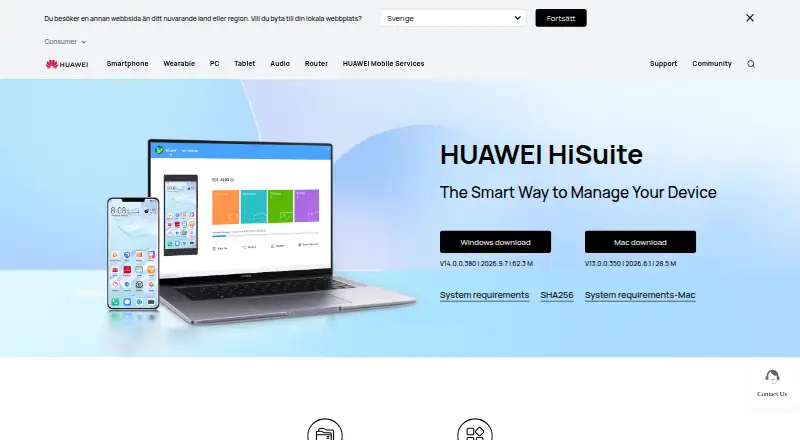
A Windows or Mac computer can manage a HUAWEI phone through Huawei HiSuite. Contacts, messages, photos, videos, apps, files, backups, restores, system updates, and recovery are among its functions. Mac has fewer tools than Windows. The software is free, while phone connection requires HDB access and an eight-digit verification code.
Review
In a line
Huawei HiSuite gives HUAWEI mobile-device owners no-cost computer controls on Windows or Mac.
What it does
HiSuite lets a computer work with contacts, messages, pictures, videos, applications, and other phone data. Files on internal storage or an SD card can be arranged, exported to a computer, or imported onto a phone.
A computer can hold a copy of phone data, and that saved copy can later be sent to a device. System Recovery can return a phone to factory settings when a system crash stops it from starting. Upgrade and rollback options are also available for the HUAWEI mobile system.
The computer interface supports sending and receiving messages, exporting them, and mass text messaging. Transfers between phones and transfers of apps are supported.
How it connects
HiSuite runs on Windows and macOS and connects to HUAWEI phones. Setup calls for HDB to be enabled, the phone's authorization prompts to be accepted, and an eight-digit code to be entered. HDB authorization for HiSuite can be revoked later.
Mac is limited to picture, video, file, and backup-and-restore functions. Windows supports the broader set of functions described above.
Good fit
HiSuite suits HUAWEI phone owners who want computer-based file management, phone backups, message handling, or system recovery. It can also help with moving apps or data between phones.
If your main need is phone protection, compare it with Backup software. For moving content between phones, see Phone Transfer Software.
Watch for
Check the platform before installing. Windows support covers Windows 7, 8.1, 10, and 11 in 32-bit or 64-bit editions, with 500 MB of free disk space and 1 GB of RAM.
On Mac, the available tools are picture, video, file, and backup-and-restore functions. HiSuite backs up mobile data, not computer or server data. Its backup and restore scope is files.
Connection setup needs HDB access, authorizations, and a verification code.
Pricing
HiSuite is free on Windows and Mac. There is one free plan, with downloads for both platforms.
Verdict
Choose HiSuite if you own a HUAWEI phone and want a free desktop tool for managing files, messages, backups, updates, or recovery. Windows users get the wider feature set.
It is a poor match for Mac users who need every Windows function, or for anyone seeking computer or server backup. For a different wireless phone-management approach, consider AirMore.
Our take
Huawei HiSuite gives HUAWEI phone owners a no-cost way to manage a device from a computer. Windows users receive the broadest set of tools, including messaging, app handling, updates, rollback, and recovery. Mac users should expect a smaller feature set. The software focuses on mobile data and file backups, so it does not replace a computer or server backup product. Setup also involves several authorization steps before the phone can connect.
- Backs up phone data onto a computer
- Works with contacts, messages, media, apps, and files
- Provides mobile-system upgrades, rollback, and recovery
- Supports transfers between phones and app transfers
- Mac offers a narrower set of functions than Windows
- No computer or server backup
- Connecting requires HDB, authorization, and an eight-digit code
- Windows setup requires 500 MB disk space and 1 GB RAM
- Pick it ifHUAWEI owners who manage phone data from a computer; Phone backup, file handling, updates, and recovery
- Skip it ifYou need computer or server backup; You use a Mac and need the full Windows feature set; You want a tool without phone authorization steps
Pricing
HiSuite has a single no-cost plan offering Windows and Mac downloads, so the listed versions have no purchase charge.
- HUAWEI HiSuiteWindows and Mac downloads · Mac version supports picture, video, file, and backup/restore functionsFree
As consumer.huawei.com lists them, checked 3 Oct 2026.
Questions
Is Huawei HiSuite free?
Yes. A free HiSuite plan provides downloads for Windows and Mac.
Which computers can run HiSuite?
HiSuite runs on Windows and macOS. Windows support lists versions 7, 8.1, 10, and 11, with 500 MB of free disk space and 1 GB of RAM.
What can HiSuite back up?
Phone data can be copied to a computer, then the saved data can be moved back to devices. The backup scope is files; computers and servers are not backed up.
Does HiSuite work on a Mac?
Yes, though Mac is limited to picture, video, file, and backup-and-restore management.
Can HiSuite update a HUAWEI phone?
Yes. HiSuite includes upgrade and rollback operations for the HUAWEI mobile system.
What does phone connection require?
Enable HDB, accept the phone authorization requests, and enter the eight-digit verification code. The HDB authorization may be revoked afterward.
Can HiSuite manage messages?
Yes. Messages can be sent and received on a computer, exported, and sent in bulk.
Can HiSuite recover a phone that will not turn on?
When a system crash prevents startup, System Recovery can reset the device to factory settings.