Hygger Project and Product Management Review
hygger.io · checked 11 Oct 2026
Boards, roadmaps, prioritization, and time tracking for project and product work.
How it plugs in
Signal on Scrum Software6.6#3 of 19
Teams can use Hygger for project and product management. It brings together task lists, Kanban and sprint boards, timelines, roadmaps, prioritization methods, automation, and time tracking. Access is available through web, Android, and iOS apps, plus an API and 10 listed integrations. A free option and trial are available.
Review
In a line
Hygger helps teams manage projects and products. It organizes work with boards, task lists, timelines, roadmaps, and reports.
What it does
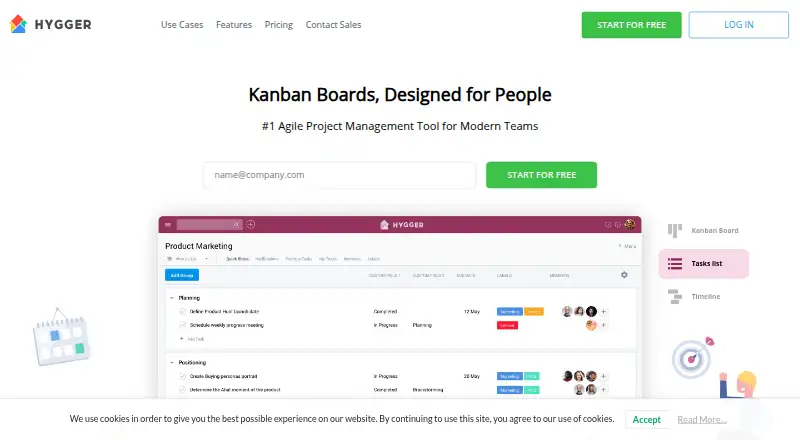
Teams can organize tasks on Kanban boards, sprint boards, task lists, and timelines. Kanban supports swimlanes and work-in-progress limits.
Scrum tools cover sprint estimates, burndown charts, velocity, and sprint release reports. Hygger also supports Value/Effort, weighted scoring, and RICE or ICE prioritization methods.
Roadmaps can be created and shared by teams. Time tracking includes reports, while a live activity stream shows activity across boards. Automation rules, guest access, and board task views are included.
How it connects
Hygger has native connections for GitHub, Bitbucket, and GitLab. It also works with Google Drive, Dropbox, and Slack.
Harvest, iCalendar, Intercom, and Jira are the other listed integrations. The service runs on the web and has Android and iOS apps.
The API handles standard create, edit, remove, and delete actions for basic Hygger objects. Returned data is confined to what the authorizing user can see, and each API key allows up to 600 requests per second.
Good fit
Hygger suits teams that need both project planning and product prioritization. Its boards, sprint reporting, roadmaps, and scoring methods cover different planning styles.
It can fit teams looking for project management software with mobile apps, guest access, time reports, and connections to development, storage, chat, and calendar tools.
Kanban-focused groups may value swimlanes and work-in-progress limits. Scrum teams get estimates, burndowns, velocity, and release reports.
Watch for
Check that the listed integrations cover your workflow: GitHub, Bitbucket, GitLab, Google Drive, Dropbox, Slack, Harvest, iCalendar, Intercom, and Jira are the named options.
The API only returns information visible to the authorizing user and permits 600 requests per second for each API key. Confirm that this fits your planned connection.
Only active users count toward subscription costs. New members are charged proportionally for the remaining billing period.
Pricing
Hygger has paid plans, a free plan, and a free trial. New signups can use the service at no cost for their first 50 tasks and try its platform capabilities during that period.
Pricing starts from $7 per user per month with annual billing. The listed Standard plan is $7 a year, billed per user with an annual subscription. Enterprise is $14 a year, also billed per user annually. Both listings mention a 20% discount or two months free.
Sensitive and credit information is encrypted with SSL, and payments are handled by a gateway provider rather than Hygger's servers.
Verdict
Choose Hygger if your team wants one workspace for task boards, Scrum reporting, roadmaps, prioritization, and time tracking, with mobile access and a free starting option.
Review the active-user billing rule and the annual plan wording before committing.
Teams comparing Kanban software can consider Hygger when swimlanes, work-in-progress limits, and prioritization methods matter alongside standard project tracking.
Our take
Hygger makes sense for teams that combine delivery work with product planning. It covers Kanban and Scrum practices, lets teams rank ideas with several scoring methods, and adds roadmaps, time reports, automation, and guest access. The free first-50-task access gives buyers room to explore. Before paying, confirm that your required connections are among the 10 listed integrations and that the API's user-level visibility works for your process. Annual billing and active-user charges also deserve a close look.
- Kanban and Scrum boards with sprint reporting
- Value/Effort, weighted scoring, and RICE/ICE prioritization
- Roadmaps, time reports, automation, and guest access
- Access through web, Android, and iOS
- Free plan, trial, and first 50 tasks free
- Only 10 native integrations are listed
- The API only exposes data the authorizing user can see
- Annual plan prices and billing wording need checking
- Subscription costs include active users
- Pick it ifTeams combining project delivery and product prioritization; Kanban or Scrum teams needing reports and roadmaps; Groups wanting mobile access and a free starting option
- Skip it ifYou need an integration outside Hygger's 10 listed connections; Your API work requires data users cannot directly see; You prefer billing that is not based on active users
Pricing
A free plan and trial are available, and the first 50 tasks after signup are free.
- Standard$9/user, monthly subscription · Price per user$9/mo
- Enterprise$18/user, monthly subscription · Price per user$18/mo
- Standard$7/user, annual subscription · Price per user · 20% discount or 2 months free$7/yr
- Enterprise$14/user, annual subscription · Price per user · 20% discount or 2 months free$14/yr
As hygger.io lists them, checked 11 Oct 2026.
Questions
Does Hygger have a free plan?
Yes. Hygger has a free plan and trial. New users can use the service without charge for their first 50 tasks after signup and explore its platform capabilities during that period.
What platforms does Hygger support?
Hygger runs on the web and offers Android and iOS apps. It also provides an API.
Which apps connect to Hygger?
The named integrations are GitHub, Bitbucket, GitLab, Google Drive, Dropbox, Slack, Harvest, iCalendar, Intercom, and Jira.
Does Hygger support Kanban and Scrum?
Yes. Kanban boards support swimlanes and work-in-progress limits. Scrum tools cover sprint estimates, burndown charts, velocity, and sprint release reports.
What can the Hygger API do?
The API supports create, edit, remove, and delete operations for basic Hygger objects. It returns only data visible to the authorizing user and allows 600 requests per second per API key.
How is Hygger billed?
Pricing starts from $7 per user per month with annual billing. Only active users count, and new members are charged proportionally for the rest of the billing period.
Near it
All alternatives →- ZSZoho Sprints#2 on this board
- O
 OpenProject#4 on this board
- J
 Jira#1 on this board
- T
 Taiga#5 on this board
- S
 Scrumwise#6 on this board
- Y
 YouTrack#7 on this board
- PPP4 Plan (formerly Hansoft)#8 on this board
- T
 Tuleap#9 on this board
- AC
 Automic Continuous Delivery Automation#10 on this board
- AD
 Aha! Develop#11 on this board