ID Photo Maker Review
idphotomaker.app · checked 15 Oct 2026
Make passport, visa, and identity pictures from selfies on an Apple device.
How it plugs in
Signal on Passport Photo Maker Software6.3#3 of 29
This free app for iPhone and iPad creates passport, visa, résumé, badge, school, and club ID images. It provides 40+ country formats, selectable backgrounds, exact file exports, and 4×6-inch print layouts. Regular editing stays on-device, while optional AI Attire uses external processing.
Review
In a line
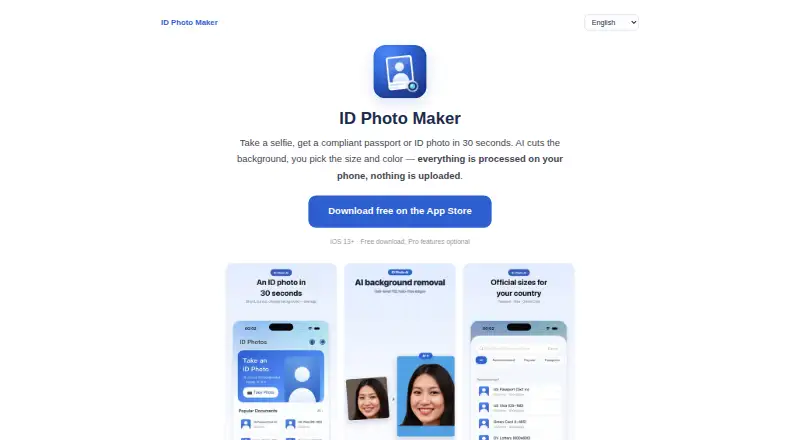
A selfie can become a passport or identity image in roughly 30 seconds. The app runs on Apple devices and offers presets spanning over 40 country formats.
What it does
Choose a document or identity-photo format, then crop and adjust a selfie. Presets cover uses such as passports, visas, green cards, DV lottery entries, résumé headshots, employee badges, school IDs, and club IDs.
AI background removal lets you choose white, blue, red, or a custom color. Optional AI Attire can change a T-shirt into a suit or blouse. Exports can use exact pixel dimensions and a target file size, including a stated 240 KB-or-less example for DS-160.
Multiple copies can be arranged on a 4×6-inch sheet for kiosk or drugstore printing. Presets are described as following official head-size, margin, and background rules, with no-retouch reminders on strict-document options.
How it connects
Standard editing, including background removal, beautification, and cropping, runs on the device. The maker says those photos are not uploaded, stored, or viewed by it.
AI Attire is different: the selected photo is encrypted to the maker’s Alibaba Cloud server in Singapore and then sent to OpenAI’s image API. The maker says the image exists only in memory for that request, while it keeps an anonymous style, duration, and cost record.
An optional Cloud Album stores photos in the user’s private Apple iCloud database, which the maker says it cannot access. Apple handles payments and iCloud, and RevenueCat checks subscriptions. There is no public API or SDK.
Good fit
This suits iPhone or iPad users who need a correctly sized passport, visa, or identity photo without visiting a studio. It also fits people who need a file-size limit or several printed copies.
The country presets, exact exports, background choices, and print-sheet layout cover common application and workplace photo tasks.
Watch for
The product is an iOS app. Its homepage says iOS 13 or later, while the App Store compatibility section lists iOS 17 or later for iPhone and iPadOS 17 or later for iPad. Apple also lists macOS 14 or later on an M1-or-newer Mac but marks the app as not verified for macOS.
AI Attire sends a photo outside the device, unlike the standard editing tools. Apple’s listing says location, identifiers, usage data, diagnostics, and other data may be used for tracking or linked to the user.
Camera and photo-library access is requested only when needed and is optional. Registration is not required, and the maker says it does not collect names, phone numbers, or contacts.
Pricing
The Free plan includes shooting, cropping, and preview. A PRO upgrade costs $0.99 one time for the full-version feature unlock.
A Full version yearly plan costs $19.99 a year and renews automatically. It includes HD cutout, formal attire, beauty tools, print sheets, and Cloud Album.
Verdict
Choose ID Photo Maker if you use Apple devices and want guided formats, precise digital exports, or a ready-to-print sheet. The free tier lets you try the basic capture and crop workflow before paying.
Check your device’s actual operating-system requirement before downloading, especially if you plan to use an iPad or Mac. Skip the optional attire tool if sending a photo to external services is not acceptable. For other options, see ePassport Photo Maker or ID Photo Studio.
Our take
ID Photo Maker is a practical choice for Apple users who need passport or identity photos in specific national formats. Its free tier covers shooting, cropping, and preview, while the yearly plan adds HD cutout, attire, beauty, print-sheet, and cloud features. On-device editing limits photo sharing for standard tools, but AI Attire uses an encrypted upload path through the maker’s server and OpenAI. Device requirements are worth checking because the homepage and App Store list different iOS versions, and macOS support is not verified.
- 40+ country photo formats
- Exact pixel and file-size exports, including a 240 KB DS-160 example
- Background colors and AI removal tools
- 4×6-inch sheets for kiosk or drugstore printing
- Standard editing runs on the device
- AI Attire sends selected photos to external servers
- Homepage and App Store list different iOS requirements
- Mac listing is marked not verified
- No public API or SDK
- Pick it ifApple users making passport, visa, or ID photos; People needing exact file sizes or print sheets; Users who want standard edits kept on-device
- Skip it ifYou need Android, verified macOS support, or a public API; You do not want optional attire processing to leave the device
Pricing
Basic shooting, cropping, and preview are free. PRO costs $0.99 one time. The full yearly plan is $19.99 per year with automatic renewal and adds HD cutout, attire, beauty, print sheets, and Cloud Album.
- Freeshoot · crop · previewFree
- PRO upgradefull-version feature unlock$0.99 one-time
- Upgrade to PROupgrade to PRO$0.99 one-time
- Full version (yearly)yearly auto-renewing subscription · HD cutout · formal attire · beauty · print sheet · cloud album$19.99/yr
- Full version yearlyauto-renewing yearly subscription · HD cutout · attire · beauty · print sheet · cloud album$19.99/yr
As apps.apple.com lists them, checked 15 Oct 2026.
Questions
Is ID Photo Maker free?
Yes. The Free plan includes shooting, cropping, and preview. A PRO upgrade costs $0.99 one time, while the full yearly plan costs $19.99 per year and renews automatically.
What devices does it support?
The app is for iPhone and iPad. The homepage says iOS 13+, while the App Store lists iOS 17+ and iPadOS 17+. macOS 14+ on an M1-or-newer Mac is listed but not verified.
Does it make photos for different countries?
Yes. More than 40 national formats are available, among them US passport, Schengen visa, Japan résumé, and Korea ID options.
Can I print several copies at once?
Yes. The app lays out multiple images on a 4×6-inch sheet suitable for a photo kiosk or drugstore.
Are my photos uploaded?
For ordinary edits, the maker says images remain on-device and are not uploaded, stored, or viewed. AI Attire instead transmits a chosen image using encryption to the maker’s server and OpenAI.
Does it offer an API?
No public API or SDK is described on the maker’s home page or App Store listing.