Game Narrative Design Software
Ink and Inky software review
inklestudios.com · checked 5 Oct 2026
Ink provides a game-focused narrative scripting language, with Inky for creating, testing, and exporting interactive stories.
How it plugs in
Signal on Game Narrative Design Software6.5#4 of 25
Ink is a game-story scripting language used alongside the Inky editor. You write text-first scripts with embedded logic, then test and export stories from one app. Linux, macOS, and Windows are supported, along with Unity and Unreal workflows, and the software is free under the MIT license.
Review
In a line
Ink provides scripting for game narratives, while Inky handles story writing and testing. Its main audience is professional game developers, though it can also produce choice-based interactive fiction.
What it does
You write branching stories in a document-style format. Ink puts the story text first and lets you add code and logic inside it.
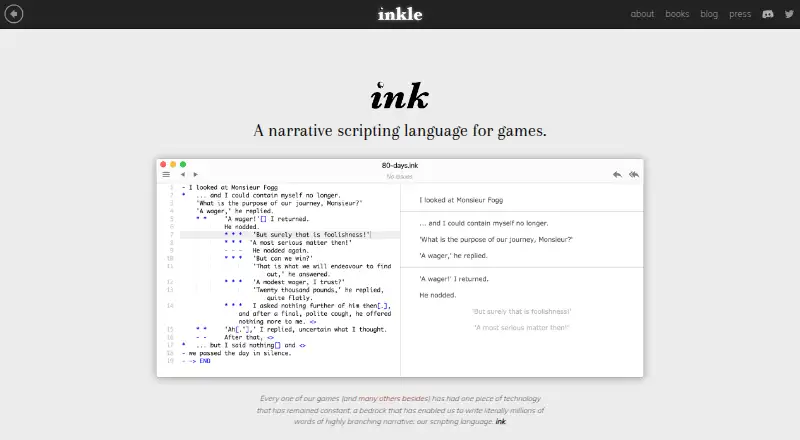
Inky lets you write, play through, and export an ink story in one place. Its play pane refreshes while you write, errors are highlighted as you type, and a divert can jump to its destination.
How it connects
Stories from Inky can be saved as JSON or turned into a web page for customization. The ink-Unity integration plugin recompiles files while you edit and includes a previewer inside the Unity Editor.
For Unreal Engine, the site points to Inkpot, a container made by The Chinese Room for bringing ink into Unreal. Ink, Inky, and the Unity plugin are open source under the MIT license. Help is available through Discord and GitHub Discussions.
Good fit
Ink is suited to game teams creating branching dialogue and other interactive narratives, including projects built with Unity or Unreal Engine. Writers can also use it for making and sharing choice-based interactive fiction.
The downloadable editor runs on Linux, macOS, and Windows, so writers can work on those desktop systems.
Watch for
Ink is primarily designed for professional game development, so casual users may find its focus narrower than a general writing app. Its writing format combines ordinary text with code and logic.
Unreal use relies on Inkpot, while Unity uses a separate integration plugin. Check that this workflow matches your engine setup before committing. The product page does not describe security certifications or compliance.
Pricing
There is no charge for ink, Inky, or the ink-Unity integration plugin. They are released under the MIT license, and the site lists a free plan rather than paid tiers.
Verdict
Choose ink if you need a free tool for branching game narratives and want an editor that can test stories as you write. Unity users get a dedicated plugin, and Unreal users have the Inkpot route. It can also serve interactive-fiction writers who are comfortable with text mixed with logic.
Look elsewhere if you need a general-purpose writing tool or a workflow outside the supported Unity and Unreal paths. Confirm how Inkpot or the Unity plugin fits your project before starting a large story.
Our take
Ink is a sensible choice for teams building branching game stories without a software budget. Its editor keeps writing, playtesting, error checking, and export together, while integrations cover Unity and an Unreal option through Inkpot. The tradeoff is its game-development focus and a writing format that mixes prose with logic. Interactive-fiction writers can use it too, provided they are comfortable with that structure. Review the engine path you need, especially for Unreal, before building a substantial project.
- Free ink, Inky, and Unity integration under the MIT license
- Runs on Linux, macOS, and Windows
- Live play pane and error highlighting in Inky
- JSON files and customizable web-page exports
- Unity plugin and an Unreal integration option
- Primarily designed for professional game development
- Writing mixes text with code and logic
- Unreal integration depends on the separate Inkpot container
- No security certifications or compliance are described
- Pick it ifGame teams writing branching dialogue; Interactive-fiction writers using supported desktop systems; Unity projects needing an in-editor story preview
- Skip it ifYou need a general writing app rather than a narrative scripting tool; Your engine workflow does not fit Unity or the Inkpot Unreal route; You want documented security certifications or compliance
Pricing
The software costs nothing: ink, Inky, and the ink-Unity integration plugin are available under the MIT license, with no paid plan listed.
- Freeink, Inky, and the ink-Unity integration plugin are freely available under the MIT licenseFree
As inklestudios.com lists them, checked 5 Oct 2026.
Questions
What are ink and Inky?
Ink supplies the scripting system for game narratives, and Inky is the application used to write, test, and export those stories.
Which computers can run Inky?
Inky downloads are provided for Linux, macOS, and Windows.
Can ink handle branching dialogue?
Yes. Ink is designed for interactive narratives, including branching dialogue and choice-based stories.
Does ink work with Unity?
Yes. While you edit, the Unity plugin recompiles ink files and provides a story previewer within the Unity Editor.
How does ink work with Unreal Engine?
The site recommends Inkpot, a The Chinese Room container that brings ink into Unreal Engine.
What can Inky export?
Inky can produce JSON story files or a web page that you can customize.
Where can I get help with ink?
The maker directs users to its Discord server and GitHub Discussions for questions about ink and its Unity integration.
Is ink free?
Yes. The MIT-licensed ink, Inky, and ink-Unity integration plugin are available at no cost.