
Inoreader: RSS Reading, Monitoring, and Pricing
inoreader.com · checked 14 Oct 2026
A personalized hub for reading and monitoring many kinds of sources.
How it plugs in
Signal on News & Reading Apps6.6#2 of 16
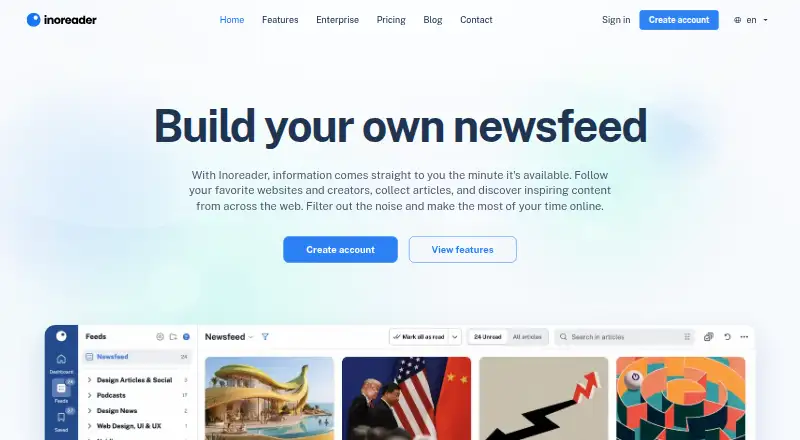
Inoreader lets websites, newsletters, podcasts, social listening, and Google News alerts converge in a single workspace. Monitoring, rules, filters, tags, saved reading, offline access, and AI features extend the reader. Free supports 150 RSS subscriptions; paid plans raise limits and add web feeds, API access, and further automation.
Review
In a line
Websites, creators, newsletters, podcasts, social sources, and alerts appear together in Inoreader's personalized newsfeed, delivered as a hosted service. It runs on the web, iOS, Android, and browser extensions.
What it does
Users can follow public RSS and web feeds, newsletters, podcasts, Google News alerts, and social sources such as Facebook pages, Bluesky, Telegram, VKontakte, Mastodon, Reddit, and YouTube subscriptions.
Monitoring feeds track people, brands, companies, trends, and events, with searches available in 30 languages. Rules and filters can sort items, apply tags, organize folders, or trigger push notifications.
Inoreader Intelligence can summarize articles, identify named entities, process podcasts and videos, suggest tags, and create reports. It supports OpenAI, Mistral AI, and Anthropic models.
You can save articles, highlight passages, add notes, search annotations, export them to Readwise, extract full article text, translate and annotate it, use text-to-speech, play audio in the background, and read offline. Pro users can upload PDFs, documents, and spreadsheets for article-style searching.
How it connects
Inoreader lists IFTTT, Zapier, and n8n integrations. Zapier connects it with more than 1,500 apps, while n8n connects it with more than 1,000 services. Supported exports include Pocket, Evernote, OneNote, Google Drive, Dropbox, and Instapaper.
Folders, tags, and Team channels can serve as the basis for RSS feeds or HTML clips. Pro also permits feed creation from websites that do not publish RSS. The service offers a public API for ordinary use with Pro; developers of publicly available apps on unsupported platforms can request access.
The API documentation covers app registration, rate limits, errors, OAuth 2.0, feed and tag operations, stream contents, unread counts, and marking items as read. Inoreader is hosted and has no self-hosting package or open-source license. For readers comparing tools, see RSS Reader Software.
Good fit
Inoreader serves casual readers, media professionals, content marketers, and researchers.
It is useful for building a monitored reading hub, organizing articles with folders and tags, saving research notes, following social and podcast sources, and connecting reading workflows to other apps.
Watch for
Free permits up to 150 RSS subscriptions. Pro lists up to 2,500 RSS subscriptions, 20 web feeds, 20 newsletter feeds, 30 social and monitoring feeds, 100 boosted feeds, 30 rules, and 50 filters.
Creating feeds from sites without RSS, uploading files for searching, and ordinary API use are Pro features. Pro also lists a maximum guaranteed feed refresh interval of once every hour.
Inoreader is a hosted service, not open-source software, and no self-hosting package is documented. Check whether its web, mobile, extension, and API setup matches your workflow.
Pricing
The Free plan costs nothing forever, needs no credit card, and includes 150 RSS subscriptions, Google News alerts, article search, and a customizable view. The homepage offers a 14-day trial with no credit card required.
Pro costs €7.50 a month when billed annually, or $9.99 billed monthly. It adds higher feed limits, web and newsletter feeds, monitoring feeds, boosted feeds, rules, filters, translations, text-to-speech, API access, and offline reading.
Custom has flexible payment options and a price on request. It offers custom add-ons for web feeds, monitoring feeds, and boosted feeds, plus API access.
Verdict
Choose Inoreader if you need one place for feeds, newsletters, podcasts, social listening, alerts, saved research, and automated sorting.
The free tier works for a smaller RSS collection. Pro is suited to higher limits and features such as website-created feeds, file uploads, offline reading, and ordinary API use.
Skip it if you require open-source software or self-hosting. Before paying, confirm that the plan limits, refresh timing, and supported connections fit the sources you follow.
Our take
Inoreader is a broad reading and monitoring service for people who track many kinds of information. Free covers basic RSS use, while Pro raises source limits and adds automation, offline access, file search, and API features. The hosted model keeps setup simple but rules out self-hosting and open-source control. The 14-day trial provides a way to check source coverage, organization tools, and integrations before choosing a paid plan. It is most suitable when one dashboard matters more than a minimal reader.
- RSS, newsletters, podcasts, social sources, and alerts can be brought together in one workspace
- Rules, filters, tags, and folders help arrange incoming items
- AI tools can summarize, tag, and report on content
- Pro includes API access and offline reading
- Exports include services such as Pocket, Evernote, and Readwise
- Free permits no more than 150 RSS subscriptions
- Ordinary API use is a Pro feature
- Hosted service has no open-source license or self-hosting package
- Pro feed refresh guarantee is once per hour
- Custom pricing is available only on request
- Pick it ifPeople monitoring many news and social sources; Researchers and content teams organizing saved reading; Buyers needing feeds, automation, and an API
- Skip it ifYou need self-hosted or open-source reader software; You follow more than 150 RSS feeds but do not want a paid plan; You require faster than hourly guaranteed Pro refreshes
Pricing
Free lasts forever and includes 150 RSS subscriptions. Pro is €7.50 a month billed annually or $9.99 billed monthly. Custom pricing is on request. A 14-day trial requires no credit card.
- FreeFree forever; no credit card required · 150 RSS subscriptions · Google News alerts · article search · customizable viewFree
- ProBilled annually; $9.99 billed monthly · 2,500 RSS subscriptions · 20 web feeds · 20 newsletter feeds · 30 Facebook, Bluesky, Telegram and monitoring feeds · 100 boosted feeds · 30 rules · 50 filters · 10 translations/day · 5 text-to-speech articles/day · API access · offline reading€7.50/mo
- CustomFlexible payment options · Custom add-ons including web feeds, monitoring feeds and boosted feeds · API accessOn request
As inoreader.com lists them, checked 14 Oct 2026.
Questions
Is Inoreader free?
Yes. The Free plan costs nothing forever, requires no credit card, and allows up to 150 RSS subscriptions.
Can I try Inoreader before paying?
Yes. The homepage offers a 14-day trial with no credit card required.
What platforms support Inoreader?
It runs on the web, iOS, Android, and browser extensions. Offline reading is included on Pro.
Can Inoreader follow social sources?
Yes. Supported feeds include Facebook pages, Bluesky, Telegram, VKontakte, Mastodon, Reddit, and YouTube subscriptions.
Does Inoreader have an API?
Pro includes API access for ordinary uses. Developers of publicly available apps on platforms where Inoreader is unavailable can request access.
Can Inoreader be self-hosted or inspected as open source?
No. Official documentation describes a hosted browser and mobile service and provides no self-hosting package or open-source license.
What does Pro cost?
Pro costs €7.50 a month when billed annually, or $9.99 billed monthly.