
AI Music Transcription Software
Ivory: AI Piano Transcription and Sheet Music
ivory-app.com · checked 15 Oct 2026
Turn piano recordings into editable notation and MIDI with AI.
How it plugs in
Signal on AI Music Transcription Software6.6#6 of 29
In a browser workspace, Ivory transforms piano recordings and YouTube URLs into editable notation, MIDI and MusicXML. The service targets polyphonic solo piano and combines linked score and piano-roll displays with chord recognition, playback tools and note editing. Access is available through web, iOS and macOS, with free and paid tiers.
Review
In a line
Ivory uses artificial intelligence to turn piano audio or video into sheet music and MIDI that you can edit. Its transcription engine is built around polyphonic solo-piano performances.
What it does
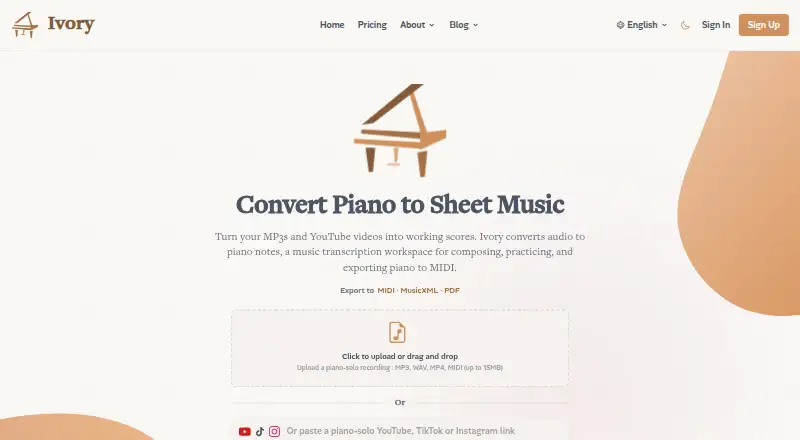
Feed the web app an MP3, WAV, MP4 or standard MIDI file of up to 15MB, or paste a YouTube URL. Ivory produces sheet music, performance MIDI, score MIDI and MusicXML, with PDF export also available.
In the editor, notes can be moved, resized or removed before smart rhythm quantization is applied. Playback offers transposition, tempo adjustment, looping, metronome and separate left- and right-hand parts. The player combines chords, linked notation, a piano roll and animated hands that illustrate fingering.
Clean solo-piano recordings generally suit the system best. Noise, dense playing and reverberation can reduce accuracy, and very long videos may be rejected. Free accounts can have transcription quotas.
How it connects
Sibelius, Finale and MuseScore can open Ivory's PDF, MusicXML and MIDI output. Ivory documents workflows for Logic Pro, Ableton Live, FL Studio, Cubase and Reaper, and says an audio-to-MIDI DAW plugin is still in development.
Businesses can ask for audio-to-MIDI API access. Ivory also documents a proprietary .NET API. It is closed-source software, available through web, iOS, macOS and an API.
The iPhone and iPad app runs from iOS 16 onward and produces vertical 1080×1920 piano videos. Recordings from USB or Bluetooth MIDI keyboards are supported, with possible hardware-dependent latency.
Good fit
Ivory suits musicians, educators and enthusiasts who want to learn from piano recordings, capture ideas or prepare notation for another music program. Its piano focus, playback controls and export formats make it useful for solo-piano work.
For a broader overview of similar tools, see Music Transcription Software.
Watch for
This is a piano specialist rather than a general multi-instrument transcriber. The online editor may feel limited for substantial notation changes, so exporting MusicXML for editing elsewhere can be more practical.
Ivory says recordings and uploads remain confidential and are not used for model training. Preview files on free accounts are automatically removed within seven days. Ivory states that it follows GDPR, while Stripe handles payment cards without Ivory storing full card details.
Pricing
Ivory offers free access, a trial and paid tiers. The free tier provides a 30-second performance-MIDI preview, quantized MIDI, MusicXML and PDF, interactive editing and the basic AI model. Videos exported without a subscription show a translucent Ivory watermark, which subscribers can remove. Free accounts may also face transcription quotas.
One-off credits are €3.99 each, never expire and work with or without a subscription. The monthly tier is €8.99; the annual tier is €59 and advertised as a 45% saving. Both subscriptions provide full-length performance MIDI, 100 full-song transcriptions per month, advanced editing, the premium model and MIDI, MusicXML and PDF exports.
Enterprise & Education pricing is on request and includes volume licensing, API access, team collaboration, dedicated technical support and custom DAW integrations.
Verdict
Ivory is a sensible choice when your material is chiefly solo piano and you want recording-to-notation or MIDI conversion without manual transcription. Its browser player, hand separation, chord display and export choices support learning and arranging workflows.
For bands or mixed-instrument material, or if you need a comprehensive notation editor in the browser, consider alternatives. Before subscribing, verify video length, recording cleanliness, free-use limits and how well your target software handles MusicXML. Enterprise buyers should ask about API and custom integration terms.
Our take
Ivory gives solo-piano musicians a way to obtain editable notation or MIDI without entering every note manually. Its practical strengths are piano-focused AI, synchronized playback views, note editing and exports compatible with common notation applications. Limitations include its narrow instrument scope, lower accuracy on noisy or reverberant material, possible restrictions on long or free-account jobs and a modest browser editor. Regular full-length users may find a subscription worthwhile; occasional projects can begin on the free tier or use credits.
- Trains specifically on polyphonic solo piano.
- Exports PDF, MusicXML, performance MIDI and score MIDI.
- Offers synchronized notation, piano roll and playback controls.
- Works on web, iOS and macOS.
- Uploads are not used to train Ivory models.
- Not designed for general multi-instrument audio.
- Noise, dense playing and reverb can reduce accuracy.
- Very long videos may be rejected.
- Browser editing can be limited for larger changes.
- Free video exports include a watermark.
- Pick it ifSolo-piano transcription for musicians, teachers and learners; People exporting notation or MIDI to desktop music software; Users who want browser, iOS or macOS access
- Skip it ifYou need dependable transcription for bands or mixed-instrument recordings; You require a full-featured notation editor inside the browser; Your projects regularly exceed free-account limits or video constraints
Pricing
Begin at no cost; €8.99 monthly or €59 annually unlocks full-length MIDI, 100 monthly transcriptions and the premium model. Credits are sold once for €3.99 each, while enterprise rates require a request.
- Free€0 forever · 30-second performance-MIDI preview · Quantized MIDI/MusicXML/PDF · Unlimited transcriptions · Interactive editing · Basic AI modelFree
- Extra credits€3.99 per credit · Buy 1–50 credits · Credits never expire · Used after monthly allowance · Available with or without subscription€3.99 one-time
- Monthly€8.99 per month · Full-length performance MIDI · 100 full-song transcriptions/month · Advanced editing · Premium AI model · MIDI/MusicXML/PDF€8.99/mo
- Yearly€59 per year (save 45%) · Full-length performance MIDI · 100 full-song transcriptions/month · Advanced editing · Premium AI model · MIDI/MusicXML/PDF€59/yr
- Enterprise & EducationContact sales · Volume licensing · API access · Team collaboration · Dedicated technical support · Custom DAW integrationsOn request
As ivory-app.com lists them, checked 15 Oct 2026.
Questions
What files can Ivory transcribe?
You can submit MP3, WAV, MP4 or standard MIDI files up to 15MB through the web app, or use a YouTube URL.
What does Ivory export?
Output options include PDF, MusicXML, performance MIDI and score MIDI.
Can I edit the generated notes?
Yes. Notes can be dragged, resized or deleted in the browser, followed by smart rhythm quantization.
Does Ivory transcribe instruments besides piano?
No general multi-instrument coverage is described; the model is trained on polyphonic solo piano.
Which music programs can open Ivory exports?
Ivory says Sibelius, Finale and MuseScore can import its notation exports.
Is there a free Ivory plan?
Yes. Free access includes a 30-second performance-MIDI preview, quantized MIDI, MusicXML and PDF, interactive editing and the basic AI model.
What are the paid prices?
The monthly option is €8.99, the annual option €59, and extra credits are €3.99 each as a one-time purchase. Enterprise pricing requires contacting sales.
Are uploaded recordings used to train AI?
Ivory says uploads stay confidential and are never used to train its AI. Free-preview files are automatically deleted within seven days.