
MuScriptor: Audio Transcription to MIDI and Sheet Music
muscriptor.kyutai.org · checked 14 Oct 2026
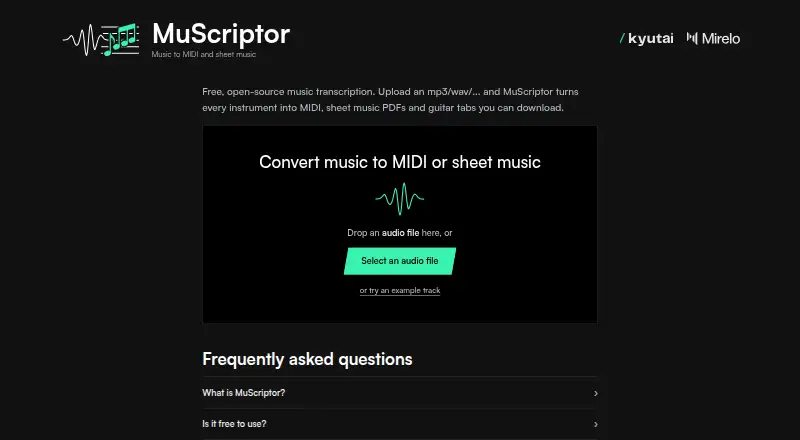
MuScriptor converts recordings into MIDI, sheet music, and tablature.
How it plugs in
Signal on Music Transcription Software7.7#1 of 31
MuScriptor separates instruments in full recordings into editable MIDI tracks and printable notation. The hosted site takes a range of audio formats and provides downloads; local options include a web interface, CLI, and Python package. It is free, but the model weights are licensed for non-commercial use, and transcription quality varies by music style.
Review
In a line
MuScriptor transforms audio recordings into MIDI and sheet music, with tablature available for supported instruments.
What it does
For a recording with multiple instruments, MuScriptor can identify parts—including voice, drums, bass, and synth lead—and place them on separate editable MIDI tracks. It also provides full scores, individual PDF parts, MusicXML, and guitar or bass tabs.
It can identify musical details such as chords, key, tempo, and meter. You can specify instruments you expect to hear to guide the transcription. Chord symbols are not included.
How it connects
The web demo takes MP3, WAV, FLAC, OGG, M4A, AIFF, and Opus files. MusicXML files open for editing in MuseScore, Sibelius, or Guitar Pro. To engrave PDFs locally, install MuseScore 4 or newer separately.
MuScriptor is open source. You can host its web interface yourself or transcribe locally using a command-line tool or Python package. The application code is MIT-licensed; the model weights have separate non-commercial terms.
Good fit
MuScriptor may work for musicians converting acoustic recordings into editable MIDI or printable notation, particularly players of guitar and other fretted instruments. It handles voice, piano, strings, brass, woodwinds, drums, and other instruments.
Local use is documented for Linux, Windows, and Intel or Apple-Silicon Macs. The small model is aimed at CPU-only systems, while the large variant is intended for GPU use.
Watch for
Results can contain errors. The service reports better performance on acoustic and guitar music than on electronic music, so check the transcription before relying on it.
Local use requires Hugging Face authentication and acceptance of the model's CC BY-NC 4.0 license, which permits only non-commercial use. You also need the necessary rights to submit the music and use the output.
Pricing
MuScriptor is free. Its hosted demo supports audio uploads and downloads, and the application code is available under the MIT license. The model weights have separate non-commercial terms.
Verdict
Consider MuScriptor for free conversion of recordings into editable MIDI, scores, or tabs if you are prepared to check the results. Its local options can keep audio on your own machine.
It may not fit if you need reliable results on electronic music or commercial use of the model weights. Review the license and MuseScore requirement before setting up local PDF output.
Our take
MuScriptor is worth considering for free transcription of full mixes into MIDI tracks, notation, or tablature. You can use the browser demo or host the interface locally to process audio on your machine. The main trade-offs are imperfect results—especially on electronic music—and a non-commercial license for the model weights. Check that its output formats and licensing fit your needs, and note that local PDF engraving requires a separate MuseScore installation.
- Free hosted transcription and open-source application code
- Can separate detected instruments into editable MIDI tracks
- Exports notation and tabs for supported fretted instruments
- Browser access and local tools are available for major desktop systems
- Transcription is imperfect and less effective on electronic music
- Model weights are restricted to non-commercial use
- Local PDF engraving requires MuseScore 4 or newer
- Does not provide chord symbols
- Pick it ifMusicians converting acoustic recordings into MIDI or notation; Guitar and bass players who want tablature; People who want local transcription options
- Skip it ifYou need dependable results for electronic music; You need commercial use of the model weights
Pricing
The hosted service and application code are free. The application code is MIT-licensed, while the model weights are under CC BY-NC 4.0 and restricted to non-commercial use.
- Freefree hosted demo · MIT-licensed code · model weights CC BY-NC 4.0 non-commercialFree
- Free open-source MuScriptorbrowser transcription · MP3/WAV upload · MIDI · sheet-music PDFs · guitar tabsFree
As muscriptor.kyutai.org lists them, checked 30 Sept 2026.
Questions
Is MuScriptor free?
Yes. The hosted service and application code are free; the model weights have separate non-commercial terms.
What files can I upload?
The browser demo supports MP3, WAV, FLAC, OGG, M4A, AIFF, and Opus.
What does MuScriptor produce?
It can provide MIDI, sheet-music PDFs, MusicXML, and tablature for supported fretted instruments. Detected instruments can be placed on separate MIDI tracks.
Can I use MuScriptor on my computer?
Yes. A self-hosted web interface, command-line tool, and Python package are available for Linux, Windows, and Intel or Apple-Silicon Macs.
Can I use the model commercially?
No. The CC BY-NC 4.0 model weights are restricted to non-commercial use. The application code is MIT-licensed.
Does it work well with electronic music?
The service reports better performance on acoustic and guitar music than on electronic music, and results can contain errors.
Which music programs can open its notation output?
MusicXML can be edited in MuseScore, Sibelius, or Guitar Pro. Local PDF engraving requires MuseScore 4 or newer.