JamesDSP: Free Linux Audio Effects Processor
github.com · checked 8 Oct 2026
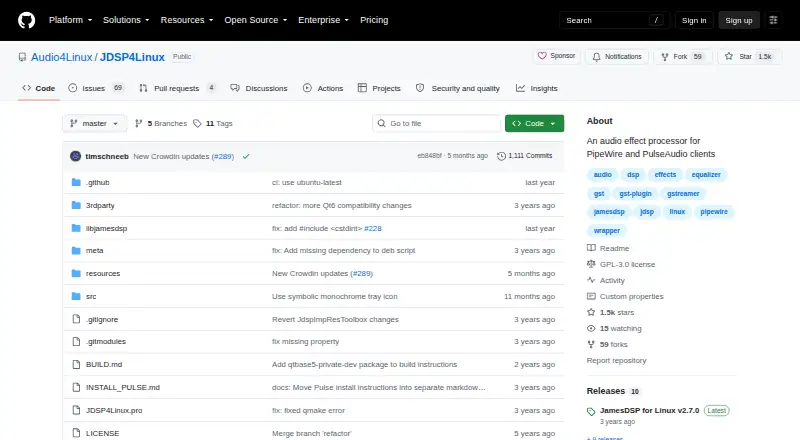
Open-source Linux audio effects processor for PipeWire and PulseAudio clients.
How it plugs in
Signal on Audio Enhancement Software6.4#4 of 30
JamesDSP for Linux processes desktop audio with equalizers, bass boost, compression, reverb, convolution, crossfeed, widening, analog modeling, and limiting. It supports PipeWire as its main audio backend and keeps PulseAudio support for compatibility. The free, GPLv3-licensed project also offers EEL2 scripting, AutoEQ integration, D-Bus control, and command-line tools.
Review
In a line
For Linux, JamesDSP provides a free, open-source way to process audio. It works with applications using PipeWire or PulseAudio.
What it does
Computer audio can pass through automatic bass boost, multiband compression, reverb, equalizers, convolution, crossfeed, stereo widening, analog modeling, and output limiting. Virtual surround and audio routing are supported too.
Its arbitrary-response equalizer can draw on the AutoEQ database, provided a network connection is available. The partitioned convolver handles mono, stereo, and full or true stereo impulse responses.
Custom processing is possible through live EEL2 DSP scripts. The included editor is minimal, with syntax highlighting, basic code completion, and console output.
How it connects
PipeWire is the primary audio backend. PulseAudio remains available for backward compatibility, and its backend is in maintenance mode. With PipeWire clients, users can exclude selected apps and switch the target audio device; PulseAudio clients do not have those controls.
The project is open source under GPLv3. From version 2.5.0 onward, D-Bus IPC and a command-line interface provide control over settings, presets, devices, and preset rules.
For Linux, documented installation routes cover Flatpak, Arch AUR, Fedora and openSUSE packages, and source compilation. The Flatpak has aarch64 and x86_64 builds, while its sandbox normally confines access to the application data directory.
Good fit
Linux users seeking desktop-wide effects may find JamesDSP suitable, particularly when their applications use PipeWire. It also accommodates custom EEL2 processing and automation through D-Bus or the command line.
Its toolkit spans everyday equalization and spatial processing, plus convolution and dynamic-range work. JamesDSP was first published as an audio-effects processor for Android devices; this page focuses on its Linux desktop release.
Watch for
Use PipeWire clients when selective app exclusion or target-device switching is important. PulseAudio support remains, but that backend is maintained for compatibility.
The AutoEQ equalizer requires network access. Flatpak users should review the sandbox, which by default limits access to the app's data directory.
The project states that it provides no warranty and lists no security or compliance certifications.
Pricing
JamesDSP is free. It offers a free plan with no free trial, and no paid plan is listed.
Verdict
Choose JamesDSP if you run Linux and want a broad set of audio effects without a purchase, particularly with PipeWire. It is also a fit for users comfortable with open-source software, EEL2 scripts, or command-line and D-Bus control.
For category browsing, compare it with Audio Enhancement Software and Audio Equalizer Software.
Our take
JamesDSP is a sensible choice for Linux listeners who want many effects in one free package and can use PipeWire. Its scripting editor and remote controls add room for custom setups, while AutoEQ and convolution support cover more specialized tuning. The main checks are backend and packaging: some controls require PipeWire, AutoEQ needs internet access, and the Flatpak sandbox can restrict files. The project also provides no warranty or listed security certifications.
- Free and open-source under GPLv3
- Wide range of equalizer and spatial effects
- Custom EEL2 scripting with a built-in editor
- PipeWire supports app exclusion and device selection
- D-Bus and command-line control available since version 2.5.0
- Per-app exclusion is unavailable to PulseAudio clients
- AutoEQ requires a network connection
- Flatpak access is restricted by its sandbox
- Project provides no warranty or certifications
- Pick it ifLinux users running PipeWire; People who want custom audio effects or automation; Listeners needing equalization, convolution, or virtual surround
- Skip it ifYou need selective app exclusion or target-device switching with PulseAudio; You need a warranty or security certification; You need unrestricted file access from a Flatpak
Pricing
Free plan with no trial. JamesDSP has no paid tier listed, so buyers pay nothing to use it.
- FreeFree on Flathub; PipeWire package supports LinuxFree
As flathub.org lists them, checked 8 Oct 2026.
Questions
Is JamesDSP free?
Yes. JamesDSP has a free plan, no free trial, and no listed paid plan.
Which systems does JamesDSP support?
The desktop project supports Linux. It works with PipeWire and also supports PulseAudio for backward compatibility. JamesDSP was first published as an audio-effects processor for Android devices.
Does JamesDSP work with PipeWire?
Yes. PipeWire is the intended backend, and its clients can use selective app exclusion and change the target audio device.
What audio effects are included?
Available processing includes bass boost, dynamic-range compression, reverb, equalizers, convolution, crossfeed, stereo widening, analog modeling, virtual surround, routing, and output limiting.
Can I create custom effects?
Yes. A live EEL2 scripting engine supports programmable effects, with a small editor offering syntax highlighting, basic code completion, and console output.
How can I install JamesDSP on Linux?
The project documents Flatpak, Arch AUR, Fedora and openSUSE packages, and source builds. Its Flatpak lists aarch64 and x86_64 versions.
Does JamesDSP have remote controls?
Since version 2.5.0, D-Bus IPC and a command-line interface can control settings, presets, devices, and preset rules.
Near it
All alternatives →- RD
 RØDE UNIFY#3 on this board
- DSDTS Sound Unbound#5 on this board
- MMicMixer#2 on this board
- NB
 NVIDIA Broadcast#6 on this board
- FFxSound#1 on this board
- KA
 Krisp AI Meeting Assistant#7 on this board
- SSSteelSeries Sonar#8 on this board
- WWavelet#9 on this board
- JA
 JACK Audio Connection Kit#10 on this board
- S
 Splitwave#11 on this board