Krisp AI Meeting Assistant: Features, Plans, and Pricing
krisp.ai · checked 27 Sept 2026
Meeting capture assistant with transcripts, summaries, and tracked action items.
How it plugs in
Signal on Meeting Notes Software7.2#9 of 112
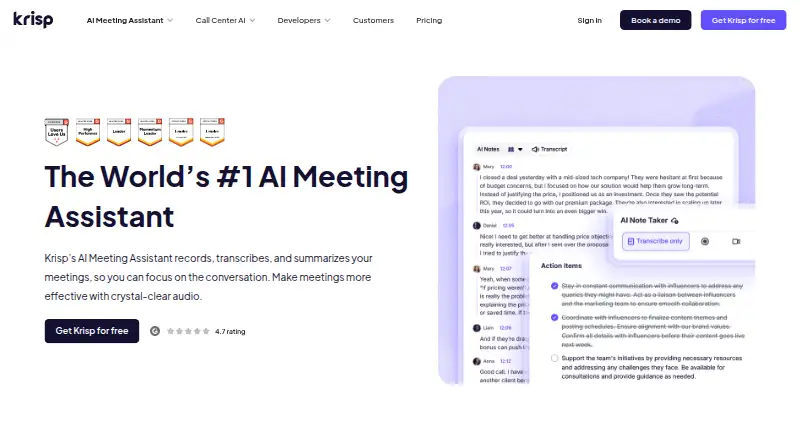
Krisp AI Meeting Assistant captures meetings, converts speech to text, distinguishes speakers, and produces summaries, decisions, and action-item lists. Windows and macOS desktop apps, iOS and Android apps, and a browser extension for supported browsers provide access across devices. It supports Zoom, Google Meet, Microsoft Teams, Slack Huddles, and workflow services including Zapier, HubSpot, Salesforce, Pipedrive, Slack, and MCP. Annual plans begin at $8 per user each month.
Review
In a line
Krisp AI Meeting Assistant is a paid service that records meetings and converts them into searchable notes, summaries, and follow-up details. Krisp is based in Berkeley, California, and was founded in 2017.
What it does
Meetings can be recorded, transcribed, and indexed with speaker labels for later search. Available capture options cover audio, video, or transcription alone.
Live transcription covers 17 languages and reports 96% accuracy. Afterward, the assistant summarizes discussion, surfaces decisions, and outlines next steps. Note templates and action-item tracking are included.
How it connects
Windows and macOS have desktop apps; iOS and Android have mobile apps. Supported browsers can use the browser extension. It works with Zoom, Google Meet, Microsoft Teams, Slack Huddles, and other conferencing applications.
Meetings may be captured without displaying a bot, and platforms such as Zoom can use one optionally. Available workflow links include Zapier, HubSpot, Salesforce, Pipedrive, Slack, and MCP.
For related tools, see AI noise cancellation software and audio enhancement software.
Good fit
It suits people and teams that need meeting records, searchable transcripts, summaries, and tracked next steps across desktop, mobile, and browser meetings.
Advanced adds team and billing management, administrator controls, shared access, and enforced note-taking. Core includes 10 GB of storage; Advanced includes 60 GB. Enterprise offers unlimited storage.
Watch for
There is no permanent free plan. The free trial lasts seven days and requires no credit card, although trial access includes unlimited transcription, noise cancellation, recording, notes, and action items.
Check which billing cycle and storage level you need. Monthly rates are higher than annual rates, and Enterprise pricing is provided on request.
Krisp states that data is encrypted with AES-256 at rest and TLS 1.3 in transit. It reports GDPR, SOC 2 Type II, PCI-DSS 4.0, and HIPAA compliance, and says voice data is not visible to its servers or used to train models.
Pricing
Premium capabilities are available to test for seven days at no charge and without entering card details, including unlimited transcription, noise cancellation, recording, notes, and action items.
With monthly billing, Core is $16 per user and Advanced is $30; annual billing lowers those prices to $8 and $15 per user, respectively.
Enterprise is quoted individually. Core includes 10 GB of storage, Advanced includes 60 GB, and Enterprise includes unlimited storage.
Verdict
Choose Krisp if your meetings span several conferencing services and you want automatic transcripts, summaries, decisions, and tasks in one archive. Its desktop, mobile, and browser options cover common working setups, while Advanced adds controls for managed teams.
Look elsewhere if you require a free plan beyond seven days or need a published Enterprise price. Compare the monthly and annual rates carefully, and confirm that the supported conferencing app and workflow connections match your work.
Our take
Krisp AI Meeting Assistant suits users seeking recorded meetings, searchable transcripts, speaker identification, and automatically generated follow-up notes on multiple device types. Its integrations can move meeting information into common sales, messaging, and automation tools. The trial gives a week to assess the workflow without a card. Budget for a paid plan afterward, and check storage, administration features, billing term, and conferencing support before choosing a tier.
- Transcribes meetings in 17 languages with stated 96% accuracy
- Creates summaries, decisions, next steps, and lists of action items
- Runs on Windows, macOS, iOS, Android, and supported browsers
- Connects with major conferencing and workflow tools
- Premium features are available during a seven-day trial without a credit card
- No permanent free plan
- Monthly rates are higher than annual rates
- Enterprise pricing is available only by request
- Storage varies by plan: 10 GB, 60 GB, or unlimited
- Pick it ifTeams needing searchable meeting records and tracked next steps; People using several conferencing apps; Organizations wanting admin and security controls
- Skip it ifYou need a lasting free plan; You require a public Enterprise price; Your conferencing app is not among the supported options
Pricing
The seven-day trial costs nothing and does not require a credit card. Core is $16 per user monthly or $8 with annual billing. Advanced is $30 monthly or $15 annually. Enterprise pricing is available by request.
- Free TrialFree for 7 days · Premium features during trial · No credit card required · Free for 7 daysFree
- CoreMonthly · 10 GB storage$8/mo
- AdvancedMonthly · 60 GB storage$15/mo
- EnterpriseOrg-wide rollout · Security and custom controlsOn request
As krisp.ai lists them, checked 27 Sept 2026.
Questions
Does Krisp have a free plan?
No permanent plan is offered, but a seven-day trial is available without a credit card.
Which devices support Krisp AI Meeting Assistant?
Windows and macOS desktop applications, iOS and Android mobile apps, and an extension for supported browsers are available.
Which meeting services does it support?
It works with Zoom, Google Meet, Microsoft Teams, Slack Huddles, and other conferencing applications.
What does the assistant produce?
It captures meetings, turns speech into transcripts, identifies speakers, summarizes discussions, extracts action items, and surfaces decisions and next steps.
How much storage comes with each plan?
Storage is 10 GB on Core, 60 GB on Advanced, and unlimited on Enterprise.
Can meetings be recorded without a bot?
Yes. Meetings may be captured without displaying a bot, while platforms such as Zoom can use one optionally.
Does Krisp offer workflow integrations?
Yes. Available workflow links include Zapier, HubSpot, Salesforce, Pipedrive, Slack, and MCP.