
Keystatic: File-Based Content Editing for Developers
keystatic.com · checked 15 Oct 2026
An open-source editor that lets teams manage Markdown, JSON and YAML files alongside their code.
How it plugs in
Signal on Git-Based CMS7.3#4 of 23
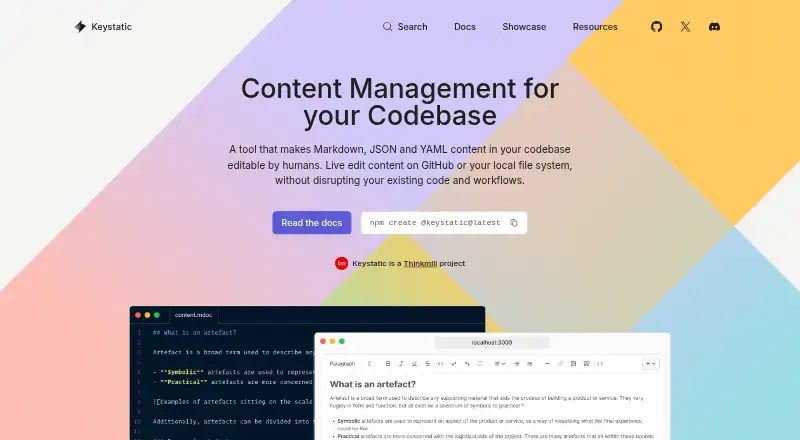
Keystatic provides a browser-based admin UI for content files kept in a codebase. Data may stay local, go straight to GitHub, or use both options, with Markdoc and MDX supported. Integration documentation is available for Astro, Next.js and Remix. A free starting tier is offered, while Cloud Pro begins at $10 monthly; the project remains experimental.
Review
In a line
Keystatic is an open-source content-management interface for Markdown, JSON and YAML files held in a codebase.
It offers web, self-hosted and API use without requiring a database.
What it does
You define repeated content as collections and one-off records as singletons, then edit them through a visual admin UI or directly in files.
Markdoc and MDX work within its Markdown and YAML/JSON content. Visual editing and live preview are available, with branching as the content workflow.
The command npm create @keystatic@latest can create a Next.js, Astro or Remix project with Keystatic included.
How it connects
Content may be kept on the local filesystem, committed straight to GitHub, or handled through both storage modes. Astro, Next.js and Remix each have official integration guides, and publishing uses a Git commit.
The TypeScript API configures and reads content. The Reader API reads a project directory and can feed Next.js getStaticProps, Astro frontmatter, Remix loaders and React Server Components. Because it relies on Node.js APIs, browser execution is unavailable.
Keystatic Cloud uses GitHub for authentication, so teammates can edit without their own GitHub accounts. Cloud Images can store, optimize and deliver web images. The public code uses the MIT License, and community help is available through Git-based CMS discussions and Discord.
Good fit
Keystatic suits projects that keep content beside application code and want a web editor without adding a database.
It works well for Astro, Next.js or Remix sites, GitHub-backed teams, and content written in Markdown, YAML, JSON, Markdoc or MDX.
Cloud teams can group multiple projects under one team, with access applied across that team's projects.
Watch for
The repository labels Keystatic experimental and notes that work continues. Its issue tracker includes reports of stale-entry save failures, broken Japanese IME composition and date-field truncation.
An open feature discussion notes that custom field types complicate the internal API and have slowed core development.
The Reader API is server-only, and Thinkmill says it cannot guarantee security during Internet transmission. Check these points before adopting it for a critical workflow.
Pricing
A free Keystatic plan permits three users on each team, with unlimited teams and projects.
Keystatic Cloud Free has no charge and allows unlimited teams and projects, while limiting each team to three users.
Cloud Pro is priced at $10 monthly. It supports teams above three users, charges $5 monthly for every additional user, and includes experimental multiplayer editing plus Cloud Images.
Verdict
Choose Keystatic if your content already belongs in a Git-based project and you want editors to work through a browser or files. Its framework guides, file formats and GitHub storage options cover a focused set of workflows.
Look elsewhere if you need a mature system, browser-side Reader API access, or extensive custom field work today. The experimental status and reported defects make a trial and issue review sensible before a larger rollout.
Our take
Keystatic is a practical option for teams that treat a code repository as the source of truth for site content. The free tiers make a small project easy to start, while Cloud Pro adds larger team access, images and shared editing. Its limits matter: the project is experimental, the Reader API needs a server, and open issues include editing and date-field problems. Consider it when Git workflows and supported frameworks match your project; avoid committing critical publishing work without checking those risks.
- Open-source repository under the MIT License
- Handles Markdown, JSON, YAML, Markdoc and MDX
- Can keep content locally, on GitHub, or in both places
- Astro, Next.js and Remix have official integration guides
- Free tiers permit three users per team
- Project is labeled experimental and still changing
- Reader API cannot run in a browser
- Issue tracker reports save, IME and date-field defects
- Custom field types can slow core development
- Cloud Pro charges $5 a month for each extra user
- Pick it ifGit-based sites built with Astro, Next.js or Remix; Teams wanting file-based content without a database; Projects using Markdown, YAML or JSON
- Skip it ifYou need a mature, defect-free publishing system; Editors require browser-only Reader API access; You depend on many custom field types
Pricing
Free tiers permit three users per team.
- FreeUp to 3 users per team · unlimited teams and projectsFree
- Keystatic Cloud FreeUnlimited teams and projects · Up to 3 users per teamFree
- Keystatic Cloud ProStarts at $10/month · More than 3 users · Additional users cost $5/month each · Multiplayer editing · Cloud Images$10/mo
As keystatic.com lists them, checked 2 Oct 2026.
Questions
Is a database required for Keystatic?
No. Keystatic says it works without a database, using content files stored in a codebase.
What storage choices does Keystatic provide?
Content may be saved locally, sent directly to GitHub, or kept in both places.
What framework integrations are documented?
The official guides address Astro, Next.js and Remix.
Can the Reader API run client-side?
No. Its Node.js dependencies prevent browser use, so the Reader API is meant for servers.
Does Keystatic offer a free tier?
Yes. Free tiers allow three users per team; Cloud Pro is $10 monthly and extra users cost $5 each.
Which features come with Cloud Pro?
Along with access for more than three users, Cloud Pro offers experimental real-time editing of one document and Cloud Images.