
CrafterCMS Review: Open-Source Headless Content Platform
craftercms.com · checked 15 Oct 2026
Open-source, API-led headless CMS for structured content and digital experiences.
How it plugs in
Signal on Content Management Systems7.7#2 of 165
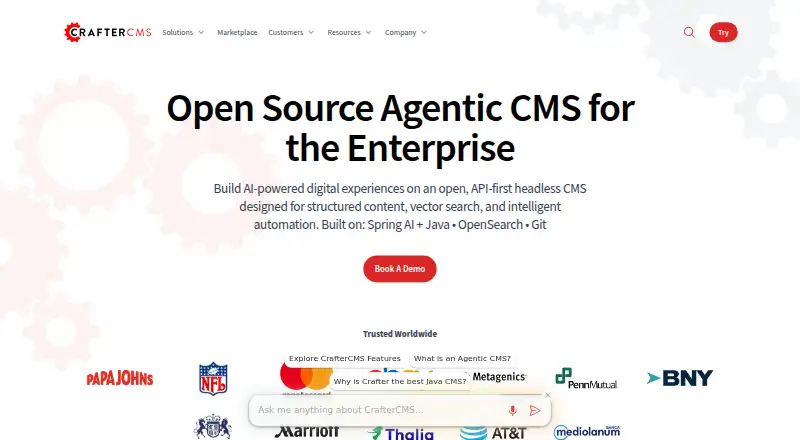
CrafterCMS offers an open-source headless platform that manages structured content for enterprise digital experiences. Authoring and delivery operate as separate subsystems, while a distributed Git repository handles versioning and branching. Deployments can be self-hosted or managed, with Community and Enterprise releases available.
Review
In a line
CrafterCMS combines open-source code with an API-first headless architecture. It organizes structured content for digital experiences delivered across channels.
What it does
Authoring and delivery are decoupled within the platform. Browser-based tools let authors edit in context, assemble experiences by dragging components, and preview output across channels.
A distributed Git repository records content changes and branches. The platform also includes workflows, auditing, dependency tracking, personalization, targeting, and OpenSearch-powered search.
How it connects
React, Next.js, Angular, Vue, single-page applications, and other front-end frameworks can use CrafterCMS as their content source. From content models, the platform builds a project-specific GraphQL schema and also offers REST retrieval and in-process APIs.
NPM packages support retrieval, models, Redux, search, utilities, in-context editing, Experience Builder, and Studio UI extensions. From Linux, macOS, or Windows command lines, Crafter CLI can authenticate with CrafterCMS and call its APIs.
Integrations include Elastic Stack, Stripe, GitLab, Bitbucket, GitHub, Jenkins, Shopify, commercetools, and Elastic Path. Its Git repository also suits Git-based CMS workflows.
Good fit
Organizations looking for a headless CMS can use CrafterCMS to manage structured content across channels, with localization, custom roles, and visual editing.
The platform supports React and other front-end frameworks, multisite work, webhooks, asset transformations, and personalization. Groovy, Java, FreeMarker, and plugins can modify APIs, workflows, delivery behavior, and the authoring UI.
Watch for
Running CrafterCMS 4.6.1 yourself requires Java 21, a JVM with at least 8 GB of memory, and Git 2.20.1 or newer. Docker is needed for Docker-based or macOS setups, and supported environments also include Linux 10.12 or later and Windows through WSL2.
Git-centered development can complicate merges between development, staging, and production. Large content lists may feel slow, and advanced features can require more documentation than newcomers expect.
The core system runs without an external database; MongoDB is optional for the Profile and Social modules. Commercial support is available separately.
Pricing
The Community release is free, GPL v3 licensed, self-hosted, and community-supported. Enterprise plans begin at $5,472 annually and bundle commercial support, enterprise features, and either self-hosted or managed SaaS deployment.
Verdict
Choose CrafterCMS if you need open-source code, headless delivery, Git versioning, and APIs serving several front ends. It suits teams prepared for self-hosting or managed deployment that also require localization, workflows, personalization, or multisite support.
Look elsewhere if your team wants a simpler setup, has little Java or Git experience, or needs clearly documented pricing for every deployment option. Compare it with other content management systems before committing.
Our take
CrafterCMS is aimed at organizations creating structured, multi-channel digital experiences with modern front ends. Community offers an open-source entry point, while Enterprise and managed deployment options provide commercial support or operational services. The trade-off is operational complexity: self-hosting has specific Java, memory, and Git requirements, and Git-based release processes may challenge some teams. Advanced-feature documentation can also take work to navigate. Teams wanting APIs, localization, workflows, and personalization should shortlist it; teams seeking a lightweight, low-maintenance editor may prefer another CMS.
- GPL v3 Community release with a free self-hosted option
- REST, GraphQL, plus in-process content interfaces
- Git versioning with branching and audit history
- Visual editing, localization, workflows, and personalization
- Self-managed and managed deployment options
- Self-hosted installations require Java 21, 8 GB JVM memory, and Git
- Git-based deployment can complicate environment merges
- Large content lists may feel slow
- Advanced features may be difficult for newcomers to document
- Enterprise plans begin at $5,472 annually
- Pick it ifTeams delivering structured content to several front ends; Organizations needing Git versioning and localization; Businesses choosing self-managed or managed deployment
- Skip it ifYou need a simple CMS with minimal setup; Your team cannot maintain Java, Git, or Docker environments; You require published pricing for every plan
Pricing
The Community release is free and self-hosted.
- CommunityOpen-source GPL v3 release · Community support · Self-hosted downloadOn request
- EnterpriseCommercially supported release · Self-hosted or self-managed deployment · Enterprise features and supportOn request
- Crafter CloudFully managed SaaS · REST and GraphQL APIs · Managed infrastructure, monitoring and upgradesOn request
- CrafterCMS CommunityFree open-source release · Community support · GPL v3 · self-hosted downloadFree
- CrafterCMS EnterpriseStarting at $5,472.00 per year · Commercial support · self-hosted or managed SaaS · enterprise features$5,472/yr
As craftercms.com lists them, checked 24 Sept 2026.
Questions
Is CrafterCMS open source?
Yes. Community source code is available under GPL v3, with a free self-hosted release and community support.
Can I use CrafterCMS without paying?
Yes. CrafterCMS Community is free, open source, self-hosted, and community-supported.
Which APIs are available in CrafterCMS?
REST retrieval, GraphQL, and in-process interfaces are available. GraphQL schemas derive from content models and change when those models are updated.
Which front-end frameworks work with CrafterCMS?
React, Next.js, Angular, Vue, single-page applications, and other front-end frameworks can use CrafterCMS.
Where can CrafterCMS run?
Supported environments include Docker, Linux, macOS 10.12 or later, and Windows through WSL2. Enterprise deployments may also use public cloud, private cloud, or on-premises infrastructure.
What is the price of CrafterCMS Enterprise?
Enterprise plans start at $5,472 per year and include commercial support, enterprise features, and self-hosted or managed SaaS deployment.