Kiosk Browser Review: Features, Connections and Pricing
android-kiosk.com · checked 15 Oct 2026
Android kiosk browser that locks devices to websites and web apps, with remote fleet controls.
How it plugs in
Signal on Kiosk Management Software6.4#3 of 27
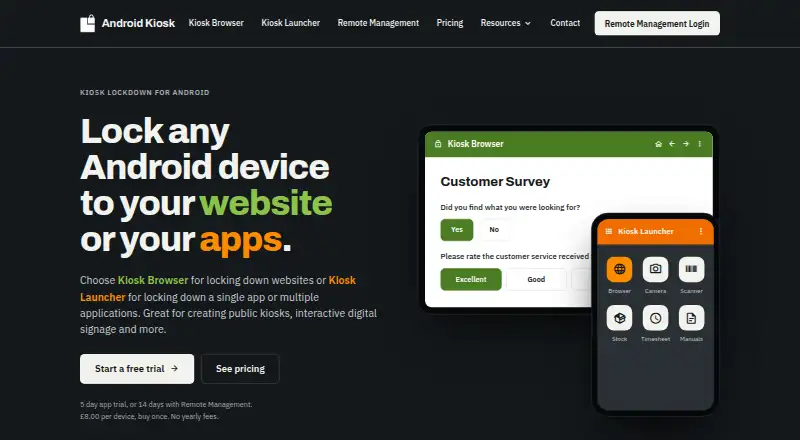
Kiosk Browser turns an Android device into a locked, full-screen station for websites and web apps. It supports check-in, booking, surveys, signage and ordering, plus barcode and NFC input. A web console adds shared settings, app deployment, remote actions, alerts and screenshots. A REST API connects fleet controls to other systems.
Review
In a line
Kiosk Browser locks an Android device to a selected website or web app in full-screen mode. Its companion Kiosk Launcher locks devices to selected Android apps. See other kiosk browsers for alternatives.
What it does
Administrators can limit navigation with URL allow and deny lists. The browser includes scheduled sleep, wake and app restart controls, session reset, digital signage support, and a Chromium browser engine.
It accepts NFC, built-in barcode scans and compatible hardware scanners, including Zebra TC series and M3 Mobile devices. Google Cloud Print and ESC/POS Bluetooth printing are listed for the Android app.
JSON settings and a configuration builder support bulk setup. Provisioning or JSON can install and update APK apps on managed devices.
How it connects
A JavaScript interface lets a web app control browser, hardware and device information functions. Kiosk Remote Management includes a REST API for connecting fleet operations to other systems.
The web console provides shared configurations, app installs and updates, remote actions and wipes, email alerts, location history and requested screenshots. Security controls include TLS in transit, encrypted databases and backups, Auth0, rate limiting, restricted employee access and two-factor authentication.
The software is proprietary, not open source. Remote Management runs primarily in Microsoft Azure North Europe, with multi-region replication described by the maker.
Good fit
It suits organizations running Android check-in or booking kiosks, surveys, digital signs and web-based ordering stations. Teams managing many devices can use centralized settings, deployment, alerts and remote actions.
The JavaScript interface, REST API, barcode support and NFC support help when a kiosk must connect to a web app or physical input hardware.
Watch for
Provisioning needs a new or factory-reset device. Direct APK installation is intended for testing because it cannot fully block system controls, can be uninstalled and lacks some management functions.
QR provisioning requires Android 7 or later; Android 9 or later is recommended. Android 6 can use NFC or ADB, while Android 4 releases are unsupported and no longer updated.
Remote Management keeps device events, sessions and locations for 30 days, backups for 10 days and logs for 10 days. Check whether those retention periods and the proprietary licence fit your requirements.
Pricing
A free plan is available, and the standalone app has a 5-day trial with all features. Connecting devices to Remote Management gives a 14-day trial without payment details.
Remote Management costs $1.60 a month per device for 1–199 devices, with lower per-device rates at larger volumes and a 15% annual discount with at least five devices. All app features are included.
A Single Device Licence costs $10.60 one-time per device, with lifetime upgrades and no yearly or maintenance fees. The separate Kiosk Browser or Kiosk Launcher licence is also $10.60 one-time; prices exclude VAT.
Verdict
Choose Kiosk Browser when Android hardware must stay on a controlled website or web app and operators need remote fleet administration. Its browser controls, hardware input options and API cover common kiosk deployments.
Plan the rollout around factory-reset provisioning and supported Android versions. The direct-install route is not a full lockdown, and older Android releases are outside support. Smaller deployments may prefer the one-time licence, while larger fleets can use Remote Management pricing tiers.
Our take
Kiosk Browser is a practical choice for fixed Android stations that need full-screen web access, controlled navigation and optional remote management. It also covers barcode, NFC, printing and scheduled operation, which can reduce the need for separate kiosk tools. Buyers should confirm device age, provisioning access and whether the proprietary licence is acceptable. The one-time licence fits standalone units; Remote Management fits fleets that need central settings, deployment, alerts and an API. Avoid direct APK installation when system-level lockdown is required.
- Locks Android devices to a website or web app in full screen
- Supports URL allow and deny lists, session reset and scheduled controls
- Works with NFC, barcode scanning and selected Zebra and M3 Mobile scanners
- Remote console offers deployment, actions, alerts, maps and screenshots
- REST API and JavaScript interface support system and web-app integration
- Full provisioning requires a new or factory-reset device
- Direct APK installation cannot fully block system controls
- QR setup needs Android 7 or later; Android 4 releases are unsupported
- Remote Management retains events, sessions and locations for 30 days
- The software is proprietary rather than open source
- Pick it ifAndroid check-in, booking, survey and ordering kiosks; Digital signage stations with centralized device management; Web apps needing barcode, NFC or fleet API connections
- Skip it ifYou need open-source kiosk software; Your devices cannot be factory-reset or meet the Android requirements; You only need an unmanaged browser without kiosk lockdown
Pricing
A free plan and trials are available. Paid choices are $10.60 one-time per device for a Single Device Licence or $1.60 a month per device for Remote Management, with volume rates and discounts.
- Remote Management£1.00 / $1.60 USD per device per month; 15% annual discount with five-device minimum · 1–199 devices £1.00/$1.60 · 200–499 £0.90/$1.45 · 500–999 £0.80/$1.25 · 1000+ £0.65/$1.00 · all app features included$1.60/mo
- Single Device Licence£8.00 / $10.60 USD per licence, per device; buy once · Free lifetime upgrades · no yearly or maintenance fees · 65% discount at 250+ licences · 80% discount at 500+ licences$10.60 one-time
- Single Device Licence (Kiosk Browser or Kiosk Launcher)£8.00 / $10.60 USD per licence, per device; buy once · Free upgrades for product lifetime · 65% discount at 250+ licences · 80% discount at 500+ licences · prices exclude VAT$10.60 one-time
As android-kiosk.com lists them, checked 15 Oct 2026.
Questions
What does Kiosk Browser lock?
It locks an Android device to a selected website or web app in full-screen mode. Kiosk Launcher locks the device to selected Android apps.
Can it connect to other systems?
Yes. Kiosk Remote Management has a REST API, and the browser exposes JavaScript functions for browser, hardware and device-information control.
Which Android versions are supported?
QR provisioning requires Android 7 or later, with Android 9 or later recommended. Android 6 can use NFC or ADB. Android 4 releases are unsupported.
Does it support barcode and NFC input?
Yes. It supports NFC readers, built-in barcode scanning and compatible hardware scanners, including Zebra TC series and M3 Mobile devices.
How long are the trials?
The standalone app trial unlocks all features for 5 days. Devices connected to Remote Management get a 14-day trial without payment details.
What does Remote Management cost?
The listed rate is $1.60 a month per device for 1–199 devices, with lower rates for larger fleets and a 15% annual discount with at least five devices.