Klap: AI Video Clips for Social Media
klap.app · checked 15 Oct 2026
AI tool that turns long videos into short clips for TikTok, Reels, and Shorts.
How it plugs in
Signal on AI Video Repurposing Tools5.9#18 of 50
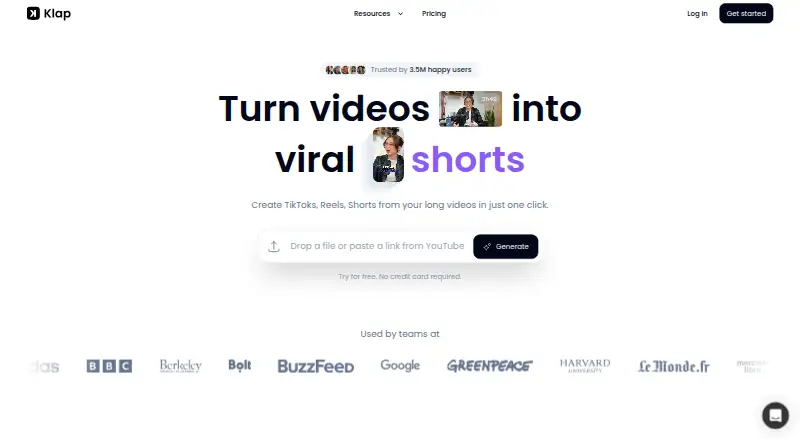
Klap turns uploaded videos or YouTube links into short-form clips. Its AI finds topics, trims highlights, reframes the picture, and adds subtitles and suggested captions. You can style fonts, colors, logos, and framing, then share or schedule posts to major social networks. It runs on the web and through an API, with a free one-video trial.
Review
In a line
Klap is a hosted video repurposing service. It converts long videos into short clips for TikTok, Instagram Reels, and YouTube Shorts.
What it does
Upload a video file or paste a YouTube link. Klap identifies topics and edits selected moments into short clips, with automatic reframing to keep the main subject visible.
It creates subtitles and suggested captions. You can change fonts, colors, logos, and framing before sharing or scheduling clips on TikTok, YouTube, Instagram, LinkedIn, or Facebook.
Klap says it works best with spoken content such as podcasts, interviews, lessons, reviews, and training videos. It edits and transcribes in 52 languages.
How it connects
Input options include YouTube, Google Drive, Dropbox, Vimeo, Twitch, Loom, direct video links, and uploaded MP4, MOV, or WebM files. Publishing connects to TikTok, YouTube, Instagram, LinkedIn, and Facebook accounts.
Klap offers a REST API for short generation, captions, reframing, transcripts, managed users, and embedded editing. It also provides integrations for Zapier, Make, and n8n, plus an MCP server with 18 tools for AI-agent workflows. Zapier and Make list their integrations as under review.
The API uses bearer keys, while Sign in with Klap uses OAuth 2.1. OAuth has no webhooks, so completed projects and exports must be checked by polling. Klap is not open source; its hosted-service terms prohibit copying or distributing the service.
Good fit
Klap suits creators, marketers, agencies, and organizations that need many short clips from longer spoken videos. Its social presets, brand controls, and scheduling support recurring publishing.
Teams building their own workflow can use the API, automation integrations, or MCP tools. Business customers processing personal data for others can use Klap's separate data-protection agreement.
Watch for
Klap stores database data with Supabase and videos and processing data with Google Cloud in the United States. Uploaded content remains until you delete it, with backups kept for up to 30 days.
Transcripts and clipping instructions may be sent to AI providers including OpenAI and providers routed through OpenRouter. Videos without speech may be sent to Google Gemini for transcription.
The service has no free plan, and OAuth workflows require polling instead of webhooks. Account-deletion requests go through live chat and are stated to be processed within 30 days.
Pricing
Klap is paid, with a free trial that lets you create one video without a credit card. Annual pricing starts at $14 a month.
Monthly plans are Basic at $29 a month for 100 clips, Pro at $79 a month for 300 clips, and Pro+ at $189 a month for 1,000 clips. Individual operations cost $0.32 to generate a short, $0.44 to process and analyze a video input, and $0.48 to export a processed video.
Verdict
Choose Klap if you want an automated path from long, spoken videos to branded social clips, especially when you publish across several networks or need API access. Its language coverage and upload sources broaden where footage can come from.
Look elsewhere if you need a permanent free plan, local or self-hosted processing, webhooks for completion events, or guarantees that video and transcript data stay outside third-party AI services. Compare AI Video Repurposing Tools and Podcast Clip Makers for other categories.
Our take
Klap is a practical choice for teams turning podcasts, interviews, courses, or reviews into regular social posts. The combination of automatic topic selection, reframing, captions, brand styling, and scheduling covers the main editing steps in one service. Its API and automation options also suit custom workflows. Budget for paid use after the single-video trial, and review United States storage, third-party AI processing, and the lack of OAuth webhooks before handling sensitive footage or building automated publishing.
- Turns long videos into short clips automatically
- Accepts many video sources and common file formats
- Supports 52 languages for editing and transcription
- Offers captions, reframing, brand styling, and scheduling
- Provides REST API, automation integrations, and MCP tools
- No free plan after the one-video trial
- Stores videos and processing data in the United States
- May send transcripts or videos to outside AI providers
- OAuth workflows have no webhooks
- Monthly plans limit the number of clips
- Pick it ifCreators and teams repurposing spoken videos for social media; Agencies needing branded clips and scheduled publishing; Developers connecting video clipping to other workflows
- Skip it ifYou need self-hosted or open-source video processing; You require OAuth webhooks instead of polling; Your policy forbids United States storage or third-party AI processing
Pricing
You can try one video free without a credit card, but there is no ongoing free plan. Monthly plans cost $29, $79, or $189 and include 100, 300, or 1,000 clips. Separate operation charges apply for generation, input processing, and export.
- Generate Short Operationper operation · Create a short-form video$0.32 one-time
- Video Input Operationper operation · Process and analyze a video input$0.44 one-time
- Export Operationper operation · Export processed videos$0.48 one-time
- Basicyearly · 100 clips/mo · AI clipping · unlimited social accounts · analytics$14/mo
- Basicmonthly · 100 clips/mo$29/mo
- Proyearly · 300 clips/mo · AI clipping · unlimited social accounts · analytics$39/mo
- Promonthly · 300 clips/mo$79/mo
- Pro+yearly · 1000 clips/mo · AI clipping · unlimited social accounts · analytics$94/mo
As docs.klap.app lists them, checked 15 Oct 2026.
Questions
Can Klap use YouTube videos?
Yes. You can paste a YouTube link, or connect sources such as Google Drive, Dropbox, Vimeo, Twitch, and Loom. Direct links and MP4, MOV, or WebM uploads are also supported.
Which social networks can Klap publish to?
Klap supports sharing and scheduling to TikTok, YouTube, Instagram, LinkedIn, and Facebook accounts.
Does Klap have an API?
Yes. Its REST API handles short generation, captions, reframing, transcripts, managed users, and embedded editing. OAuth completion events require polling because there are no webhooks.
Is Klap free?
There is a free trial for one video without a credit card. Klap has no free plan; annual pricing starts at $14 a month.
How does Klap handle uploaded data?
Supabase and Google Cloud store data in the United States. Content remains until deletion, with backups kept for up to 30 days. Some transcripts, instructions, or videos may be sent to AI providers.
What videos work best with Klap?
Klap says spoken videos work best, including podcasts, interviews, educational videos, reviews, and training. It edits and transcribes in 52 languages.